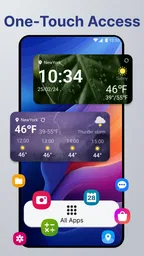
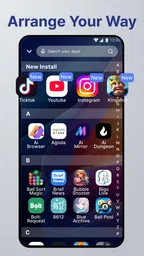
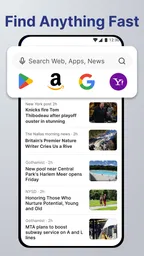
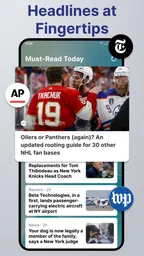
Flow Homescreen review
 Analysis by Appsdrops
Flow Homescreen is a personalization app built around a simple promise: transform your phone and streamline your life. That idea sounds appealing if you want your home screen to feel more intentional, but the experience of any personalization app also depends on the conditions in which you use it. A stable connection can make browsing and setting things up feel smoother, while a weak signal can turn even a simple phone task into a stop-and-start affair. I’d approach Flow with that practical side in mind: it is an app to explore at your own pace, rather than something you need to depend on every moment of the day.
Making a phone feel more like yours
Flow Homescreen sits in the personalization space, where the goal is to make everyday phone use feel more suited to your habits and taste. Its short store description is simply “Flow,” while its broader message is about changing the feel of your phone and bringing some order to daily life. That leaves room for a personal interpretation: maybe you want a cleaner-looking starting point, or perhaps you are curious about a different way of approaching your home screen. Either way, the appeal is in trying a change and seeing whether it makes your phone more comfortable to use.
I like that the core idea is easy to grasp. A home screen is one of the places we return to throughout the day, so even a modest change can affect how the whole device feels. Personalization is not only about appearance, either. It can also be about creating a more deliberate first step when you pick up your phone. The best result is the one that feels natural after the novelty wears off—not merely a setup that looks interesting for a few minutes.
Flow is free to download, and its age rating is Everyone. It was released on June 11, 2025, and its current version is 1.3.3. The app has an average rating of 4.5 from around 2,100 ratings, alongside 451 written reviews and over 50,000 installs. Those figures offer a sense of its reach, but I would still treat them as a starting point rather than a guarantee that its style will suit every phone owner.
When the connection becomes part of the experience
Connectivity can shape the first impression of a personalization app, especially when you are exploring, setting things up, or returning to make changes. With a dependable network, those moments are more likely to feel straightforward. If your connection is slow or keeps dropping, the same session may feel less fluid, and it can be harder to tell whether you are waiting on the app or simply dealing with the network around you.
That is why I would try Flow when you have a few unhurried minutes and a connection you trust. You can focus on how the app feels instead of juggling setup with a commute, a weak signal, or another distraction. It is a small bit of planning, but it makes it easier to judge the actual experience and decide whether the approach suits you.
At the same time, a phone’s home screen is part of a wider routine. You may open it at home, at work, in a café, or while moving between places, and each setting comes with different connectivity. A good personalization choice should still feel comfortable as your context changes. I would pay attention not only to how Flow looks during an initial session, but also to how easily its presence fits into the ordinary rhythm of using your phone.
Using it across everyday mobile situations
Mobile apps are often opened in short bursts. You might have a moment between tasks, a quiet break, or a few minutes before heading out. That makes simplicity and a clear sense of purpose especially valuable. Flow’s central idea is straightforward enough to understand quickly: it is meant to help transform the phone experience. Whether it earns a lasting place on your device comes down to whether that idea remains useful once you are back to normal daily use.
I would avoid making a major home-screen change in a rushed moment. Instead, take time to look around, try the experience at a comfortable pace, and consider how it fits with the way you already use your phone. If you regularly switch between different environments, notice whether the app still feels convenient when you are distracted or short on time. Personalization works best when it makes routine interactions feel more natural rather than adding another thing to manage.
Network conditions can vary during those mobile moments. A solid connection may make exploration feel more responsive; an unreliable one can interrupt your attention. If you find yourself somewhere with poor reception, it may be better to leave any non-urgent setup or browsing until later. That is not a special requirement for Flow so much as a sensible way to handle apps whenever connectivity is uneven.
Handling interruptions without frustration
Connection problems are part of mobile life, and they can arrive at inconvenient times. A page may take longer than expected, an action may not seem to finish, or you may lose your signal while switching locations. In those situations, I prefer to pause before repeating the same action several times. Check whether the connection has returned, give the app a moment, and then see whether continuing makes sense. That measured approach can help prevent a brief network hiccup from becoming a frustrating session.
For a personalization app, interruptions matter because setup is often a deliberate task rather than something you want to rush through. If you are experimenting with how your phone should look or feel, a pause can break your concentration. I would treat the process as something to do when you can give it attention, especially if your connection tends to fluctuate. Once the network is steadier, you can pick up the exploration with a clearer idea of what you wanted to change.
It is also worth keeping expectations practical. A network issue does not automatically mean an app is broken, and a momentary delay does not tell you everything about its overall quality. I would look for a consistent pattern before deciding that Flow is not working for you. If problems persist, reopening the app after checking your connection is a reasonable first step. The key is to separate a temporary connectivity snag from the lasting usability of the personalization experience.
Being thoughtful about mobile data
Not everyone has the same data plan or the same access to a reliable network, so it makes sense to be mindful when exploring any app on the go. If you are trying Flow away from home and want to keep your mobile data use under control, choose a time when you are comfortable browsing and making decisions. You can also postpone a longer exploration until you are connected to a network that suits your needs. That way, you are not distracted by concerns about reception or data while deciding whether the app is right for you.
I would not assume that every part of an app behaves the same way under every connection condition. Instead, notice what happens during your own use and choose the setting that feels comfortable. If you are in a hurry or your signal is unreliable, there is little reason to push through a session that can wait. A more relaxed moment makes it easier to evaluate the design and decide whether the changes you make actually improve the way you use your phone.
For anyone who is careful about data, a simple habit can help: explore when you have a dependable connection, and save optional browsing for a time that fits your plan. This is a general mobile-use suggestion, not a claim about a specific feature or network policy. It keeps the focus on what matters most here—whether Flow’s personalization approach feels worthwhile in your everyday routine.
Who may enjoy Flow Homescreen
Flow may appeal to people who enjoy making their devices feel more personal and are open to changing the way their home screen fits into daily life. Its broad promise is easy to understand, and the app has reached over 50,000 installs. The 4.5 average from around 2,100 ratings suggests a positive reception among many users, though individual tastes differ. If you are happy with your current setup, you may not feel a strong need to change it; if you like exploring personalization, Flow gives you a reason to take a closer look.
It may also suit someone who prefers to evaluate an app by trying it in a calm, familiar setting. Rather than expecting an instant transformation, give yourself a little time to decide whether its approach feels practical. Think about the way you reach for your phone, what you want to see when you start using it, and whether a new setup makes those everyday moments feel better. Those personal questions are more useful than judging a personalization app by novelty alone.
The most important test is whether Flow makes your phone feel more comfortable to use, not just different. That distinction matters because a fresh look can be exciting at first, while long-term usefulness depends on how well the experience fits your habits. I would keep the change only if it feels like a genuine improvement after the first impression has passed.
Final thoughts on connectivity and the experience
Flow Homescreen is a free personalization app for people who want to rethink how their phone feels. Its message—transform your phone and streamline your life—gives it a clear direction, and the app’s positive average rating and growing install count suggest that plenty of users are interested in that idea. I find the concept appealing because a home screen is such a regular part of phone use, but the value of any change depends on whether it stays useful in real life.
Connectivity is best treated as part of the setting in which you explore Flow, rather than the whole story. A strong connection can make a session feel more convenient; a weak one can interrupt your focus. Try it when you have time, be mindful of your mobile data preferences, and avoid judging the experience by a single moment when reception is poor. That approach gives you a fairer sense of whether its personalization style belongs on your device.
Flow Homescreen is worth considering if you enjoy tailoring your phone and are curious about a fresh approach to your everyday starting point. I would recommend exploring it without rushing, then keeping it only if the result feels genuinely helpful. For me, that is the right measure of a personalization app: not how dramatic the first change seems, but whether it makes picking up and using your phone feel a little more like your own.
What we like
- Quick access to favorite apps can reduce time spent searching.
- A personalized layout can make the home screen feel more organized.
- Widgets can display useful information without opening apps.
- Customizable themes let users match the screen to their style.
- A focused layout can help keep frequently used tools within reach.
What could be better
- Some customization options may require time to configure.
- A new layout can take time to get used to.
- Widget support may vary across installed apps.
- Personalized screens may need occasional upkeep as apps change.
- Compatibility can vary across Android devices and versions.





