
FIXD OBD2 Scanner review
 Analysis by Appsdrops
When a warning light appears, it is easy to jump straight to the worst-case explanation—or to keep driving and hope it disappears. FIXD OBD2 Scanner is meant to give you a more informed first step: connect a compatible OBD2 scanner to your car and use the app to interpret what the vehicle is reporting. I see it as a practical companion for understanding a problem, not a substitute for a mechanic or a promise that every repair will be simple.
What to expect from a car-scanning app
FIXD is a free auto and vehicle app from developer FIXD. The app has a 4.0 average from around 30,000 ratings, and it has passed a million installs. It is rated for Everyone, though the useful audience is really drivers who want a clearer explanation of car trouble. The app itself is free, with in-app purchases ranging from $0.99 to $119.99 per item, so check the purchase details before committing to anything beyond the basic experience.
The key expectation to set is that the app is only one part of a diagnostic setup. You need a compatible OBD2 scanner that can connect with your vehicle and the app; installing FIXD alone will not read a car’s systems. Think of the scanner as the link that retrieves diagnostic information and the app as the place where you can make that information easier to understand.
That distinction matters if you are used to automotive apps that offer maintenance reminders, fuel tracking, or driving logs without hardware. FIXD’s central purpose is more focused: helping you make sense of vehicle trouble codes. It is most useful when you have a specific question—such as why a warning light is on—rather than when you are looking for a general-purpose car diary.
I would recommend it to a driver who wants to arrive at a repair conversation better prepared. It can help you begin with a code and a plain-language interpretation instead of a dashboard light and a guess. But it should not be treated as a definitive diagnosis. A code can point toward a system or condition without identifying the failed part, and the same symptom can have more than one cause.
Getting from installation to a first scan
For a first-time user, the sensible order is simple: install the app, have the compatible scanner ready, and check that your car has an accessible OBD2 connection before starting a scan. The connector is generally found in the driver’s area, but its exact position varies by vehicle. Your owner’s manual is a better guide than forcing a plug into a spot that only looks right.
Once the scanner is connected, follow the app’s on-screen connection steps and keep your phone close enough for the scanner to communicate with it. If the app does not connect immediately, I would check the physical plug first, then confirm the phone is communicating with the scanner, and only then try again. This order avoids wasting time changing settings when the real issue is a loose connection.
A useful first success is not merely seeing that the scanner has connected. It is getting a result, noting the code and its explanation, and relating that information to what the car is actually doing. If a warning light prompted the scan, write down when it appeared and whether you noticed any change in how the car runs. That context makes the result more useful when you speak with a repair shop.
For example, imagine a warning light comes on during an ordinary commute, but the car still seems to drive normally. Rather than searching a vague description online, you can scan the vehicle when it is safely parked, record the code, and use the app’s explanation to frame a better question for a mechanic. The practical win is a more grounded conversation—not a reason to ignore the light or attempt a repair you are not equipped to make.
Making the result useful, not just readable
A diagnostic code is a starting point, so I would avoid ordering a part just because an app explanation mentions a related component. Before taking action, compare the result with the car’s symptoms, note whether the warning stays on or comes and goes, and ask a qualified technician whether additional testing is needed. This is especially important when a code refers to a broad system rather than a single, obvious failure.
There is also value in keeping a record of what you saw before a visit. A code may be cleared, a warning may disappear temporarily, or the vehicle may behave differently by the time it reaches a shop. Recording the original result and the circumstances around it gives you something concrete to share. It does not replace a professional inspection, but it can make the first discussion less vague.
Use the app when the car is parked, not while driving. A scan is most helpful when you can give the result your attention and think through the next step without being distracted by the phone. If a warning is accompanied by unsafe handling, severe loss of power, overheating, or another urgent symptom, prioritise safe driving decisions and professional help over trying to troubleshoot through an app.
The most useful habit is to treat the code as a clue, then verify it against symptoms and expert advice. That approach keeps the app in its strongest role: making vehicle information easier to discuss without asking it to settle a mechanical question by itself.
Where new users can get tripped up
The first common confusion is expecting the phone to scan a car on its own. It cannot do that; the compatible OBD2 scanner is essential. If you are comparing the app with a phone-only vehicle tracker, this is an important difference. FIXD is built around reading information through a scanner, so the overall experience depends on having the right hardware as well as the app.
The next is assuming that a readable explanation equals a confirmed diagnosis. An error code narrows the conversation, but it does not necessarily tell you which part to replace or whether a repair is urgent. I would use the wording to prepare questions, not as a do-it-yourself repair order. That caution is especially worthwhile if you have little mechanical experience or the vehicle is behaving unusually.
Connection trouble can also feel like an app problem when the scanner is not seated properly or the phone is not communicating with it. Work through the physical connection and the app’s setup steps patiently rather than repeating the scan in a hurry. If the connection still fails, check that the scanner is compatible with your car and the app before concluding that the vehicle has a fault.
Finally, free to install does not mean every possible feature or service is necessarily included without charge. FIXD has in-app purchases, so I would review any purchase screen carefully and decide whether the added option addresses a need you actually have. If all you want is a one-time code reading, do not assume a paid offering is required until you have checked what the free experience lets you do.
How it compares with other ways to investigate a warning light
Compared with a basic handheld code reader, FIXD’s appeal is the phone-based explanation and the chance to keep the result alongside the conversation you are having about the car. A simple reader may suit someone who only wants a code and already knows how to interpret it. FIXD is a more natural fit if you want help turning a code into a useful question, provided you are comfortable pairing an app with a separate scanner.
Compared with searching the web for a dashboard symbol, a scan gives you a more specific starting point than a symptom description alone. But online advice can still be useful for learning what questions to ask, and a mechanic can inspect the vehicle in ways an app cannot. I would not choose one source as a complete replacement for the others: use the scan to gather information, and use professional judgement when deciding what the car needs.
It is also not the right pick if you want a full workshop diagnostic tool, expect the app to repair faults, or do not want to buy or handle a scanner. A driver who already owns a code reader and is comfortable researching technical codes may prefer that simpler route. Someone seeking routine maintenance tracking as the main purpose should compare apps built around that task instead.
Who will get the most out of it
I think FIXD makes the most sense for everyday drivers who want to be less in the dark when a warning appears, especially people who feel uncomfortable walking into a repair shop with no information at all. It can also help a household with more than one driver keep a scan result available for whoever handles the repair conversation. The benefit is preparation and understanding, not guaranteed savings or a replacement for service.
It is less suitable for drivers who are unwilling to use a separate scanner, expect a precise repair diagnosis from a single code, or need a professional tool for complex troubleshooting. If your car has a serious symptom, do not let a reassuring-looking explanation delay help. The app can help you understand what has been reported, but it cannot judge every mechanical risk from the code alone.
The app’s current version is 26.22, and it requires iOS 11 or later. Before installing, check that your device meets that requirement and that your intended scanner is compatible with your vehicle and phone. Those small checks are more useful than downloading first and discovering that the hardware or device setup is not a match.
A sensible next step after the first scan
After you get a result, save or note the code, the date you scanned, and what the car was doing at the time. Then decide whether the next move is monitoring a non-urgent issue, asking a mechanic for an inspection, or stopping and seeking prompt assistance because the vehicle feels unsafe. Keeping those steps separate helps prevent a code explanation from turning into an overconfident repair decision.
My overall view is that FIXD OBD2 Scanner is a useful first layer of understanding for drivers who have the required scanner and want clearer language around vehicle trouble. It makes the gap between a dashboard warning and a repair conversation feel smaller, while still leaving the real diagnosis where it belongs: with appropriate testing and experienced judgement. If that is the help you want, it is worth considering; if you expect the app alone to find and fix a fault, you will be disappointed.
What we like
- Works with most vehicles made in 1996 or later.
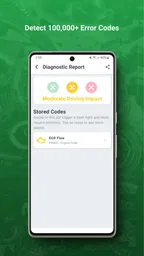
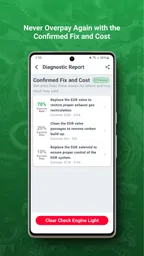
- Explains diagnostic trouble codes in plain language.
- Can help identify issues before visiting a mechanic.
- Tracks vehicle health and maintenance reminders.
- Pairs with a compact sensor for convenient wireless scans.
What could be better
- Requires a separate FIXD sensor for most features.
- Some features require a paid Premium subscription.
- Compatibility can vary by vehicle make and model.
- Bluetooth setup may take a few tries on some phones.
- It cannot diagnose every mechanical or electrical problem.





