

First Alert by Resideo review
 Analysis by Appsdrops
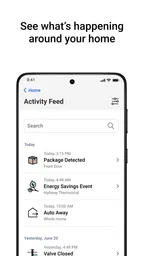
I like smart-home apps most when they help me make a decision quickly, not when they turn everyday tasks into another dashboard to babysit. First Alert aims to bring home comfort, safety, video, and water-leak monitoring together, which makes it appealing if you already use compatible equipment from the brand. My view is that its real value depends less on how many controls fit on a screen and more on whether the devices you own work smoothly as a group.
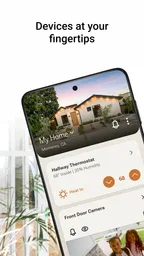
A single control point for a First Alert home
First Alert is a free Lifestyle app from Resideo Technologies, Inc. Its focus is the connected home: the app is intended to let people manage supported comfort and safety devices alongside video and leak detection. That is a more specific role than a general smart-home hub, and it is worth keeping in mind before installing it. The app is most compelling when it serves equipment you already rely on, rather than when you expect it to replace every home-control app you use.
The current release is version 3.0.5, and the app has a 4.1 average from around 7,200 ratings, with roughly 844 written reviews and over 100,000 installs. Those figures suggest an established app with a meaningful user base, though they cannot tell you whether your particular devices will behave as you want. Compatibility is the practical question to settle first: check that your equipment is supported and that the functions you care about are available through this app before treating it as the center of your home setup.
That distinction matters because “one app” does not automatically mean “one seamless system.” A thermostat, a camera, a safety device, and a leak detector solve different problems and may have different setup steps and daily routines. Bringing them into a common place can reduce app switching, but it does not remove the need to understand each device’s role or to keep its own settings sensible.
Where the app can earn a place in daily life
For a household that uses supported First Alert products, the clearest benefit is having a familiar starting point for checking several kinds of home equipment. Rather than opening a comfort app for one task and a safety app for another, you can turn to the same app to see what is relevant across those areas. I would especially value that arrangement in a home where more than one person needs to know which app to use for basic checks.
A realistic example is leaving for a weekend away. Before heading out, you might use the app to check the connected equipment you have set up, review a camera view if one is part of your system, and keep an eye on any supported water-leak monitoring. These are separate checks, not a guarantee that the app will make the home safe by itself. The useful point is having a consistent place to look, while remembering that a phone app cannot replace good physical maintenance or an appropriate emergency plan.
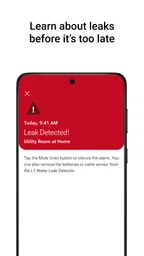
Leak detection is a particularly practical feature area because a small issue can become an expensive one if it goes unnoticed. If you have a supported detector, think through where you would want it placed before relying on the app: a device can only help with the area it monitors. Likewise, consider who in the household should know how to interpret a notification and what the next step would be. That kind of planning makes connected monitoring more useful than simply installing an app and assuming the job is done.
What the current version tells me—and what it does not
The app’s release date is June 18, 2024, and version 3.0.5 is the current version identified here. That gives a reader a clear snapshot of where the product stands, but it does not establish a particular feature history. I would not assume that the version number alone means a major redesign or that a specific device was added in a recent update. For a home-control app, the useful change to look for is one that improves device compatibility, setup clarity, reliability, or the way alerts are handled.
For someone already using the app, a new version is worth evaluating in terms of routine rather than novelty. After updating, check that the devices you depend on remain visible and that the controls and alerts you use still make sense. If you share access with family members, it is also sensible to confirm that everyone can still find the functions they need. This is not a claim that version 3.0.5 changed those parts; it is a practical way to judge any update to an app that sits between you and home equipment.
For a new user, the release information offers less guidance than a compatibility check and a clear setup goal. Decide what you want the app to help with first: comfort, a safety check, video, or leak awareness. Then make sure your supported devices can serve that purpose before adding more complexity. Starting with one everyday task makes it easier to tell whether the app is genuinely helpful instead of creating a crowded control screen you rarely open.
How it compares with separate brand and smart-home apps
Compared with using a different app for every connected product, First Alert’s appeal is straightforward: it brings several home-related categories under one brand’s umbrella. That can make sense if your equipment is already centered on First Alert and Resideo products. The trade-off is that a brand-focused app may be less suitable as a universal command center for a mixed collection of devices from many manufacturers. If your home is built around another ecosystem, its main app may be a better daily hub, with First Alert used only where its own equipment needs it.
Compared with a dedicated camera app, a broader home app may be more convenient for people who want video in the context of other home checks. But if your main priority is detailed camera workflows, you should judge the camera controls themselves rather than assume that inclusion in a wider app makes them the strongest available option. The same principle applies to comfort settings: a single app can reduce switching, yet someone who wants deep, specialized control may prefer the app designed around that device category.
In my experience, the best setup is often not a contest to eliminate every other app. Keep a primary hub if it is useful for your wider home, and use First Alert where it provides reliable access to supported First Alert equipment. That arrangement is less tidy on paper, but it is better than forcing every device into one place if the result makes important controls harder to find.
Setup choices that make monitoring more useful
One small but often overlooked step is deciding what deserves an alert before you rely on notifications. Safety and leak warnings are different from routine comfort checks, and a phone that buzzes for everything can train its owner to ignore it. Review the notification choices available for your devices and aim for a balance: important events should be noticeable, while routine information should not crowd them out. I would also make sure the people who may respond to an alert know what action is expected.
Another useful workflow is to separate “checking” from “changing.” When you open the app, first establish what needs attention, then adjust only the relevant setting. This is especially sensible in a shared home, where an unplanned comfort change or an overlooked warning can cause confusion. A consistent routine—such as checking connected devices before bed or before a trip—can be more dependable than opening the app at random and expecting it to surface every issue automatically.
Finally, treat a camera view or a device status as one piece of information, not proof that everything is fine. A connected system can help you notice a problem, but it cannot inspect a room outside the camera’s view or make a physical repair. For leak monitoring, for instance, it is still worth checking vulnerable areas in person from time to time. The app’s usefulness rises when it supports sensible habits rather than replacing them.
Costs, access, and who should look elsewhere
The app itself is free, rated for Everyone, and lists in-app purchases ranging from $4.49 to $149.99 per item. Those purchases are a reason to look carefully at what you are selecting in the app store and how any paid option fits your needs; I would not assume that every capability is included at no cost. The app is suitable for users on Android 11 or later, so an older Android device may not meet its stated minimum system requirement.
I would recommend it most to people who own compatible First Alert equipment and want one convenient place to manage or check it. It is also a reasonable choice for households that value a shared, straightforward routine around comfort and safety devices. I would skip it if you have no supported equipment, want a neutral hub for a broad mix of brands, or expect the app alone to provide complete home security. In those cases, a platform centered on your existing devices—or the specific manufacturer app that offers the controls you need—may be a better fit.
Another point to consider is how much control you actually want on a phone. If you rarely check home status remotely and prefer simple physical controls, the added app layer may not change your day much. If you travel, share responsibilities, or want a convenient way to review supported equipment, it can have a clearer purpose. The value is therefore personal: it depends on your devices and habits, not just on the breadth of the app’s intended scope.
My recommendation and what I would watch next
Overall, I see First Alert as a practical companion for a First Alert-centered smart home, rather than a universal answer for every connected device. Its strongest case is convenience across comfort, safety, video, and leak monitoring, especially when those categories already matter in your household. Its main limitation is the same one that comes with any brand-focused app: the experience is only as useful as the equipment it supports and the controls you actually need.
Before committing, I would confirm device compatibility, decide which alerts matter, and try the app with a concrete routine such as checking the home before leaving for a trip. If that routine feels clear and dependable, the app is doing useful work. If you find yourself returning to several other apps for the controls that matter most, it may be better as a supporting tool than as your main dashboard.
Looking ahead, the changes I would value most are not simply a higher version number but improvements that make setup easier, keep supported devices dependable, and help users distinguish urgent alerts from routine updates. Those are expectations, not claims about what the current release already does. For now, I would choose it when its brand-specific coverage matches my home, and look elsewhere when flexibility across many manufacturers is the priority. The best reason to install it is having supported equipment that benefits from a shared, easy-to-check home routine.
What we like
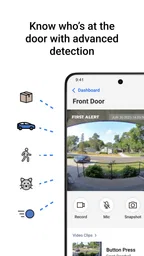
- Quickly view compatible cameras and doorbell video in one place.
- Get alerts when compatible sensors detect activity at home.
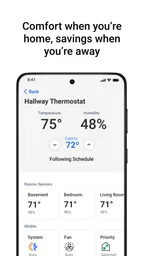
- Adjust supported thermostat settings from the same app.
- Use the app to check your system while away from home.
- Manage multiple compatible devices without switching between apps.
What could be better
- Features depend on owning compatible Resideo or First Alert devices.
- Some functions may require a paid monitoring plan.
- Push alerts can arrive late if your phone or network has poor connectivity.
- Live video quality depends on your home internet connection.
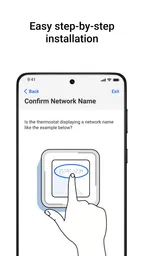
- Initial setup may take time when pairing several devices.





