


Facer Watch Faces review
 Analysis by Appsdrops
I like changing a smartwatch face when I want a quick visual refresh, but I also want the watch to stay practical. Facer Watch Faces is a personalization app built around that balance: it offers a large space to explore different looks, while the value of any particular face depends on how well it suits your watch and daily routine. My main takeaway is that it is most useful when you enjoy browsing and tailoring your watch, not when you expect every design to be equally simple or lightweight.
Browsing, setup, and everyday speed
Facer is made by Facer Studios and sits in the smartwatch-personalization category. The app is free to install, with optional in-app purchases ranging from a few cents to nearly a thousand dollars per item. That broad range makes it worth checking the price of a particular paid item before committing; the free starting point does not mean every design or purchase choice is free.
In practical terms, browsing is the part that can feel busiest. A deep catalog is useful when I have a clear idea—say, a clean analog face for work or a bolder design for the weekend—but it can also turn a quick change into a longer search. I get better results by deciding first what matters: readability, a certain mood, or a glanceable layout. That small bit of preparation keeps exploration from becoming aimless scrolling.
I would not judge the app’s speed solely by how quickly a screen opens. Finding a face, previewing it, applying it, and seeing it settle on the watch are separate steps, and the experience can depend on the connected device and its software. I’d allow a little time for the full process rather than switching faces in a hurry just before heading out. If you are choosing a watch face for an occasion, setting it up beforehand is the less frustrating approach.
When the catalog gets demanding
Heavy use usually means repeated browsing, comparing designs, and changing your selection several times. That is where a large library becomes both the app’s strongest appeal and its main source of friction: more choice creates more chances to find a personal fit, but also more decisions to make. I recommend saving a shortlist mentally or narrowing the search by the job the face needs to do, rather than treating every option as a must-see.
A useful test is to look at the watch from arm’s length and ask whether the face answers your everyday questions quickly. Can you read the time without pausing? Is the arrangement comfortable to scan while walking or carrying something? A design that looks striking in a preview may not be the most useful one on your wrist. I would try a few contrasting styles, then keep the one that makes routine glances easiest.
There is also a practical trade-off between visual detail and a calm, readable screen. A richly decorated face may suit someone who treats the watch as an accessory, while a restrained design can be better for frequent time checks. I would not assume that a more elaborate look is automatically a better choice. For a commute or a busy workday, clarity can matter more than novelty.
Reliability and what to do when a change feels slow
For an app linked to a wearable, reliability is not just whether the phone app opens. The useful outcome is having the selected face appear on the watch and remain suitable for normal use. If a change does not seem to take effect promptly, I would first give the watch and phone a moment to complete their connection, then check that the intended face is still selected before repeating the process. Repeated tapping can make it harder to tell whether the first attempt is still in progress.
I also prefer to make changes when I have a moment to verify them, rather than assuming a new design has taken effect in the middle of a rushed morning. That is especially sensible if I rely on the watch’s familiar layout for quick checks. If something looks wrong, returning to a previously familiar face is a reasonable fallback while I sort out the connection or selection. The app is a customization tool, so a small amount of patience is part of using it comfortably.
Facer has an average rating of 4.4 from around 194,000 ratings, alongside roughly 16,000 written reviews. That suggests many people find enough value in its selection to keep using it, though a rating cannot tell me whether a specific face will suit a particular watch or whether someone will enjoy browsing. I treat the overall response as a useful signal, not a guarantee of a perfect experience on every setup.
Fit matters more than the number of choices
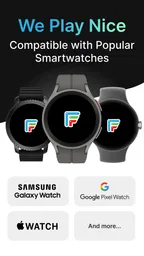
Smartwatch compatibility is the first thing I would consider before spending time exploring. A face that looks ideal in the app still needs to work with the watch you own. If you are choosing a wearable or troubleshooting a pairing issue, check the app’s current compatibility information in the relevant app store and confirm that your watch is supported. This is more useful than assuming that a large collection means every design works everywhere.
Device constraints also affect how ambitious I would be with a face. If your watch feels sluggish in general, or you are careful about keeping its screen simple, start with a less visually busy design and see how it feels in daily use. I would avoid making strong assumptions about battery life or performance based only on a preview; the watch itself, its settings, and the chosen design all matter. The sensible approach is to test a face during ordinary use and switch back if it makes the watch less comfortable to use.
The app is rated for Everyone and has been available since July 19, 2014. It has passed 10 million installs, so it is a well-established option rather than an obscure experiment. Still, those figures do not remove the need to check your own device fit. A long-running, widely installed app can be a reassuring starting point, but your watch model and personal priorities should make the final decision.
How it compares with simpler alternatives
The usual alternative is to stick with the faces already offered by a watch’s built-in software. That route is often better if you want the fewest steps, a familiar selection, or no extra browsing. Facer makes more sense when you want to explore beyond the standard choices and enjoy changing the look to match different settings. I see it as a broader creative option, not a required replacement for the watch’s own tools.
There is a difference between wanting variety and wanting a perfect face immediately. If you are in the first group, browsing can be part of the fun. If you are in the second, the built-in selection may be less distracting and easier to settle on. People who dislike making repeated visual choices may find that a large catalog is not an advantage. By contrast, someone who likes coordinating a watch with work clothes, exercise gear, or a special event may appreciate having more styles to consider.
A realistic routine might be to use a clear, restrained face during work hours, then choose something more expressive for a social evening. I would make that change when I have time to check the result, not while rushing between appointments. This lets the app serve a real purpose—matching the watch to the moment—without turning every small change into a project.
Who will get the most from it
I would recommend Facer Watch Faces to people who enjoy personalization, want more visual choice, and are willing to spend a little time finding a design that works on their wrist. It is particularly appealing if you see a watch face as part of your style as well as a way to read the time. The free entry point makes browsing approachable, while paid items mean it is sensible to decide what you are willing to spend before buying anything.
I would skip it if your only goal is the quickest possible setup, if you are happy with your watch’s standard faces, or if you find large catalogs tiring. It is also not the right first step if your watch has an unresolved connection or compatibility problem; sorting that out comes before exploring extra designs. And if a face looks lovely but makes the time harder to read, I would choose the clearer option, regardless of how appealing the preview is.
For a first session, I suggest choosing one practical goal, such as better readability or a different look for weekends. Browse with that goal in mind, try a small number of contrasting options, and judge them on the actual watch during a normal day. That workflow is more revealing than comparing previews alone and makes it easier to decide whether you want to keep exploring or return to a simpler setup.
My performance verdict
Facer’s appeal is breadth and personal expression; its trade-off is that browsing and choosing can take more effort than using a small built-in selection. I would expect the experience to feel smoothest when I narrow my search, apply a face without rushing, and check the result on the watch. For reliability, I would allow time for changes to appear and keep a familiar face in mind as a fallback. I would not promise identical speed or resource use across watches, so trying a simpler design is a sensible first move if your device already feels constrained.
Overall, I think it is a worthwhile personalization app for curious smartwatch owners, not an essential download for everyone. Its reach—more than 10 million installs—and its solid average rating point to broad interest, but the best reason to use it is more personal: finding a face that genuinely suits your habits. If you enjoy that process and your watch supports the experience, it is easy to see the appeal. If you value speed, predictability, and minimal choice above all, the standard faces may serve you better.
What we like
- A large catalog makes it easy to find faces for different styles.
- Many designs offer useful complications such as weather and battery status.
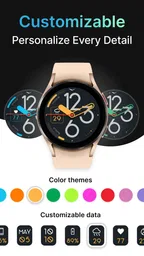
- Users can customize colors and fields on compatible watch faces.
- Favorites help keep preferred designs easy to find.
- New designs are added regularly to the catalog.
What could be better
- Some watch faces require a paid subscription or separate purchase.
- Compatibility varies by watch model and operating system.
- Certain designs may use more battery than simpler faces.
- The catalog can feel crowded when searching for a specific style.
- Some faces may need extra setup before complications display correctly.





