







Epic Games review
 Analysis by Appsdrops
When I want to join friends for a game, the awkward part is often getting everyone into the same conversation before anyone has even launched. Epic Games is meant to make that social side easier: it brings gaming chat, voice conversations, and parties together around an Epic account. I’d consider it most useful if the people I play with already use Epic’s ecosystem, rather than as a general-purpose chat app.
Epic Games is a free entertainment app from Epic Games, Inc. Its focus is narrower than a traditional social network: it is a companion for coordinating with other players, not a place I would open for news, videos, or a broad public community. That distinction helps set expectations. If I need to talk to a group while arranging a session, it makes sense; if I simply want another standalone messaging app, it may feel unnecessary.
What to expect from the app
The practical promise is a shared social layer for Epic users: chat when a game is not ready, voice when typing is too slow, and parties when a group wants to gather. That can remove a few small but familiar annoyances, such as trying to arrange a time through one service and then switching to another once everyone is ready to play.
In my view, the key benefit is continuity, not an unusual chat feature. A party gives a group a common place to coordinate, while text is better for details that do not need an immediate answer. Voice suits the moment when people are actively getting together. Used this way, the app complements the games and social connections you already have in Epic’s ecosystem; it does not replace the game itself.
The audience numbers suggest that the app has found a substantial user base, with over five million installs. Its average rating is 3.2 from around twelve thousand ratings, so I would not treat popularity as proof that every player will enjoy the experience. The rating is a useful reminder to judge it against your own needs: the more your friends rely on Epic, the more relevant its central idea becomes.
The age rating is Teen, which is worth keeping in mind when deciding whether it suits a younger player. The app is free, so trying it does not require a purchase. Still, free does not mean it will be useful to everyone: the main question is whether your regular gaming group is actually reachable through it.
Start with the people you want to reach
For a first-time user, I would begin with a specific goal rather than exploring every screen. Pick one friend or group you already play with and decide what would count as success: sending a message, joining a voice conversation, or getting a party organized. That gives the setup a clear purpose and makes it easier to tell whether the app belongs in your routine.
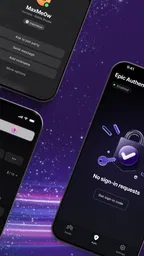
Before relying on it for an important session, check that you are signing in with the Epic account you intend to use. The app’s emphasis on secure login with two-factor authentication is reassuring, but security steps can add a little friction during setup. I would handle account access calmly in advance rather than waiting until friends are already in a lobby. Keep account details private and use the sign-in prompts in the app instead of sharing credentials in a chat.
Once signed in, the next useful step is simply to find the conversation or party flow your group will use. Avoid assuming that installing the app automatically brings every friend into one place: the people you want to talk to still need to be part of your Epic social circle and available through the relevant experience. If your group has not settled on a common channel, ask them which one they actually check before moving all coordination there.
Turn setup into a first useful moment
A good first test is a low-pressure plan for a real session. I might message a friend earlier in the day to say when I expect to play, then use voice or a party when we are both ready. That small workflow tests the parts that matter—finding the right person, starting a conversation, and moving from planning to live coordination—without making a big group depend on an unfamiliar app.
For a larger group, I would use text for information people may need to reread, such as a meeting time or who is joining, and save voice for the period when everyone is gathering. This is a practical trade-off: voice can make coordination feel immediate, but it is not always convenient when someone is commuting, in a shared room, or unable to speak. A written message gives those players a way to catch up without asking the group to repeat everything.
One non-obvious advantage of having chat and party tools in the same Epic-oriented setting is that the group can keep the social part of a session together rather than treating voice as an unrelated destination. The value is greatest when the same friends play across the Epic ecosystem and already recognize one another there. It is less compelling when every friend group is split between separate services or when the game you want to play has its own reliable communication setup.
I would also test the transition between modes before a time-sensitive match. Start with a message, then see how your group prefers to gather for voice. That reveals a useful personal routine: some groups want a quick written check-in first, while others prefer to talk as soon as someone is online. The app’s tools are only helpful if the group agrees on where to look, so a short test prevents “I thought you were in the other chat” confusion later.
Where first-time users can get confused
The word “party” can mean different things depending on what a player expects. Here, I would approach it as a way to bring people together socially, not assume that starting one automatically launches a particular game or guarantees that everyone can join every activity. Keep the first attempt simple: gather the people you intend to speak with, confirm you can hear one another, and only then move on to the game you had planned.
Another possible source of confusion is expecting the app to act like a universal messenger. It is centered on Epic’s ecosystem, so it makes more sense as a companion for Epic-connected gaming than as a replacement for every family, work, or friend-group chat. If your friends do not use Epic, asking them to adopt another account and app just for one occasional session may create more friction than it solves.
Account security can also feel like an interruption when all you want is to get online quickly. I see two-factor authentication as a sensible safeguard for an account tied to gaming activity, but it does mean signing in deserves a little attention. If a login step does not behave as expected, pause and check that you are using the correct account and following the in-app security flow; repeatedly guessing or sharing sign-in information with friends is not a good shortcut.
Voice has its own everyday limitations. A player may not want to speak, may be somewhere noisy, or may need to keep a device quiet. In those situations, text is the more considerate option, and a group should not assume that silence means somebody has left. Conversely, if quick back-and-forth matters, typing can be slower than speaking. I would treat the two modes as alternatives for different circumstances, not expect one to suit everyone all the time.
How it compares with familiar alternatives
Compared with a general messaging app, this one has a clearer gaming purpose: Epic chat, voice, and parties are gathered around the same ecosystem. That focus can be an advantage when your usual gaming friends are already there, because you have fewer places to check for a session. The trade-off is reach. A broad messenger is often easier for people who do not play Epic-connected games, while this app has less reason to become your default channel for unrelated conversations.
Compared with using a game’s built-in chat, a companion app can be useful before everyone is inside the same game. You can coordinate first, rather than waiting for the whole group to reach the same point in a session. But if a particular game already provides the exact voice or party arrangement your group needs, switching between it and another tool may be needless work. I would choose the simplest option that everyone can reliably use, not add an app just because it has overlapping features.
There is also a group-management trade-off. A single Epic-centered space can make sense for friends who play together regularly, but a rotating group with different platforms and communication habits may prefer a service they already share. In that case, the best app is often the one that avoids asking the least-connected person to change their routine. Epic Games is strongest when it reduces switching for the group as a whole, not merely for the person who installs it first.
Who will get the most from it
I would recommend giving it a try if your regular gaming circle uses Epic and you want a straightforward place to arrange sessions, send messages, and move into voice together. It is especially reasonable for someone who often joins friends at different times: a written check-in can help establish a plan, and a party can be the next step once people are available.
I would skip it, or at least avoid making it your main chat app, if your friends already coordinate smoothly elsewhere, if they do not use Epic, or if you rarely need voice and party features. It is also not the right choice for someone looking for a broad entertainment library just because the app sits in the entertainment category. Its value is social coordination around gaming, and the usefulness falls quickly when that is not part of your routine.
The app is currently on version 1.7.4 and supports Android 8.0 or later. If you are installing it on an older device, check that basic requirement before planning to use it with your group. For most first-time users, though, the more important preparation is social rather than technical: make sure the friends you want to reach are willing to use the same place.
My practical recommendation
My advice is to install it with one real gaming plan in mind, sign in securely, and test a message before the next session. If that leads naturally to a successful voice conversation or party with your friends, the app has earned a place on your phone. If everyone keeps falling back to another chat service, there is little reason to force the change.
Epic Games is a focused companion rather than an essential app for every player. I like the idea of keeping Epic-related conversation and group play close together, and I would find it handy with friends who already use that ecosystem. The weaker fit is just as clear: it cannot make a scattered group feel unified by itself. Try it for one small, ordinary gaming plan, then keep it only if it genuinely makes getting together easier.
What we like
- Offers a curated selection of PC games from a well-known publisher.
- Regular free game promotions can add titles to your library.
- Supports cloud saves for compatible games.
- Includes social features for connecting with friends.
- Game pages provide details on system requirements.
What could be better
- The catalog is smaller than some competing PC stores.
- Free game offers may require frequent account sign-ins.
- Some titles use separate launchers or account systems.
- Cloud saves are not available for every game.
- Refund eligibility depends on the purchase and playtime.





