





Emoji Battery & Shimeji Pet review
 Analysis by Appsdrops
I usually notice battery indicators only when I’m checking how much charge is left, so changing that small corner of the screen can make a phone feel more personal without changing how I use it. Emoji Battery & Shimeji Pet takes that light-touch approach: it is a personalization app built around an emoji-style battery icon and a Shimeji screen pet. The idea is playful rather than practical, and that distinction matters. I’d consider it when I want my home screen to feel a little less standard, not when I’m looking for a serious battery-management tool.
From a plain status icon to a more personal screen
My starting point with an app like this would be a phone that already works fine but looks much like everyone else’s. The battery indicator is always there, yet it is usually easy to overlook. An emoji treatment gives that familiar status detail a bit more character, while a small animated companion can add another visual accent. Together, those elements suit someone who enjoys customizing a phone in small, visible ways rather than rebuilding the whole interface with a launcher or a large theme pack.
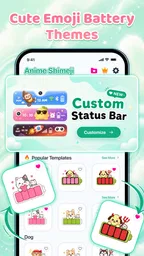
The app sits in the personalization category, and the name captures its two-part appeal. One part is cosmetic information: a battery icon presented with emoji styling. The other is an on-screen Shimeji pet, a companion meant to make the display feel lively. I’d approach both as decoration layered onto everyday phone use. The battery element may be the more consistently useful of the two because it relates to something I check, while the pet is primarily there for amusement and atmosphere.
That combination makes the app more distinctive than a utility that only swaps an icon. It also gives users two different reasons to keep it installed: a small change to a familiar interface and a character that can make the screen feel less static. The trade-off is that these are visual touches, not a replacement for a system battery page. If I needed detailed information to diagnose battery drain or plan charging, I’d use the phone’s built-in settings or a dedicated battery utility instead.
Trying the two elements without over-customizing
I’d begin by deciding which part I actually want to see every day. If the battery design is the main attraction, I’d make that the first change and live with it for a while before adding the pet. This is a useful, easily overlooked approach: changing one visual element at a time makes it clearer whether the result is charming or simply more clutter on a screen I glance at dozens of times a day.
Then I’d place the Shimeji companion into the routine only if I enjoy having a little motion or character on the display. A pet that looks delightful during a brief setup can become distracting if it draws my eyes away from notifications, reading, or a task. I’d test it during ordinary use—checking messages, unlocking the phone, and moving between apps—rather than judging it only while staring at a customized screen. The best result is one that remains pleasant after the novelty wears off.
One practical tip is to treat the battery icon and pet as separate design decisions, even though they are bundled in the same app. The icon is tied to a quick glance at charge; the pet is a mood-setting extra. If I like one but not the other, I’d keep my setup focused on the piece that earns its space. That mindset helps avoid the common customization trap of enabling every available decoration just because it is available.
I’d also check the appearance in the places where I normally rely on status information. A custom battery treatment is only helpful if I can still read the charge state quickly. This is particularly relevant for anyone who keeps a busy screen, uses several status indicators, or prefers a very clean interface. If the emoji styling competes with other symbols or feels too whimsical for daily use, the standard system indicator may be the better fit.
Where it fits in an everyday routine
Picture a normal morning: I unplug my phone, glance at the battery before leaving, and then check messages while getting ready. With this app, the battery display can make that routine feel a little more personal, and the pet can add a bit of personality when I unlock the screen. Later, if I’m waiting for a bus or taking a short break, that small visual detail can be more enjoyable than a default status symbol. It is a modest improvement, but it is the kind of customization I notice in passing rather than something that demands a new habit.
For a teenager who likes expressive phone themes, or an adult who enjoys a playful home screen, that low-effort character may be the point. It could also suit someone who wants a small change without switching launchers or spending time arranging a complete icon set. On the other hand, people who prefer professional-looking screens, minimal motion, or a strictly functional status bar may see little value. The app is at its best when the owner actively likes cute visual details; it is not an essential upgrade for every phone.
The useful handoff here is between customization and the phone’s regular interface. I’d want the app’s additions to complement the screen I already use, not force me to change how I navigate or check charge. If I’m setting up a phone for someone else, I’d ask whether they enjoy animated companions before enabling that side of the experience. A battery design may be an easy personal touch, but a character that occupies attention is more subjective, and the recipient’s taste matters.
How it compares with familiar customization choices
Compared with changing wallpaper alone, Emoji Battery & Shimeji Pet reaches into a part of the interface I see while checking the phone, rather than decorating only the background. Compared with a full launcher, it has a narrower purpose: it is for small, playful touches, not for reorganizing app grids, gestures, or icon layouts. That limited scope can be a strength if I want a quick personality boost without committing to a new way of using my device.
It is also different from a conventional battery app. A battery utility is usually the better choice when I need detailed usage information, troubleshooting, or tools intended to help manage charging. This app’s battery identity is visual, so I wouldn’t expect the emoji presentation to tell me more than the phone’s ordinary battery status. The sensible comparison is not “which one is more powerful?” but “do I want a decorative indicator or a diagnostic tool?” For the first, this app has a clear appeal; for the second, I’d choose something else.
Against a simple emoji battery customization, the Shimeji pet gives the experience another source of personality. That extra character may be exactly what makes the app feel fun, but it also means the app is not as focused as a single-purpose icon changer. If I only want the battery to look different, I’d weigh whether I actually want the pet component too. If I like both ideas, their pairing makes more sense than installing separate tools just to achieve the same playful mood.
What to expect before settling on it
The developer is Tools for Everyday - AI Tasks. The app is free to install, with in-app purchases listed from $2.99 to $19.99 per item. I’d treat that as a reason to explore the basic experience before paying for anything: first see whether the battery style and pet fit your screen, then decide whether an optional purchase would add enough value for your own use. A free starting point makes experimentation easier, but it does not mean every possible customization is necessarily included at no cost.
Its audience rating is Everyone, which suits the light, decorative premise. It has an average rating of 4.2 from around 67,000 ratings, and it has passed one million installs. Those figures suggest that plenty of people have tried it, though popularity alone cannot tell me whether I’ll enjoy seeing a pet on my own display. I’d use them as context, then make the decision based on whether I want a cute, expressive screen rather than a strictly restrained one.
The current version is 1.0.7, and it requires Android 8.0 or later. It was released on June 17, 2026. Those details are useful when deciding whether the app can fit a device and when comparing its maturity with long-established customization tools. I’d check the device’s Android version before downloading, especially if I’m setting it up on an older phone. The app is free, but the listed purchase range is worth keeping in mind if I prefer to avoid optional spending altogether.
One question I’d ask before installing is whether this can replace a battery-monitoring app. I would not rely on it for that role: its appeal is the custom look of the battery indicator, while the phone’s own settings remain the sensible place to inspect battery information. Another natural question is whether the Shimeji is necessary to enjoy the app. It is not essential to the central idea; I’d consider the icon and pet as complementary options and keep only what I find pleasing in daily use.
When the charm gives way to friction
The main limitation is a matter of taste and attention. A playful battery icon can be harder to appreciate if I want a clean, restrained status bar, and a pet may feel distracting once I return to work or reading. There is also a practical trade-off in combining decoration with information: the battery state still needs to be immediately legible. If I catch myself pausing to interpret the visual treatment, the customization has made a quick glance less useful, and I’d switch back to a simpler indicator.
Another point to consider is the difference between a pleasant first impression and a lasting habit. Screen decorations can be exciting during setup, but I see their real value only after using them across a regular day. I’d give the configuration a short trial during the activities that matter most—commuting, messaging, and focused work—then decide whether the pet adds delight or visual noise. That test is more reliable than choosing based on a preview alone.
I would skip this app if I’m mainly trying to extend battery life, get deeper battery statistics, or streamline a work-focused interface. I’d also choose another option if I want a complete theme system or detailed control over the phone’s layout. Where it makes sense is narrower and clearer: I want an emoji-style battery presentation, enjoy the idea of a Shimeji companion, and am happy with cosmetic personalization rather than expecting a technical utility.
My take after weighing the whole flow
For someone who likes cute phone details, Emoji Battery & Shimeji Pet offers a straightforward way to make a routine glance feel more personal. I like the pairing because it connects a practical, frequently seen indicator with a companion that is there purely for character. My advice is to start with the battery look, add the pet only if it suits your habits, and judge the setup while using the phone normally. That approach keeps the customization intentional instead of turning the screen into a collection of effects.
Overall, I’d recommend it to friends who enjoy expressive personalization and want a small visual change rather than a major interface overhaul. I would not recommend it as a battery-health solution or as a must-have for people who prize minimalism. With an average rating of 4.2 and a free install, it is easy to consider, while the optional purchases make it sensible to decide what you value before spending. If the combination of an emoji battery display and a screen pet sounds fun in your everyday routine, it is worth trying; if you want information or efficiency first, the phone’s standard tools are a better match.
What we like
- Cute shimeji characters make the battery screen feel more personal.
- The playful design can make checking battery levels more enjoyable.
- A lightweight pet theme adds visual interest without changing how the phone works.
- It offers a fun option for users who like animated phone decorations.
- The combination of battery visuals and a pet theme feels distinctive.
What could be better
- Animated characters may feel distracting on a frequently checked screen.
- The cute style may not suit users who prefer a minimal interface.
- Battery animations can use extra power while the app is active.
- Some decorative features may require extra setup or permissions.
- The themed display may be less practical than a standard battery indicator.





