


Emoji Battery Icon Customize review
 Analysis by Appsdrops
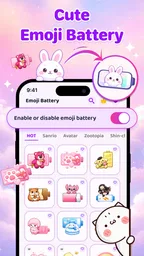
I like a phone customization app best when it changes something I see often without making ordinary tasks harder. Emoji Battery Icon Customize takes that idea to the status bar: it lets you give the battery indicator a more playful look with emoji, stickers, and themes. That is a focused purpose, not a complete home-screen makeover, and the distinction matters. If you want a small personal touch that appears during everyday phone use, it may be worth trying; if you want deep control over every part of Android, it is unlikely to replace a broader customization tool.
It is a free personalization app from ZAppsolution, with optional in-app purchases priced from $2.99 to $19.99 per item. The free starting point makes it easy to explore without committing money, while the paid items mean the full range of choices may not be available at no cost. I would treat the purchase options as something to consider only after seeing whether the basic style and appearance suit your phone. The app is rated for Everyone, and its current version is 1.1.9.
What the battery makeover changes
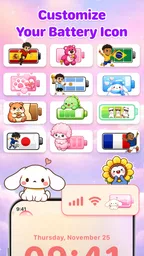
The central appeal is that the battery indicator becomes a design detail rather than a plain system symbol. Emojis and stickers can give the status bar a lighter, more expressive feel, while themes offer a more coordinated way to change its appearance. That narrow focus is useful: you do not have to redesign your wallpaper or rearrange your apps just to make the top edge of the screen feel more personal.
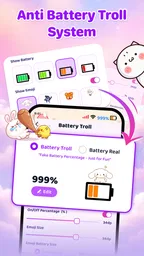
In my view, the strongest use case is a phone you check repeatedly throughout the day. The battery icon is a tiny element, but it sits in a familiar place and gets noticed during quick glances. A style that feels cheerful or matches your preferred visual mood can make the interface feel more like yours. The trade-off is equally clear: this is a cosmetic change, not a battery-management tool. I would not install it expecting longer battery life, more accurate charge information, or help deciding when to plug in.
The app’s store summary describes customization of the battery icon and status bar, but practical results can depend on the Android device and its software. Android manufacturers vary in how they handle status-bar elements, so I would check the app on your own phone before building a larger theme around it. A change that looks appealing in one setup may not have the same prominence or fit on another. Keeping expectations modest makes the app easier to judge fairly.
Small changes that work better in daily use
A useful approach is to choose a design for legibility first and personality second. Emojis with busy shapes or strong visual detail can be fun, but a tiny status-bar icon has limited room to communicate. I would start with a simple option, use the phone as usual, and notice whether the battery symbol remains easy to recognize at a glance. If the decoration draws attention away from the battery state, switch to a quieter style rather than forcing a look that is charming only on a preview screen.
There is also a practical way to make the customization feel intentional: coordinate it with the rest of the interface instead of treating the icon as an isolated novelty. A restrained theme can sit comfortably beside a clean wallpaper, while a playful sticker may suit a more colorful setup. This is a matter of taste, but it helps avoid visual clutter. Because the change is concentrated in the status bar, even one mismatched element can feel conspicuous against an otherwise minimal phone.
Another good test is to use the phone in different everyday contexts before deciding that a style works. Check the status bar while reading, messaging, or using a bright screen outdoors, then compare how easily you can spot the battery indicator. You do not need a formal test routine; a few ordinary checks reveal whether the customization is genuinely pleasant or merely amusing for a moment. That quick trial is especially worthwhile before spending on optional items.
Free access, optional spending, and what value means here
Because the app is free to install, the initial decision is low-risk: you can try the basic experience without paying an upfront price. In-app purchases range from $2.99 to $19.99 per item, so there is a meaningful difference between trying the app and buying additional content. I would not assume that a paid item is necessary to get value from it. The sensible question is whether the options available to you already provide a look you want to keep.
Value here is personal rather than functional in the usual sense. You are paying, if you choose to, for more ways to make a small interface detail feel distinctive—not for a new battery capability. If you enjoy changing your phone’s appearance and like the idea of a themed battery icon, an optional purchase might be worthwhile after you have tested the free experience. If you rarely notice the status bar or prefer Android’s standard symbols, paying for more decoration is difficult to justify.
My practical advice is to avoid buying quickly just because a design looks attractive in isolation. First live with a free style long enough to see whether you still enjoy it after the novelty wears off. Then consider an in-app purchase only if you have a clear reason to want a different look. That approach keeps the app’s cosmetic value in proportion and makes the price decision about your own use rather than the promise of a larger collection.
Where it sits among Android customization choices
Compared with changing a wallpaper, this app targets a much smaller part of the screen. Wallpaper customization changes the overall mood of the phone, while a battery-icon app is more precise and subtle. Compared with a broad launcher or icon-pack setup, it asks for less commitment in terms of visual redesign, but it also cannot deliver the same whole-interface transformation. That makes it a better fit for someone who likes the existing Android layout and only wants one distinctive detail.
It is also different from battery utilities. Those are usually chosen for information or power-related tools; this app’s stated purpose is appearance. If your priority is understanding battery use or improving how you manage charging, I would look for a utility built around those tasks instead. If your priority is a more expressive status bar, this app is closer to the point. Keeping those goals separate helps prevent disappointment and makes the choice straightforward.
Android’s built-in appearance settings may already be enough for people who want only a conventional color or system-level adjustment. A separate app makes more sense when you specifically want the battery indicator to have an emoji, sticker, or themed treatment. The extra personality is the reason to try it, but it is also the reason to skip it if you prefer a clean, standard status bar. There is no universal winner here; the right choice depends on whether that small visual change matters to you.
Who is likely to enjoy it—and who should pass
I would recommend giving it a try if you enjoy personalizing Android in small, reversible ways, especially if you already like emoji-led themes or playful interface details. It can also suit someone who wants a visible change without reorganizing app icons or replacing a launcher. With an average rating of 4.5 from around 487,000 ratings and over 10 million installs, it has reached a large audience, though those figures do not guarantee that its style or behavior will suit every device.
A realistic everyday scenario is checking your phone between errands or messages and wanting the interface to feel a little less generic. A themed battery icon can provide that small moment of personality without changing how you use the rest of the phone. For someone who enjoys switching visual styles occasionally, the free entry point makes experimentation appealing. For someone who sets a phone once and rarely changes anything, the novelty may fade quickly.
I would skip it if battery performance, detailed charge information, or system-wide customization is your main goal. I would also be cautious if a clean status bar is important to you or if you rely on recognizing the battery symbol instantly and do not want decorative elements competing with it. The minimum operating-system requirement is Android 8.0, so the app is intended for devices running that version or later; beyond that, I would judge compatibility by trying it on the phone you actually use.
My verdict after weighing the trade-offs
Emoji Battery Icon Customize has a clear, modest purpose: it turns the battery indicator into a small personalization choice rather than promising to reshape your whole phone. I see its best value in the free trial, where you can find out whether emoji, stickers, or themes make your status bar more enjoyable without spending anything upfront. The optional purchases may suit someone who wants more visual choices, but I would only consider them after confirming that the app’s basic idea earns a lasting place on your screen.
Overall, I would recommend it to friends who enjoy playful Android customization and want something more specific than a wallpaper change. I would point battery-tool seekers, minimalist users, and people wanting a complete interface overhaul toward other options. The app’s appeal is intentionally narrow, and that is both its strength and its limitation: when a small, expressive battery icon is exactly what you want, it has a sensible reason to be on your phone; when it is not, the standard indicator is probably better.
What we like
- Adds a playful touch to the device’s battery display.
- Offers a simple way to personalize the status bar.
- Emoji designs can make battery status easier to spot.
- Customization may suit different moods and themes.
- The concept is straightforward for casual users.
What could be better
- Emoji styles may not match every screen theme.
- Status bar changes can vary across Android versions.
- Some customization options may require extra permissions.
- Battery indicators may be less clear than standard icons.
- The app may not support every device or launcher.





