





Emoji Battery: DIY Status Bar review
 Analysis by Appsdrops
I judge a personalization app by more than whether it looks cute. It also has to leave the phone comfortable to use, avoid getting in the way, and make sense for people who interact with their screens in different ways. Emoji Battery: DIY Status Bar is an Android customization app from ImoDevel that brings emoji styling and playful screen pets into the status-bar experience. Its idea is lighthearted, but whether it suits you depends on how much visual novelty you want alongside the information you check every day.
Readable at a glance, playful by design
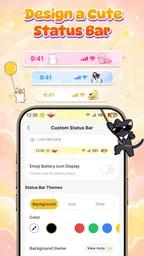
The battery indicator is one of those details most people glance at without thinking. This app invites you to make that familiar status-bar element more expressive with emoji. I can see the appeal if a standard battery symbol feels dull, or if you enjoy giving your phone a more personal look without changing its whole theme.
The key trade-off is that decoration and instant readability do not always work together. A familiar battery symbol is easy to recognize from the corner of your eye; an emoji may be more entertaining but less immediately informative, especially if its shape or color does not stand out against your screen. I would choose a design that remains clear at small size rather than one that looks clever only when inspected closely.
The app’s other distinctive idea is a playful screen pet. That can make a phone feel less static, but it also adds another visual element to a display already occupied by notifications, icons, and other indicators. If you keep a crowded home screen or rely on a clean status bar, restraint is likely to serve you better than turning every available detail into decoration.
Navigation matters here because personalization is only useful when you can find and adjust the choices you care about. The app is focused on a narrow job rather than a broad collection of phone tools, which gives its concept a clear starting point. Still, I would approach setup patiently: look at each choice on your actual screen and consider whether the result is easy to spot during ordinary use, not just attractive in a preview.
For someone who enjoys visual customization, that small test is worthwhile. For someone who wants a battery display to communicate status with maximum clarity and no extra visual interpretation, the regular system indicator is the safer choice. This is not a flaw so much as the central decision the app asks you to make: do you want a functional signal with a personal touch, or a signal that stays as conventional and unobtrusive as possible?
Motor and sensory comfort
Emoji Battery is a personalization app, not a substitute for a phone’s broader accessibility settings. I would not assume that changing the battery’s appearance will make the whole interface easier to use. Its value is more specific: it offers a playful way to alter a small part of the screen, which may be enjoyable for people who like expressive visual cues.
That same visual character will not suit every sensory preference. Someone who finds extra motion or busy displays tiring may prefer to keep the status area simple and avoid adding a screen pet. Someone sensitive to small or visually ambiguous symbols may also find a conventional battery indicator easier to parse. If you use enlarged text, display scaling, or a particular contrast setup, check how the customized element looks in that context before deciding it works for you.
Motor comfort is also about how much effort a customization asks of you. A good practical approach is to make one change at a time, then use the phone normally before adjusting anything else. That makes it easier to tell whether a choice is genuinely comfortable or whether you only liked it while browsing options. If reaching or operating small controls is difficult, a highly detailed customization process may be less appealing than leaving the system settings alone.
I would not treat a decorative battery symbol as a dependable replacement for checking the phone’s actual battery status. If you need a clear, quick indication because of work, travel, or health-related routines, prioritize a familiar display and any built-in low-battery alerts you already rely on. The emoji treatment can add personality, but it should not make an important signal harder for you to interpret.
Everyday use in different settings
Imagine checking your phone between errands while carrying bags. You may have only a moment to glance at the top of the screen before putting it away. In that situation, a distinctive emoji can be fun, but a visually busy or unfamiliar design may take longer to read than the standard battery icon. I would favor the clearest option for a phone you depend on while moving around.
At home, the balance can change. If you often leave your phone on a desk and enjoy a more characterful display, a screen pet may make the device feel more personal. The same choice may be less welcome during a meeting, in a classroom, or when you want the screen to draw as little attention as possible. A customization that feels charming in private can become distracting in a quiet shared setting.
There is also a useful distinction between occasional checking and constant checking. If you glance at the status bar many times a day, even a small loss of legibility can become annoying. If you rarely look at it and mainly want a more playful phone, you may be more willing to trade conventional clarity for style. Think about your own routine rather than choosing based only on a sample image.
For households where people share a device, consider who else needs to read the battery indicator. A symbol that makes immediate sense to you might not be as obvious to a child, an older relative, or a visitor using the phone briefly. Keeping the display familiar can be the more inclusive choice when several people depend on the same device.
Where it fits among personalization options
Compared with changing a wallpaper or applying a broad theme, this app focuses on a smaller detail: the battery area and a playful screen companion. That narrow scope may appeal if you like making a phone yours without redesigning every screen. It also means it is not the right choice if you are searching for a full visual overhaul or a general accessibility toolkit.
The usual alternative is simply to keep the standard Android battery display. That option is less expressive, but it preserves a familiar visual cue and avoids adding another decorative element. Other broad personalization approaches may offer more control over the overall appearance of a device, while this app’s concept is specifically about emoji battery styling and screen pets. Choose based on the change you actually want, not on the assumption that more customization automatically means a better fit.
Cost is worth considering before you settle on it. The app is free to install, with in-app purchases ranging from $4.99 to $19.99 per item. I would first decide whether the basic experience gives you the visual change you want, then consider any paid choice on its own merits rather than treating purchases as necessary for a satisfying setup.
It has an average rating of 4.1 from around 1,200 ratings, and it has been installed over 500,000 times. Those figures suggest that many people have tried it, but they cannot tell you whether its visual style or readability will suit your eyes and routine. The best test is still to see whether the battery cue remains clear on your own display.
Who should try it, and who may prefer another option
I would recommend giving it a look if you enjoy small, cheerful changes to your phone and want the battery area to feel less ordinary. It may also suit someone who likes screen pets and is happy to balance decoration with a little extra visual activity. It is aimed at Android users, is rated for Everyone, and version 10.0 requires Android 7.0 or later.
I would skip it if you need the most familiar battery signal possible, dislike decorative screen elements, or prefer customization that changes the whole interface rather than one specific detail. It is also a poor fit if your priority is an accessibility feature with clearly stated support for a particular need. For those situations, built-in display and accessibility settings—or the standard status bar—are a more sensible place to start.
ImoDevel’s app has a focused, understandable appeal: turn a routine status indicator into something more personal, with a playful companion on screen. I like that this concept can add character without requiring a complete redesign, but I would not recommend choosing style at the expense of a quick, confident battery check. My inclusive verdict is to treat it as optional decoration, test the result in the situations where you actually use your phone, and keep the conventional display if it is clearer or more comfortable.
What we like
- Adds a playful emoji design to the battery indicator.
- Offers a quick way to personalize the status bar.
- Keeps the battery level visible while adding visual flair.
- Works well for users who enjoy expressive phone themes.
- Can make a standard Android interface feel more personal.
What could be better
- Customization options may be limited compared with full theme apps.
- Some designs may reduce the clarity of the battery indicator.
- Status bar changes may not appear on every Android device.
- Battery readings may be less precise at a glance.
- Ads or optional purchases may interrupt the experience.





