

eero wifi system review
 Analysis by Appsdrops
I think of the eero wifi system app less as a place to tinker with settings and more as the control panel for a particular kind of home network: one built around eero hardware. If you already use that equipment, the app gives you a central way to set up and manage your Wi-Fi. If you are shopping for an app that can improve any router, this is not that. That distinction is the most useful thing to know before installing it.
Managing a home network through eero
Made by eero LLC, eero sits in the Lifestyle category, although its practical job is straightforward: it helps you manage an eero Wi-Fi system. The app is free to download, and its Everyone age rating makes it broadly suitable for household use. Its appeal is not a collection of unrelated lifestyle tools; it is having network setup and day-to-day oversight in one place.
The app’s store presence is substantial: it has a 4.8 average from around 139,000 ratings, with more than 5 million installs. Those figures suggest that many people have found it useful, but they do not tell you whether it fits your home. For that, the key question is whether you want an eero-managed network and are comfortable handling it through a phone app.
In my view, this approach makes most sense for someone who wants a guided, approachable way to deal with home Wi-Fi rather than a router interface full of technical controls. It is also convenient if more than one person in the household needs a place to check or manage the network. But the app is tied to the eero system, so it cannot replace the companion app for a different router brand.
Where it fits in everyday use
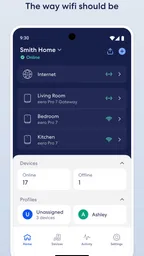
A useful way to judge a network-management app is to imagine a normal problem, not a perfect setup. Say a video call is struggling in a room away from the main router. The app’s purpose is to help you manage the eero network, while the actual result still depends on the equipment, its placement, and the home itself. I would use the app as a first place to inspect the system, not assume that a setting on a screen can solve every weak-signal problem.
That distinction matters because mesh Wi-Fi is a hardware arrangement, not just a software feature. The app is most valuable when paired with compatible eero equipment that has been positioned sensibly. If the issue is a dead zone caused by distance, walls, or a poorly located unit, moving or adding suitable hardware may matter more than repeatedly opening the app.
Compared with the usual alternative—using the manufacturer’s app for a single router—eero’s focus is narrower and more coherent if your home network is already built around its system. Compared with a generic network utility, it is better understood as a companion and management tool, not a universal scanner for every Wi-Fi setup. If you are happy with your current router and only want to check signal strength, a separate tool or your existing router app may be the more sensible choice.
Practical details that affect the experience
One non-obvious trade-off is that a simple control panel can be easier to live with, but it may not suit someone who expects deep manual control over every network detail. Before choosing eero, think about whether you want the app to make routine management approachable or whether you enjoy tuning a router yourself. Those are different preferences, and neither is automatically better.
A second useful habit is to treat network changes as a small troubleshooting process. If a device loses a reliable connection, note which room it is in and whether other devices are affected before changing settings or moving equipment. That gives you a clearer way to distinguish a device-specific problem from a broader coverage issue. The app can help you manage the system, but a little observation prevents random adjustments from making the situation harder to understand.
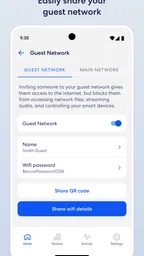
For households with guests, remote workers, or a mix of older and newer devices, keeping the network manageable can be more important than chasing an impressive speed figure. I would first make sure the equipment is placed for the rooms people actually use, then rely on the app as the ongoing management point. This is especially helpful when the household’s main concern is consistent access rather than advanced network experimentation.
What the current version means for existing users
The current version is 26.13.0.36807, while the app’s release date is February 22, 2016. That span shows that the app has remained an active product over time, but it does not by itself prove which functions were added or changed in a particular update. I would not read a version number as a promise that a specific feature is new, or assume that every update changes how the network behaves.
For someone already using eero, the practical question is whether the current app remains the place to manage the system. It does. If the app is working well for setup and routine oversight, there is no reason to expect a version change alone to require a different home-network routine. When an update does arrive, it is sensible to check the release notes in the app store and review any prompts before altering a setup you rely on.
For a new user, the long-running presence may be reassuring in a limited sense: this is not an unfamiliar one-off utility, but a continuing companion to eero’s networking products. Still, history is not a substitute for checking current device compatibility. The minimum operating-system requirement is version 9, so an older phone or tablet should be checked before you plan to use it for setup.
Costs, limits, and the right kind of buyer
The app itself is free, but that should not be confused with a promise that every related service or purchase costs nothing. In-app purchases are listed from $0.49 to $299.99 per item. That wide range makes it worth checking what a purchase relates to before confirming it, especially if you only want basic network management. I would not buy anything simply because it appears in the app; first decide whether it addresses a real need in your home.
The biggest limitation is also the clearest: this app is useful only in the context of eero Wi-Fi equipment. If you are not planning to use that system, there is little reason to install it. If you need extensive control over a network, or you prefer to keep every setting available through a router’s own web interface, compare those expectations with eero’s app-centered approach before committing to the hardware.
It may also be the wrong choice for someone expecting software alone to extend Wi-Fi coverage. Installing the app does not turn an unrelated router into an eero mesh system. That is an easy point to overlook when browsing networking apps, so I would settle the hardware question first and the app question second.
What I would watch before relying on it
For existing users, I would watch whether updates preserve the straightforward management experience that makes a phone companion useful. For prospective buyers, I would focus on compatibility with the devices you already own, the cost of the eero hardware you are considering, and whether the app’s level of control matches your habits. Those are more meaningful checks than assuming that a high rating guarantees a perfect fit.
I would also pay attention to how the network performs in the places that matter: the work area, bedrooms, and any rooms where calls or streaming regularly falter. Make one change at a time, then see whether it helps. That approach is more reliable than trying several adjustments together and losing track of what made a difference.
Overall, I recommend the app to people who have eero equipment or are deliberately choosing it and want a phone-based way to manage their home Wi-Fi. It is a poor match for someone seeking a universal router tool, and it cannot remove the need to think about hardware placement or compatibility. For the right household, the clearest strength is having one focused place to manage an eero network; for everyone else, a companion app for the router they already own is likely the more practical option.
What we like
- The app makes it easy to check which devices are connected.
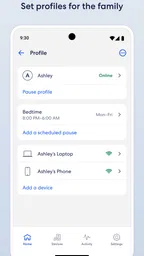
- Profiles help manage internet access for different household members.
- Network status alerts can help spot connection problems quickly.
- Remote access lets you manage the network away from home.
- Built-in troubleshooting guides can simplify common fixes.
What could be better
- Advanced settings may feel limited for networking enthusiasts.
- Some security and parental controls require a paid subscription.
- Features can vary depending on your eero hardware model.
- Managing a network requires an eero system and an account.
- Troubleshooting may depend on an internet connection.





