
EcoNet review
 Analysis by Appsdrops
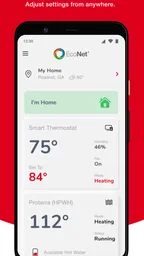
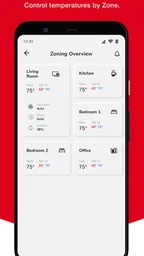
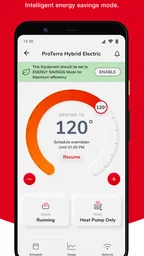
I think of EcoNet as a practical remote control for a home’s heating, cooling, and water-heating equipment—not as a general smart-home dashboard. It is a free House & Home app from Rheem Manufacturing, intended for people with compatible Rheem-brand systems. That focus is useful: instead of juggling controls at the equipment itself, you can use a phone to manage supported equipment from elsewhere in the home or while away. The important qualification is compatibility. If your HVAC or water heater is not part of the supported Rheem setup, this app is unlikely to solve a problem that a thermostat app or your existing controls already handle.
What feels quick, and what does not
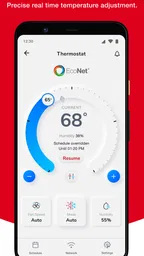
For everyday control, my expectation is straightforward rather than spectacular: open the app, find the relevant equipment, and make an adjustment without needing to learn a broad smart-home system. That narrow purpose is EcoNet’s strongest argument. A household that mainly wants convenient access to its Rheem equipment has less to sift through than it might in an app built to coordinate lights, locks, cameras, and appliances too.
That does not mean every action will feel instantaneous. A phone interface is only one part of the chain: the app, the home’s connection, the equipment, and any account or connectivity setup all have to cooperate. I would treat a brief delay after an adjustment as a reason to check that the change registered before tapping repeatedly, rather than assuming the first request failed. Repeated commands can make it harder to tell what the system is actually doing.
The current release is version 6.18.0-11550-3100206. For a homeowner, the version number matters less than whether the app and the particular equipment work together consistently. I would keep the app updated through the app store, especially if an older installation begins behaving differently after a phone or system change. An update is sensible maintenance, not a guarantee that a connection issue will disappear.
Plan for the moments when the house is busy
EcoNet can be most useful when you need to make a deliberate adjustment at an inconvenient time: before arriving home, while away for the day, or when someone else in the household has changed the setting. Those are also the moments when a remote control is easiest to over-rely on. If comfort or hot water is important right now, check that the equipment responds instead of assuming that pressing a control in the app has completed the job.
A realistic example is leaving for a weekend and remembering that the home’s heating or cooling does not need to follow the same routine as an occupied house. A remote app can make that kind of check more convenient than returning to a wall control. When you come back, though, a sensible workflow is to make the change early enough for the system to respond, then confirm the result before expecting the house to feel different. Remote access is convenient; it does not remove the equipment’s own response time.
Another useful habit is to separate “I want to inspect or adjust this” from “I need an immediate fix.” If a change is not reflected as expected, first check the phone’s connection and give the system a moment. Then revisit the control rather than issuing a string of quick taps. This is a small but practical way to avoid confusion when several people use the same household setup or when you are controlling it from outside the home.
Reliability depends on the whole setup
For a control app, reliability is less about how polished the first screen looks and more about whether the app helps you understand what is happening after you make a change. EcoNet’s focused role makes it easier to know where to go for Rheem equipment, but the app cannot make an unsupported device compatible or eliminate problems with home connectivity. If remote access is central to your routine, test the setup in ordinary conditions before you depend on it during travel or a weather change.
I would also keep the physical control path in mind. A phone is convenient, but it is not a reason to discard the equipment’s existing controls or the household’s normal way of handling an urgent comfort issue. If the app is temporarily unavailable, use the appropriate local control or the guidance for your equipment. This is especially important for households where not everyone wants to use an app, or where a guest may need to adjust the home without signing into an account.
EcoNet has an average rating of 4.0 from around 12,000 ratings, alongside roughly 5,000 written reviews. Those figures suggest that many people have tried it, but they do not tell me whether it will behave well with a particular home’s equipment and network. The better test is a simple one: can you connect the equipment you own, reach the controls you need, and verify changes without repeated troubleshooting?
Compatibility and phone constraints come first
The biggest limitation is not necessarily the phone’s processing power; it is whether your home has equipment the app is meant to control. Before making this your preferred control method, identify the Rheem equipment in your home and check that it is compatible with EcoNet. A household with a different manufacturer’s system should generally stick with that system’s intended app or its existing controls rather than install this one expecting broad compatibility.
It is also worth thinking about who will use the app and from which devices. If one person handles all settings, a single phone-based routine may be enough. If several household members need access, set up and test that arrangement before relying on it; the convenience of shared control is only useful if everyone can reach the right equipment without confusion. I would avoid making the app the only source of instructions for a sitter or guest who may not have access to it.
The app is rated for Everyone, and it is available at no charge. It has been available since June 2, 2014, and has more than 100,000 installs. Those details make it a well-established option in its narrow role, but they should not be mistaken for a promise that every Rheem product, phone, or home network will offer the same experience. Compatibility and a successful setup matter more than popularity when the question is whether it will work in your home.
Where it stands against the usual alternatives
Compared with a conventional wall control, EcoNet’s main advantage is access from a phone rather than having to be beside the equipment or thermostat. That difference matters most when you are away, when you want to check a setting from another room, or when you are coordinating the home around a changing schedule. A physical control can still be simpler for a quick adjustment by someone who does not use the app.
Compared with a broad smart-home platform, EcoNet is a more specialized choice. That specialization can be a benefit if your priority is Rheem HVAC or water-heating equipment, because you are not choosing an app chiefly for unrelated devices. On the other hand, if you want one place to manage a mix of brands and household products, a broader platform may better match your goal—provided it supports the specific equipment you own. I would choose based on the equipment and the task, not on the assumption that one app should control everything.
For someone who already has a thermostat app that reliably handles the relevant HVAC controls, the case for adding another control layer may be weaker. EcoNet makes more sense when its supported Rheem equipment is the thing you need to manage, particularly if remote access is useful. If you only want occasional local adjustments and the existing control is easy to reach, the phone app may add convenience without changing much about your routine.
My performance verdict
My overall view is that EcoNet is worth considering when you own compatible Rheem equipment and have a real reason to control it from a phone. Its focused purpose is easier to understand than an all-purpose home app, and the free price removes the cost of trying it. Still, the experience depends on a correct setup, a usable connection, and equipment that the app can actually control. I would not choose it as a general-purpose smart-home controller, and I would not rely on remote commands without checking that important changes took effect.
For a home with compatible equipment, I would start with one ordinary task, such as checking a setting from another room, then try remote access before depending on it while away. That small trial reveals whether the app fits your household’s real routine and whether its response feels dependable on your devices. EcoNet is most valuable when that test turns remote control into a straightforward habit; if the connection or compatibility proves frustrating, your existing equipment controls or a better-matched manufacturer app may be the more dependable choice.
What we like
- Remote controls make it easier to manage compatible appliances.
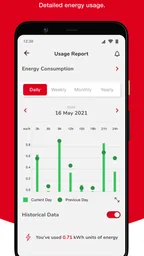
- Energy monitoring helps users understand household consumption.
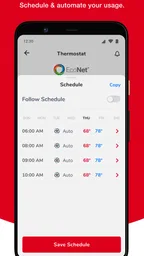
- Schedules can automate appliance operation at chosen times.
- Device status is accessible from outside the home.
- The app brings supported devices together in one place.
What could be better
- Features depend on owning compatible EcoNet equipment.
- Some devices may require a stable internet connection.
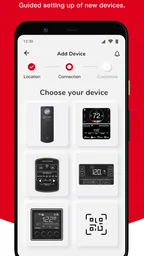
- Setup can take time when pairing multiple appliances.
- Remote access may be limited during service outages.
- The app offers little value without connected equipment.





