
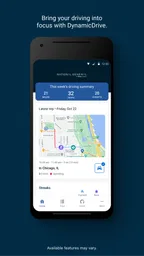
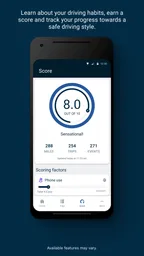
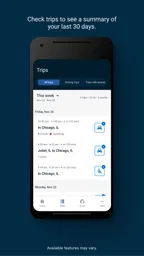
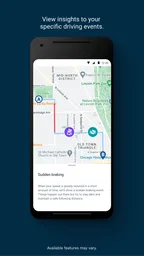
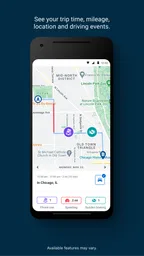
DynamicDrive review
 Analysis by Appsdrops
Choosing a driver-focused app is less about collecting another dashboard and more about deciding what you want to change behind the wheel. DynamicDrive is built around monitoring driving behavior, with the aim of helping people make safer choices and save. I see its appeal most clearly for drivers who are willing to pay attention to their habits over time, rather than those who only want navigation, fuel tracking, or a one-off driving score.
That distinction matters. A behavior-monitoring app can be useful when it gives you a reason to notice patterns you would otherwise overlook, but it is not a substitute for a map, roadside assistance, or careful judgment. Before installing it, I would ask whether you want feedback about how you drive and whether you are comfortable making that feedback part of your routine.
Decide what you want from a driving app
DynamicDrive is a free Auto & Vehicles app from National General Insurance. Its focus is narrower than a general motoring toolkit: it is intended to monitor behind-the-wheel behavior, so its value depends on whether that is the problem you want to work on. If your main concern is getting to an unfamiliar address, a navigation app is the more direct choice. If you want to reflect on driving habits, this app is the more relevant kind of tool.
There is a practical question to settle before you begin: are you prepared to use the app consistently enough for its feedback to mean something to you? A single trip may be an unusual mix of traffic, weather, errands, or road conditions. I would treat any behavior feedback as a prompt to look for recurring tendencies, not as a verdict on one drive. That mindset makes the app more useful and reduces the temptation to react to every isolated result.
The audience figures suggest that it has found a substantial group of users: it has over 100,000 installs and an average rating of 4.3 from around 8,100 ratings. Those numbers can help a new user gauge that the app is established, but they cannot tell you whether its particular approach suits your driving routine. I would use them as context, not as a reason to install without considering the app’s narrow purpose.
There are also straightforward compatibility and age details to weigh. The app is rated for Everyone, and its current version is 3.8.1, with Android 10 as the minimum operating-system requirement. If you are choosing for a household, check that the device you plan to use meets that requirement before building a routine around it. The app was released on November 1, 2024, so it is a relatively recent option rather than a long-standing general-purpose driving companion.
What it does well when the goal is safer driving
The strongest reason to try DynamicDrive is the possibility of turning a vague intention—“I should drive more carefully”—into something you can revisit. People often notice obvious mistakes but miss repeated habits: rushing between familiar stops, driving differently when late, or becoming less patient in congestion. A monitoring tool can make those patterns easier to consider, provided you use it as a learning aid rather than trying to optimize every trip for a score.
For example, imagine that your weekday commute is mostly familiar, but you often leave with little time to spare. I would use the app over a run of ordinary commutes, then reflect on whether the trips that feel most hurried also correspond with less settled driving. The useful outcome is not a perfect-looking record; it is noticing that leaving a few minutes earlier may be a better intervention than trying to make small corrections while already stressed.
Another practical use is to compare unlike situations carefully. A short neighborhood errand and a longer drive through busy roads are not equivalent experiences. Rather than drawing conclusions from one unusually smooth or difficult trip, I would keep the context in mind and look for habits that recur across comparable journeys. This is a simple but important way to avoid mistaking traffic or route conditions for a personal driving tendency.
That approach also makes the app more helpful for people sharing responsibility for a car. A driver who is trying to become more deliberate can use regular feedback as a private reminder to review habits, while a family member can discuss safe routines without turning every journey into a debate. I would keep those conversations focused on specific, repeatable behaviors rather than treating an app’s output as proof that someone is a good or bad driver.
One non-obvious trade-off is that feedback can change the way people drive simply because they know they are being monitored. That may be positive if it encourages calmer choices, but it can also make a person overly focused on the app during a trip. My advice is to set up and review the tool while parked, then give the road your full attention. The purpose is to improve driving, not to watch a phone while driving.
Where it sits beside other options
DynamicDrive belongs in a different lane from navigation and vehicle-maintenance apps. A navigation app helps answer where to go and which route to take. A maintenance tracker helps organize service tasks or vehicle records. This app’s stated purpose is driving behavior, so it is most compelling when you already have those practical needs covered and want to focus on the way you travel.
It also differs from informal self-checking. You can decide to drive more smoothly without installing anything, but self-assessment can be inconsistent: people tend to remember the stressful moment and forget the ordinary ones. A dedicated monitoring app offers a more structured reason to reflect. The trade-off is that you have to accept another tool in your routine, and the quality of your conclusions still depends on interpreting feedback sensibly.
Drivers who primarily want live traffic guidance, route planning, fuel prices, or a logbook should look for an app designed around those tasks instead. I would not choose DynamicDrive as a replacement for those tools simply because it relates to driving. It is a focused companion, not an all-purpose car app, and choosing it for the wrong job is likely to make it feel incomplete.
There is also a personal-fit question. Some drivers enjoy measurable prompts and find that external feedback helps them follow through. Others prefer to keep their phone out of the driving experience and work on habits through lessons, a conversation with an instructor, or a deliberate change in routine. Neither preference is inherently better. If monitoring makes you tense or distracted, an alternative that does not involve checking app feedback may be the wiser choice.
What to consider before making it part of your routine
Because the app is free, trying it does not require an upfront purchase. Still, “free” does not mean there is no cost at all: you spend attention setting up a new routine and deciding how much weight to give its feedback. I would start with a clear personal goal, such as becoming less rushed on regular trips, rather than installing it and hoping that a score alone will change anything.
A sensible workflow is to set up the app before driving, leave the phone alone while the vehicle is moving, and review patterns only after the trip. If you are evaluating a particular habit, keep your comparison fair: look at similar journeys and avoid drawing a conclusion from a day with exceptional traffic or a detour. This makes the exercise more useful without requiring you to turn every drive into a test.
Be equally thoughtful about who is using the phone and who is driving. If a vehicle is shared, make sure each person understands the purpose of the monitoring and does not assume that one person’s driving history represents everyone’s behavior. Clear expectations are especially helpful in households where app feedback might otherwise become a source of blame instead of a prompt for safer choices.
Switching away is relatively simple in concept because this is a focused app, but the habit you build may be the real commitment. If you stop finding its feedback useful, you can return to self-guided reflection or choose a different category of driving tool. Before switching, I would note what you actually learned: perhaps you need route planning, maintenance reminders, or more direct coaching rather than ongoing behavior monitoring. That keeps you from replacing one app with another that solves the wrong problem.
National General Insurance is the developer, which gives the product an insurance-company context, but I would still judge it by how useful its monitoring feels in everyday life. A developer’s identity alone does not tell you whether the app will fit your habits. The practical test is whether using it helps you make a specific, safer adjustment without creating distraction or unnecessary worry.
My recommendation for the right kind of driver
I would recommend DynamicDrive to someone who wants to think more deliberately about their driving and is open to using monitoring as a nudge. It is especially worth considering if you have a regular routine, can review trips when parked, and want to work on habits gradually rather than expecting a quick transformation. Its free price makes a cautious trial approachable, while its focused purpose gives you a clear standard for deciding whether it earns a place on your phone.
I would skip it if you mainly need directions, vehicle records, or a general travel utility, or if the idea of being monitored would make you self-conscious behind the wheel. It is also a poor fit for anyone likely to check a phone while driving. In those cases, a navigation tool, maintenance app, instructor-led feedback, or simply a phone-free driving routine is more appropriate.
My overall view is that DynamicDrive is best treated as a reflection tool, not an authority on every journey. Give it a fair chance across ordinary drives, compare like with like, and focus on one practical behavior you can change. If that process helps you become calmer and more consistent, the app is doing something worthwhile; if it adds distraction or does not match the task you need done, choosing another kind of driving app is the better decision.
What we like
- Provides a clear interface for managing drive settings.
- Can make key drive controls easier to access.
- Offers a focused tool for users who adjust drive behavior.
- May help streamline routine drive management tasks.
- Useful for users seeking a dedicated drive utility.
What could be better
- Some features may depend on compatible hardware.
- Results can vary across device models.
- Advanced options may be confusing for new users.
- Its usefulness may be limited on unsupported devices.
- Frequent adjustments could affect drive performance.





