Drma: AI Short Drama Maker review
 Analysis by Appsdrops
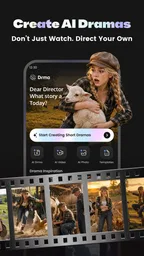
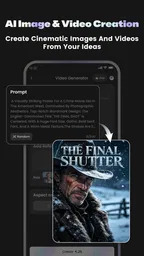
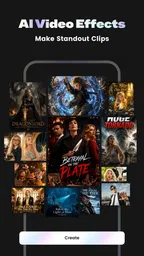
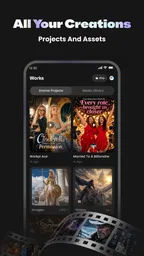
I’d treat Drma: AI Short Drama Maker as a quick creative studio for turning a story idea into a short, staged video—not as a general-purpose film editor. Its focus is on AI-assisted scripts, storyboards, and editing, so the appeal is getting from a rough premise to something watchable without assembling every scene by hand. In my view, it is most useful when you want to experiment, make a playful clip, or test a dramatic setup before committing to a more involved production.
From a premise to a short drama
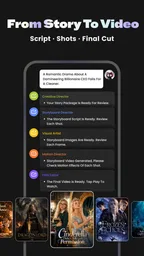
The basic workflow is easiest to understand as a sequence: start with a dramatic idea, shape it into a script, use the storyboard to think through the scenes, then refine the result with editing. That progression matters. If you jump straight to polishing visuals before deciding what the scene is about, you can end up with an attractive sequence that has no clear emotional turn.
I’d begin with one simple conflict rather than a sprawling plot. For instance, a friend discovers an unexpected message just before leaving a party. That gives the story a character, a setting, and a reason for the scene to change direction. A compact premise is also easier to judge in storyboard form: each panel should either establish the situation, reveal something, or move the character toward a decision.
The storyboard-first workflow is a practical strength for people who think visually but do not yet know how to write a screenplay. It lets you consider the order and purpose of scenes before treating the generated material as finished. I would still read the script closely rather than accepting it automatically. AI can supply momentum, but the user has to decide whether the dialogue sounds natural and whether the emotional beats actually connect.
Drma is an Art & Design app from AI Video Generator - AI Hug & Kiss Video Maker. The app is free to install, with in-app purchases ranging from $0.99 to $69.99 per item. That makes it easy to explore the workflow before spending, but I’d check the purchase options in the app before building a project around something I might need regularly. A free starting point is helpful; it does not mean every part of a longer creative routine will necessarily remain free.
Make the first draft easier to edit
One useful habit is to give a scene a clear purpose before generating or refining it. “Show that the character is worried” is less actionable than “the character reads a message, hides the phone, and changes the subject.” The second version suggests visible action, which is better suited to a storyboard and a short video. It also gives you a specific standard for deciding whether the result works.
Keep the number of story beats small at first. A short drama does not need a backstory, several locations, and a surprise ending all at once. If a result feels confusing, remove one idea rather than adding more explanation. This is especially useful when the output needs to make sense to someone watching casually on a phone, where a viewer may not pause to interpret subtle context.
For a realistic everyday use, imagine wanting to send a lighthearted birthday greeting that feels more personal than a static card. I’d sketch a tiny setup and payoff, review the storyboard for clarity, then edit away anything that distracts from the message. The same approach can work for a social post, a visual writing exercise, or a rough pitch to a friend. The app is better suited to compact concepts than to a story that depends on elaborate continuity.
Settings and choices worth checking
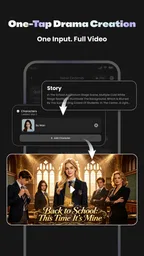
Even when an app offers one-tap editing, a one-tap result should be treated as a draft. Before relying on it, check what the controls actually let you adjust and how those choices affect the story you are making. I would pay particular attention to whether the pacing, scene order, and visual emphasis match the intended mood. A quick edit can save effort, but it cannot know that a pause should feel tense rather than merely slow.
It is also worth checking the practical basics before starting a project: confirm that your device meets the app’s minimum operating-system requirement of 8.1, and make sure you are comfortable with the available purchase choices. The age rating is Teen, which is relevant if you are choosing an app for a younger family member. These are simple checks, but they are more useful before investing time in a workflow than after a project has become part of a routine.
When trying a new tool, I prefer to make a small test project first. Use a premise you can revise easily, then see whether the script and storyboard are convenient to inspect and whether the editing step gives you enough control for your taste. This avoids confusing a limitation in a particular draft with a limitation in the whole app. It also helps you decide whether the generated approach suits your style before you build a larger idea around it.
For anyone concerned about purchases, the safest approach is to treat the free installation as a chance to evaluate the experience and to read each in-app option carefully before confirming anything. I would not assume that a paid item is necessary for every project, nor assume that all desired editing choices are included at no cost. The price range is broad enough that knowing what you are selecting matters more than making a decision based on the smallest displayed amount.
Repeatable habits that save time
The fastest users are not necessarily the ones who tap through the app most quickly. They are the ones who arrive with a focused idea and know what they want to keep. I’d reuse a simple planning habit: write down the opening situation, the change that interrupts it, and the ending image. That gives the script and storyboard a clear target, and it makes revisions less arbitrary.
A second useful pattern is to separate story decisions from polish. First decide whether the scene is understandable; then decide whether its presentation feels right. If you change the premise, the script, and the visual treatment all at once, it becomes hard to tell what improved the result. Small, purposeful revisions make the process easier to evaluate and help you learn which kinds of prompts lead to scenes you actually want to use.
I would also keep a short personal note of prompts or story structures that worked well. This is not a special app feature; it is a simple way to make a creative tool more repeatable. A concise setup followed by a clear reversal may suit a comic clip, while a quieter reveal may work better for a sentimental message. Reusing the structure while changing the details saves planning time without making every video feel identical.
For a small group project, I’d agree on the premise and intended audience before anyone starts editing. One person can focus on whether the story reads clearly, while another checks whether the scenes support the intended tone. This reduces late disagreements about whether a dramatic moment should be funny or serious. It also keeps the app in its useful role: helping people shape a short visual idea, rather than replacing the discussion that makes a shared idea coherent.
Where AI-assisted drama can fall short
The main trade-off is control. A tool built around AI-generated scripts and storyboards can help overcome a blank page, but the output still needs human judgement. Dialogue may feel too neat, characters may not have enough individuality, or the sequence may move past an important beat too quickly. If you need precise line delivery, carefully timed visual comedy, or consistent details across many scenes, expect to do more review than the phrase “one-tap editing” might suggest.
That is why I would not choose Drma as my first option for a project that depends on meticulous manual editing. Someone who wants to set every cut, adjust every moment, and control a complex timeline may be better served by a conventional video editor. Likewise, a writer who mainly wants to draft and revise dialogue may prefer a dedicated writing tool. Drma’s particular appeal is the bridge between a written dramatic idea and a storyboard-led video, not maximum control over every production detail.
There is also a creative limitation to watch for: speed can make a familiar idea feel finished before it has become distinctive. If the first generated version resembles a stock melodrama, change the character’s motivation or give the scene a more specific setting instead of merely polishing the same generic beat. A small, concrete detail—a promise the character has to keep, or a message they are reluctant to answer—can make a short story feel more personal without making it complicated.
Drma has an average rating of 4.5 from around 318,000 ratings, and it has been installed over a million times. Those figures suggest broad interest, but they are not a substitute for testing whether its creative approach suits you. Its current version is 2.0.8, and the app was released on November 10, 2024. I’d use that context as background, then make my decision based on the quality and controllability of my own trial project.
Who will get the most from it
I can see this being a good fit for beginners who want a guided route from idea to short video, creators who enjoy trying alternate story premises, and people making informal dramatic clips for friends or social sharing. It is particularly approachable if a blank editing timeline feels intimidating. Having a script and storyboard in the same creative process gives you something concrete to react to instead of forcing you to invent every production step at once.
It is less compelling for anyone who already has a finished script and wants exact, hands-on control over the edit, or for creators whose work depends on precise continuity and a carefully managed visual style. Those users may find that a dedicated editor gives them more control, even if it asks them to do more setup. I would also steer away from using generated drafts without review when the tone, wording, or meaning needs to be exact.
With 641 reviews alongside its larger rating count, the app has a visible audience, but I would not read popularity as proof that every workflow will feel effortless. What matters is whether the guided creation process saves you time without taking away too much creative control. A quick test using a premise you care about is a better measure than trying to judge the app from its broad description alone.
A practical verdict for regular use
Drma: AI Short Drama Maker works best when I approach it as a collaborative starting point: I bring a focused idea, let the script and storyboard help organize it, then make deliberate choices about what needs changing. It can make short-form storytelling feel more approachable, especially for someone who wants to create a scene but does not want to begin with a blank editing project.
My recommendation is to try a small, low-stakes story first, inspect the result rather than treating the first draft as final, and check purchase choices before depending on a paid option. If you enjoy shaping a premise through scripts and storyboard scenes, it is worth exploring. If your priority is exact editing control or polished continuity across a complex production, a traditional editor is likely the better match.
For a free-to-install app with Teen content rating, Drma offers a clear creative lane: turning short dramatic ideas into visual drafts with less setup. Its value comes from helping you get moving, not from removing the need for taste and revision. If you remember that distinction, it is easier to use the app efficiently and to know when another tool would serve your project better.
What we like
- AI tools can help turn a basic idea into a short drama.
- A short-form focus suits viewers with limited time.
- Creating episodes may offer a playful way to explore storytelling.
- AI-generated content can provide a starting point for new creators.
- The format is designed for quick mobile viewing.
What could be better
- AI results may not match the creator's intended story.
- Generated dialogue can sound unnatural or repetitive.
- The app may require an internet connection for AI features.
- Some features or content may require payment.
- Short episodes can leave stories feeling rushed.





