



DriveTime Used Cars for Sale review
 Analysis by Appsdrops
I see DriveTime Used Cars for Sale as a practical starting point for people who want to browse used vehicles and consider financing in the same place. That focus is useful, but it also defines the app’s limits: it makes the most sense if you are open to shopping through DriveTime, rather than simply comparing every seller in your area. I would treat it as a way to organize an early car search—not as a substitute for checking a vehicle, reviewing the full cost, and comparing other options before making a decision.
Shopping and financing belong in the same journey
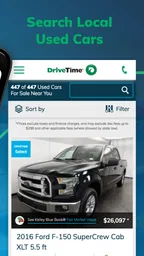
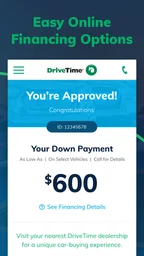
DriveTime is an Auto & Vehicles app from DriveTime Automotive Group, Inc. Its central appeal is the connection between looking for used cars and exploring personalized financing options. In practice, that pairing can make the first stages of shopping feel more coherent: instead of browsing vehicles in one place and starting a financing conversation elsewhere, you can use the app as an entry point to both.
That is particularly helpful if financing is part of your decision from the beginning. A car that looks attractive in a search result may not make sense once you consider what you can comfortably spend. My advice is to use the financing side as a planning aid, then judge any vehicle against your own monthly budget and the total commitment you are comfortable with. An option presented to you is not automatically the right option for you.
The app is free, and its age rating is Everyone, so there is no purchase price to weigh before trying it. DriveTime has a 4.7 average from around 4.4 thousand ratings, and it has passed 500 thousand installs. Those figures suggest that many people have given it a try, though they cannot tell you whether its shopping approach fits your particular needs.
Where it can save effort
The most useful workflow is to begin with a realistic idea of what you need, rather than scrolling without a plan. Think about the sort of vehicle that suits your daily routine, the amount of space you need, and the spend you can manage. Then use the app to explore what is available through DriveTime and consider financing in that context. Keeping those questions together can help you avoid getting attached to a car before thinking about affordability.
A concrete example: imagine you need a dependable vehicle for a new commute and are still deciding how much room you need for passengers or gear. You could use DriveTime to see what kinds of used cars are available through its shopping experience, while also considering financing options. That gives you a more grounded shortlist than choosing a vehicle from its photos alone. Before going further, compare the candidates with your everyday needs and take time to assess the full terms and condition of any car you are seriously considering.
One useful habit is to separate browsing from deciding. I would first collect a small set of plausible options, then revisit them with practical questions: Does this vehicle fit my routine? Is the financing workable? What would I need to verify before committing? That pause matters because the convenience of seeing shopping and financing together can make the process feel more settled than it really is. The app can help you explore; it cannot make the decision for you.
What the app is—and is not—best at
Compared with general used-car marketplaces, DriveTime has a more focused purpose. A broad marketplace can be better when your first priority is comparing vehicles from many different sellers. DriveTime is more relevant when you want to browse its used-car offerings and consider financing as part of that same process. The trade-off is straightforward: a focused shopping route may feel simpler, but it is not the same as surveying the entire market.
That distinction affects how I would use it. If you already know you want to shop through DriveTime, the app is a sensible place to begin. If you are still deciding between dealerships, private sellers, and other platforms, use it as one source rather than your only source. Comparing elsewhere can help you understand whether the selection and terms you are considering suit your priorities.
It is also worth being deliberate about the order of decisions. First decide what you need from a car; then look at vehicles that plausibly meet those needs; then consider whether the financing makes sense. Reversing that order—starting with a financing possibility and stretching your vehicle choice around it—can lead to compromises you may regret. This is not a special feature of the app so much as a sensible way to use a combined shopping-and-financing tool.
Where I would be cautious
The app’s close connection to DriveTime is both its strength and its main limitation. It is designed around that company’s shopping journey, so people who want a neutral, broad comparison across sellers may find a general marketplace more useful. I would not rely on one focused app to establish that a car is the best available choice or that a financing option is the best one for a household’s circumstances.
There is also a difference between exploring financing and understanding a complete deal. I would read the terms carefully and make sure I understand the total commitment, not just whether a vehicle seems within reach. If you are unsure how to compare financing choices, pause and get a clear explanation before proceeding. The convenience of seeing options in an app should not replace asking questions or taking time to understand the details.
Likewise, browsing a vehicle is not the same as evaluating it in person. When you find a promising car, check the details that matter to you and arrange the appropriate next steps before treating it as a final choice. Someone who needs a vehicle immediately may appreciate a focused place to start, but should still leave time for careful review rather than letting a quick search become a rushed purchase.
These are not reasons to avoid the app; they are reasons to use it with a clear role in mind. It can bring a focused inventory and financing exploration together, but it should not be asked to replace independent comparison, careful budgeting, or a proper assessment of a specific used car. For a major purchase, those extra steps are part of using the app well.
Who will get the most from it
I would recommend DriveTime to someone who is actively considering a used car and wants to explore vehicles and financing in one focused experience. It may be especially useful if you are early in the process and need to turn a vague idea—“I need a car”—into a more realistic shortlist. The combination can help you keep affordability in view while you browse, instead of treating financing as an afterthought.
It is less suited to a shopper whose main goal is to compare the broadest possible range of sellers, or to someone who has already settled on a particular vehicle elsewhere and only wants a general-purpose financing calculator. In those situations, a broader marketplace or a tool dedicated to the specific task may fit better. I would also suggest looking elsewhere if you are not interested in DriveTime’s shopping route; the app’s focused approach is precisely what makes it less universal.
DriveTime’s current version is 4.0.10850019, and it runs on Android 8.0 or later. That makes the operating-system requirement worth checking before you install it on an older device. The app was released on July 2, 2018, so it has been available for several years, but I would still make my judgment based on whether its current shopping and financing workflow suits me rather than on its age or popularity alone.
A measured recommendation
My overall view is that DriveTime Used Cars for Sale is most valuable as a focused shopping companion for people who want to connect used-car browsing with financing exploration. It gives that audience a clear place to start and encourages a more joined-up way of thinking about vehicle choice and affordability. Its free price removes the cost of trying it, while its company-specific scope means it should not be mistaken for a complete survey of the used-car market.
If I were helping a friend decide, I would say: try it if you are open to shopping through DriveTime and want financing to be part of the conversation early. Use it to build a shortlist, keep your budget grounded, and identify the questions you need answered. Then compare your options and examine the vehicle and terms carefully before committing. If you want the widest seller comparison or a fully independent starting point, make a broader marketplace part of your search instead.
That is the app’s clearest strength and its fairest boundary. It can make a particular route through used-car shopping easier to explore, but the final confidence has to come from your own comparison and due diligence. For the right shopper, I think that makes it a useful first step—not the whole journey.
Why its focused approach matters
There is a practical difference between an app that only helps you discover cars and one that puts financing exploration alongside that discovery. When both are part of the same shopping journey, it is easier to notice early that a tempting vehicle may not fit your spending plan. That can save time: rather than spending hours comparing cars that were never realistic choices, you can narrow your attention to options that make sense for your situation.
Still, I would avoid treating an initial financing result as a personal budget recommendation. Your own costs and priorities matter, and the right decision depends on the terms you actually understand and accept. I would write down a comfortable limit before browsing, then use that limit to filter your own thinking. This small step prevents an app-led search from quietly shifting what you consider affordable.
For a first-time used-car shopper, that structure can be reassuring without making the process effortless. You still need to decide what features matter, compare alternatives, and ask questions about a specific car. For an experienced buyer who already has a trusted way to compare vehicles and financing, the app may add less value. Its usefulness depends less on the number of cars you view than on whether its focused route helps you make a better-informed shortlist.
Ultimately, I would keep DriveTime installed only if its inventory and financing path are relevant to the way I want to shop. It is a sensible, approachable starting point for that particular job, and a poor replacement for wider research when breadth is the priority. Used-car purchases reward patience; this app can help organize the search, but the strongest decision still comes from slowing down at the moments that matter.
In short, I recommend it to shoppers who want a direct route into DriveTime’s used-car and financing experience, especially when they are still shaping a shortlist. I would pair it with outside comparisons and careful review of any candidate rather than relying on it alone. Used that way, DriveTime Used Cars for Sale can be genuinely helpful without asking you to mistake convenience for certainty.
What we like
- Browse a large inventory of used vehicles from multiple locations.
- Filter listings by price mileage and vehicle features.
- View vehicle photos and key details before contacting a seller.
- Save cars to revisit them later.
- Find dealership locations and contact information in the app.
What could be better
- Vehicle availability and pricing can change without notice.
- Some listings may provide limited vehicle history details.
- Financing terms depend on individual eligibility.
- The app may require location access to show nearby inventory.
- Buying a car may require follow-up with a dealership.





