


Drawsy: AR Draw for Sketching review
 Analysis by Appsdrops
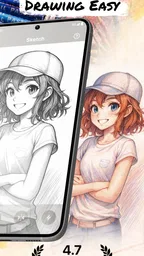
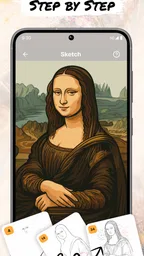
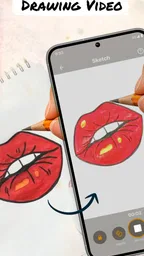
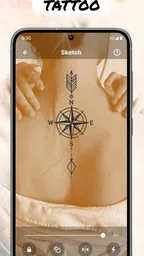
I can see Drawsy: AR Draw for Sketching being useful in a home where one device gets passed between people who want to draw but do not all feel confident starting from a blank page. Its basic idea is to use an image as a guide through augmented reality, making it easier to sketch the outline onto paper. That makes the app less like a full digital art studio and more like a practical bridge between looking at a reference and putting pencil to paper.
In my view, that distinction matters most when a family member wants to join in without needing a drawing lesson first. Someone can choose a subject they like, use it as a visual guide, and focus on following shapes rather than inventing them. It is an approachable way to try sketching together, although the result still depends on a steady hand, a suitable drawing surface, and patience.
Drawing together, one paper sketch at a time
A realistic shared-device moment might be a quiet afternoon at the kitchen table: one person wants to draw a pet, another is working on a birthday card, and someone else is simply curious about tracing. Drawsy gives them a common starting point without requiring everyone to have the same skill level. The more experienced person can help with line weight or shading, while a beginner can concentrate on the outline.
The augmented-reality approach also changes what “sharing” looks like. This is not necessarily a collaborative canvas where several people add marks to one digital image. Instead, the app can serve as a reference tool while each person makes their own paper sketch. That is a small but useful distinction: it encourages a hands-on activity and makes it easy to compare different interpretations of the same subject.
For a group, I would pick a simple image before passing the device around. A clear silhouette is easier to follow than a busy photograph with overlapping details. Starting with a recognizable object—a cup, a leaf, or a simple animal shape—keeps the exercise pleasant instead of turning it into a test of precision. Once everyone is comfortable, a more intricate reference can become a challenge rather than a source of frustration.
What the AR method changes
Compared with drawing from a picture displayed on another screen, an AR guide is intended to place the reference in the drawing process itself. That can make it easier to keep an eye on proportions and where the main lines belong. It is particularly appealing if you find it awkward to look back and forth between a phone and a notebook while trying to copy an image.
It is still worth thinking of the image as guidance, not as a guarantee of a polished result. Tracing can help with placement and outlines, but it does not automatically teach how to build volume, choose expressive details, or make a drawing feel personal. I would use it to get past the intimidating blank page, then put the phone aside and add shading or changes by hand.
That workflow is one of the better ways to avoid making every drawing feel like a mechanical copy. Trace the broad forms first, check whether the subject reads clearly, then decide which details matter enough to keep. For a card or a quick sketch, leaving out small details can make the finished work cleaner and more recognizable.
Setting up a shared session without fuss
Because the app’s central activity depends on seeing a guide while drawing, the surroundings matter. A stable place to work is more helpful than a cramped lap or a crowded table. Before beginning, I would clear space for the paper and drawing tools, choose the reference, and make sure the person drawing can comfortably see the guide. Those simple preparations reduce interruptions, especially when the device is being shared.
For a household that takes turns, agree on a short routine: choose the image, let one person complete a sketch, and then hand over the device. That keeps the app from becoming the focus of an argument about who gets to use the phone. It also gives each person room to work at their own pace instead of rushing because another user is waiting.
There is a practical trade-off here. A phone used as a drawing aid is occupied during the sketch, so it may not be available for messages, music, or other activities at the same time. If the device is shared, plan the session for a moment when its owner can spare it. Drawsy makes most sense as a focused activity rather than something everyone expects to use while the phone is needed for unrelated tasks.
I would also keep the reference simple when children or beginners are involved. An image with a clean outline is easier to interpret, and a short drawing session can end on a satisfying note before frustration sets in. Adults can then introduce more complicated subjects or encourage freehand changes, rather than treating exact tracing as the only measure of success.
Accounts, purchases, and household boundaries
Drawsy is a free art and design app from estu, with optional in-app purchases priced from $1.99 to $49.99 per item. That range is worth considering on a shared phone or tablet: free to install does not mean every possible purchase is included. I would decide in advance who is allowed to approve purchases on the device, and make sure younger users know to ask before selecting anything that costs money.
For shared use, it is sensible to keep the device owner’s account and purchase decisions separate from the drawing activity. A child can use the app as part of a supervised art session without needing to manage payment choices. If several people use one device, the person responsible for it should check the app store’s purchase controls and household arrangements rather than assuming the drawing app provides its own family settings.
I would not treat the app as a substitute for a household’s existing device rules. It is a tool for sketching, not a reason to hand over an unlocked device without supervision. If the phone belongs to a parent, roommate, or partner, agree on when it can be used and return it when the session is over. That simple boundary is more useful than expecting the app itself to coordinate people or accounts.
Age suitability and a sensible level of trust
The content rating is Everyone, so the app is positioned for a broad audience. That makes it a plausible choice for a family drawing activity, but an age label is not a complete guide to how a child should use a shared device. I would still supervise younger users around purchases and general device access, especially when the phone belongs to someone else.
As an art activity, tracing can be encouraging because a beginner gets a visible starting point quickly. The other side is that it can become a crutch if the goal is to learn drawing from observation. I would frame it as one exercise among several: use the guide for an outline, try drawing the same subject without it afterward, or change one feature to make the picture your own. That turns tracing into practice rather than a shortcut that replaces every other skill.
For an older child or adult who wants structured drawing practice, the app may be a low-pressure way to begin. For someone who prefers to invent characters, paint digitally, or work with layers and detailed editing tools, a dedicated drawing program is likely a better fit. Drawsy’s appeal is its narrow, understandable purpose—not the promise of a complete creative suite.
Where it sits among drawing alternatives
The usual alternatives each suit a different kind of artist. A conventional drawing app is better for making and editing artwork directly on the screen. A printed reference or a picture on a second device is better if you want to work without an AR guide taking up the phone you are drawing with. Freehand practice is better for learning to judge proportions without assistance.
Drawsy occupies the middle ground: it brings a reference into a paper-sketching workflow. That is useful when a person wants the physical feel of pencil and paper but needs help getting started. It is less compelling if the main goal is digital illustration, if the artist wants extensive editing controls, or if tracing itself is not enjoyable. I would choose it for guided, casual sketching, not as a replacement for a full drawing app or regular practice from life.
One helpful habit is to decide what you want from each session before opening the app. If the goal is a quick decorative sketch, follow the guide and enjoy the result. If the goal is improvement, trace only the largest shapes and then complete the details independently. If the goal is a shared activity, let each person make a version and compare choices rather than judging whose lines are most exact.
What to expect from the app’s standing and compatibility
Drawsy has an average rating of 4.4 from around two thousand ratings, with roughly 160 written reviews and over 100,000 installs. Those figures suggest that people have found it and used it, but they do not tell me whether its particular tracing style will suit your drawing habits. I would judge it by whether you want an AR-assisted route from reference image to paper, rather than treating popularity as proof that it fits every artist.
It was released on March 18, 2026, and version 2.7.0 requires Android 10 or later. That makes checking the operating system on an older shared device a sensible first step. The app is free to install, with optional purchases, and its Everyone age rating makes the intended audience broad; those details are useful to know before adding it to a family device.
My household verdict
I would recommend Drawsy to a household looking for a simple way to make drawing less intimidating, especially when people want to sketch on paper rather than produce finished digital art. It works best as a shared reference aid: choose a clear subject, take turns, and encourage each person to add something of their own after the outline is in place. Its strongest household value is giving beginners a starting point without taking the pencil out of their hands.
I would skip it if you need a feature-rich digital studio, want a tool that teaches drawing fundamentals on its own, or expect several people to use one device simultaneously. Shared-device users should also set purchase boundaries in advance, since optional items are available. For a casual art session with a phone, paper, and a little patience, though, Drawsy offers a focused way to get from “I don’t know what to draw” to a sketch you can actually finish.
What we like
- AR overlays help users trace real-world objects.
- The camera-based workflow makes drawing feel hands-on.
- Useful for practicing proportions and basic outlines.
- Can support quick sketches without drawing grids by hand.
- A simple concept suits beginners exploring guided drawing.
What could be better
- Good lighting is needed for a clear camera view.
- Hand movement can shift the projected guide.
- Small screens may make detailed tracing difficult.
- The experience depends on a compatible device camera.
- AR drawing may take practice to keep the guide aligned.





