Draw Anime - AR Drawing Sketch review
 Analysis by Appsdrops
I can see the appeal of learning anime drawing through a guided, hands-on app rather than trying to copy a polished picture all at once. Draw Anime - AR Drawing Sketch is an art and design app from LOGICLABS LIMITED that centers on step-by-step anime drawing, with AR sketching and painting as part of its approach. My first impression is that it is best viewed as a practice aid: it can make starting less intimidating, but it cannot replace the decisions and repetition that build drawing skill.
Why the first week feels approachable
When you are new to drawing, a blank page can be the hardest part. A guided sequence gives you a next move to focus on instead of asking you to invent a whole character from memory. That makes this app especially appealing for someone who wants to try anime-style art but is unsure how to begin with shapes, proportions, or line work.
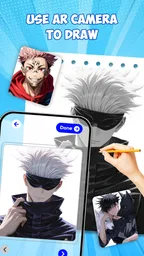
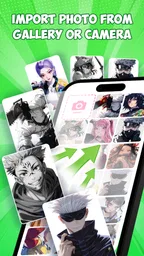
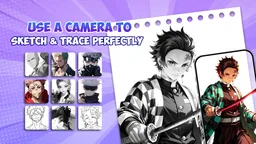
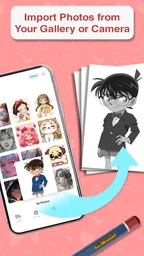
The AR element offers a different entry point from a conventional drawing tutorial. Rather than only looking at an example and then working it out on your own, you can use the sketching approach to follow a drawing in a more direct, visual way. I would treat that as a bridge into practice, not a shortcut to a finished illustration: the useful part is learning to observe how a drawing is put together, not merely tracing its outline.
That distinction matters in the first few sessions. If you copy each step carefully, you can become familiar with the rhythm of constructing a character. If you rush through the prompts just to produce a recognizable result, you may get a picture you like without understanding why the eyes, head shape, or pose work together. I recommend pausing between steps and asking yourself what changed in the drawing and what the new line contributes.
The app is free, carries an Everyone age rating, and has a 4.4 average from around 22,000 ratings. Those figures suggest it has found a broad audience, though popularity alone cannot tell you whether its teaching style suits you. I would use the first few sessions to judge the practical fit: does the guided format help you draw more often, or do you find yourself wanting more control over the lesson?
Make the first session useful
For a beginner, a good first exercise is to complete one guided drawing slowly rather than trying to make several in one sitting. Keep your attention on the sequence and the proportions, then try reproducing one small part from memory afterward. Even if that second attempt looks rough, it reveals whether the lesson helped you learn or only helped you follow.
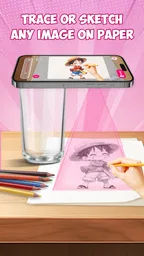
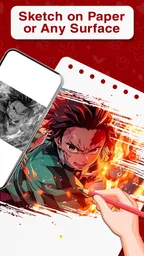
AR drawing also depends on a workable physical setup. Choose a steady surface and a place where the reference remains easy to see while you draw. If you are working in a cramped space or constantly shifting your page, the novelty of drawing over a guide can turn into distraction. A calm setup makes it easier to notice the relationship between the reference and your own lines.
One useful habit is to keep a separate practice page for imperfect attempts. That removes the pressure to make every guided result presentable and lets you compare how your own hand handles the same kinds of shapes over time. The app’s role is to get you drawing; the progress comes from paying attention to what your hand is doing between guided steps.
Does it stay useful after the novelty?
The more important test is what happens after the first week. A drawing app can feel exciting when every session introduces a new picture, but lasting value comes from whether it helps you repeat fundamentals without making practice feel like a chore. With this app, the strongest recurring use case is short, focused drawing practice: opening it when you have a little free time and following a guided exercise rather than waiting for a perfect block of creative time.
For example, imagine you have a quiet half hour after school or work and want to draw but cannot decide what to make. A step-by-step anime exercise gives that session a clear starting point. You can focus on completing the sketch, then spend a few extra minutes checking which lines felt awkward. That is more valuable than treating the result as a one-off souvenir, especially if you repeat the process and notice a specific improvement.
To keep the practice from becoming passive, change what you focus on each time. On one drawing, watch the overall shape; on another, concentrate on how the facial features sit in relation to one another. Later, try drawing a familiar part without following every prompt. This simple progression helps turn a guided reference into a learning tool rather than a tracing routine.
There is a trade-off here. Guided lessons can lower the barrier to entry, but they naturally lead you toward the app’s chosen examples and structure. If your goal is to develop a personal character design, invent unusual poses, or work through a specific anatomy problem, a blank canvas or a more flexible digital art program may be a better everyday home. I would use this app to get moving and then carry the lesson into independent sketching.
Its current version is 1.4.2, and it has passed 5 million installs. Those details give a sense of its reach, but the practical question for a returning user is whether the guided method still answers a need. If you often get stuck at the beginning of a drawing, it can remain useful as a prompt. If you already know how to plan and construct anime figures, you may find that a conventional drawing app gives you more room to work in your own way.
How it compares with familiar alternatives
Compared with watching a video lesson, an AR sketching workflow feels more immediate: you can focus on the drawing in front of you instead of repeatedly looking between a video and your page. The downside is that a video can explain choices in more depth, while following a visual guide may leave you to infer why a line belongs there. If understanding the reasoning is your priority, pair guided practice with deliberate observation or a more explanatory lesson elsewhere.
Compared with a general-purpose painting app, this one is more focused on getting a beginner into anime drawing. A flexible art app is usually a better fit when you want to choose brushes, build a complex composition, or manage a broader illustration workflow. Here, the appeal is the narrower purpose: a person who wants a guided start may prefer that focus to a toolset full of options they do not yet need.
It also differs from simply tracing a picture on paper. The AR approach can make the reference easier to follow, but relying on it too heavily risks making the guide do all the visual thinking. A good compromise is to use the reference for the first pass, then turn away from it for a small redraw or a variation. That gives you a way to check whether you are absorbing the construction rather than just reproducing it.
Keeping practice light rather than burdensome
The maintenance burden appears modest in the sense that this is a focused drawing activity, not a project that needs elaborate setup or ongoing organization. Still, the physical side of AR drawing asks for a little care: keep your page and device positioned comfortably, avoid rushing through a session, and stop if adjusting the setup becomes more effort than drawing. A simple, repeatable workspace is more likely to support a habit than a complicated arrangement you only use when conditions are perfect.
There is also a mental maintenance cost. Beginners can mistake a neat guided result for proof that they have mastered the subject, then feel disappointed when a freehand attempt looks different. I would separate “I completed the steps” from “I can draw this independently.” Both are worthwhile milestones, but they measure different things. Keeping that distinction clear helps prevent the app from becoming discouraging when your own sketches do not match the guide.
Another helpful routine is to save or keep a few attempts side by side, if your personal drawing setup allows it. The point is not to build a polished portfolio; it is to spot repeated patterns. Maybe your head shapes become more consistent, or you notice that you tend to crowd features toward one side. Those observations give your next session a purpose and make recurring practice feel less repetitive.
The app is suitable for all ages according to its Everyone rating, which makes the beginner-friendly premise approachable for younger users as well as adults trying a new hobby. I would still encourage a young learner to use it as an invitation to experiment, not as a test of whether every line is correct. Drawing should leave room for playful changes, even when a guide provides the structure.
Where repetition can start to wear thin
The main source of fatigue is the same thing that makes guided drawing attractive: a structured route. If every session feels like following rather than choosing, the process can become less satisfying once you have learned the basic rhythm. You may want to change a hairstyle, alter an expression, or invent a pose that the lesson does not lead you toward. That is a natural point to move from copying a guide to using it as a warm-up before drawing your own idea.
Another limitation is that an AR reference cannot make your hand steady or decide what you want a character to communicate. Those skills develop through practice and personal choices. If your primary aim is polished digital painting, advanced layer-based work, or a highly specific illustration workflow, I would choose a broader art tool instead of expecting a guided sketching app to cover everything.
It may also be a poor fit for someone who dislikes drawing from references. Some people enjoy learning by breaking down examples; others would rather start with loose shapes and discover a character as they go. If you belong to the second group, use the app only when you want a prompt, or skip it in favor of free sketching. The value here depends on whether guidance gets you past hesitation or makes you feel boxed in.
LOGICLABS LIMITED has kept the product focused on anime drawing rather than presenting it as a general creative suite. I see that focus as both a strength and a boundary. It gives beginners a clear reason to open the app, while experienced illustrators may outgrow the guided approach sooner. The audience is not simply “anyone who likes art”; it is more specifically someone who wants a structured way into anime-style sketching.
My long-term verdict
I would recommend Draw Anime - AR Drawing Sketch to a beginner who wants a friendly nudge from blank page to first sketch, especially if a visual guide makes practice feel less daunting. It is free to try, and its focused format gives you a straightforward way to build a small drawing habit without first learning a large, general-purpose art program.
I would not choose it as my only art tool if I wanted deep control over a finished digital illustration or lessons that explain every artistic decision in detail. Its best role is narrower and more practical: a starting point, a warm-up, or a way to return to drawing when inspiration is low. Use the guide, then challenge yourself to redraw a feature or make a small variation without leaning on it.
In the long run, whether it earns a regular place depends less on novelty than on how you use it. If you keep each session short, give yourself a specific focus, and occasionally step away from the guide, the app can support recurring practice rather than just a first-week experiment. If you only want unrestricted creative control, another drawing app will probably suit you better. For a beginner who needs structure and enjoys anime-inspired sketching, though, this is a sensible place to start.
What we like
- AR overlays help you trace anime outlines onto paper.
- Camera-based drawing feels more hands-on than drawing on a screen.
- Reference images can guide beginners through basic shapes.
- A phone stand can keep the tracing image steady while you work.
- The app offers a playful way to practice hand control.
What could be better
- Good lighting is needed for clear camera tracking.
- Hand movement can make the projected guide shift.
- Tracing may limit practice with drawing from imagination.
- Small phone screens can make references hard to position.
- Camera access is required for the AR drawing feature.





