
Draw Animation - Anim Creator review
 Analysis by Appsdrops
When I have a sketch that feels too still, I like the idea of giving it a little movement and turning it into a short visual story. Draw Animation - Anim Creator is built around that simple creative goal: transforming drawings into animated scenes. It sits in the art and design space, but its appeal is broader than making polished illustrations. The fun is in seeing a drawn idea begin to feel alive, one creative decision at a time.
From a rough idea to a moving drawing
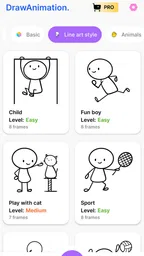
The starting point can be modest: a character, an object, or a scene that exists only as a sketch in your imagination. Rather than demanding that every idea arrive fully formed, the app’s central promise is to help turn simple sketches into captivating tales filled with life and motion. That makes it approachable for casual experimentation as well as for anyone who already enjoys drawing and wants to explore animation.
My favorite way to think about this kind of tool is as a bridge between two familiar activities. Drawing gives you the shapes and personality; animation suggests what those shapes might do. The result doesn’t have to be a grand production. A small gesture or a change that makes a character seem more expressive can be enough to give a sketch a new purpose.
The app’s name is direct about the experience: Draw Animation - Anim Creator is for people interested in making drawings move. That clear focus is useful when choosing a creative app. You’re not looking at a general-purpose art suite with animation as an afterthought; the idea of animated drawing is at the heart of the product’s identity.
Finding a comfortable first step
For a first session, I’d begin with an idea simple enough to understand at a glance. A clear subject gives you a better chance of concentrating on the transition from drawing to motion instead of getting stuck trying to design a complicated scene. Even a basic sketch can be a useful starting condition if it has a recognizable shape or an emotion you want to bring out.
That simplicity also makes the app’s central appeal easy to grasp. You can approach it with curiosity rather than needing to arrive as an experienced animator. The aim is not just to make a picture, but to explore how a drawing might tell a little story once it moves. For a beginner, that is an inviting creative challenge; for a regular artist, it offers a different way to revisit familiar sketches.
Moving through the creative process
A satisfying animation workflow usually depends on making one decision at a time. First, settle on what the sketch is meant to show. Next, consider what movement would add to it. Then keep the idea focused enough that the motion supports the drawing instead of distracting from it. This is the kind of practical mindset that suits Draw Animation: start with a simple visual thought, then build toward a more lively outcome.
There’s an important difference between adding movement and adding complexity. A drawing may already communicate its subject clearly, so the animation does not need to overwhelm it. I find that a restrained idea often feels more charming than a crowded one. Thinking about the purpose of the movement—whether it should add energy, personality, or a sense of action—helps keep the creative process grounded.
As you work, it helps to treat each choice as part of a small story. What is the viewer supposed to notice first? What changes as the scene unfolds? Even without a long narrative, those questions can make an animated drawing feel intentional. The app’s premise encourages this shift from a static sketch to an idea with life and motion, which is where the creative payoff lies.
Keeping the handoffs smooth
The key handoff is from drawing to animation. A sketch gives you a visual foundation, but the next stage asks you to imagine time: what happens first, what changes, and what should stay recognizable? That shift can be exciting, though it also requires a little patience. If the movement doesn’t seem to fit the drawing, it may be worth simplifying the idea and focusing on the most expressive part.
There’s also a handoff between your own intention and the finished result. You may begin with a clear mental picture, then discover that the animated version feels different. I see that as part of the creative process rather than a failure. An animation can reveal a new character or mood in a sketch, and that unexpected quality may be more interesting than the original plan.
Sharing or carrying a creative project from one stage to another is often where an app’s workflow matters most. Here, the reliable expectation to keep in mind is the core activity itself: making animated drawings. I wouldn’t approach it assuming that every possible production or publishing need is part of the experience. Instead, judge it by whether it helps you develop the sketch into something more lively and expressive.
What the finished result can feel like
The most rewarding outcome is a drawing that feels as if it has gained a little personality. It might suggest an action, create a playful mood, or simply hold attention longer than the original still image. That change doesn’t need to be technically elaborate to feel satisfying. Sometimes the pleasure is simply seeing an idea move in a way that matches the way you pictured it.
That makes the app a good fit for creative breaks. You can begin with a quick concept, experiment with giving it motion, and see whether the result captures the feeling you wanted. It is also a useful prompt for people who often draw but don’t usually think of their drawings as stories. Once movement enters the picture, a character or scene can suggest a beginning, a change, and a small sense of resolution.
The app is free to download, while optional in-app purchases range from about $1.49 to $22.99 per item. That gives newcomers a way to try the creative premise before deciding whether they want to spend anything. It’s a practical arrangement, though I’d still keep in mind that optional purchases can affect how much of an app’s experience feels available without paying.
Where the flow can slow down
Animation asks for more patience than making a single static image. If you arrive with a complicated scene and expect it to come together immediately, the creative process may feel less smooth. The best way around that friction is to reduce the scope: focus on one clear subject and one motion idea, then build from there. A smaller result that feels coherent is usually more satisfying than an ambitious concept that never quite comes together.
Another possible sticking point is the gap between what you imagine and what you can make in a particular session. That’s common in creative apps, especially when you’re learning how to think in motion rather than in still images. I’d recommend treating early attempts as experiments. The point is to discover what makes a sketch feel more alive, not to demand a perfect animated story on the first try.
It’s also worth setting expectations around the app’s focus. Draw Animation is centered on turning drawings into animation, so people seeking a broad professional art-production environment may want a tool designed for that wider job. For casual creators and curious beginners, however, a focused concept can be an advantage: there’s a clear creative direction, and you can concentrate on the transformation from sketch to motion.
A good fit for curious creators
Draw Animation - Anim Creator has a substantial audience, with over ten million installs. It holds an average rating of 4.5 from around 81,000 ratings, alongside roughly 1,300 written reviews. Those figures suggest that many people have explored the app, but the right fit still depends on what you want to make. If the idea of animating your own drawings sounds enjoyable, the app’s purpose is easy to understand.
It is rated for Everyone and requires Android 6.0 or later. The app was released on February 23, 2024, and its current version is 10.8. Those details help set a basic expectation for compatibility and context without changing the main question: does a drawing-focused animation app match the way you like to create?
For me, its strongest appeal is the small creative leap it encourages. A sketch can feel like a finished thought, but adding motion invites you to ask what happens next. That makes the app suitable for anyone who wants to experiment with animation without beginning from a blank screen or a fully developed story. It is less about chasing complexity and more about giving an existing idea a little extra life.
My overall impression is that this is a focused, approachable option for exploring animated drawings. Start with a simple sketch, decide what movement would make it more expressive, and let the result guide your next idea. The process may take some trial and error, but that is part of the fun. If you’re looking for a creative app that connects drawing with motion, Draw Animation - Anim Creator is worth considering as a playful place to begin.
What we like
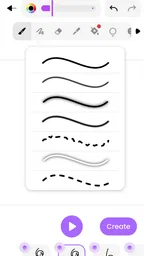
- Simple drawing tools make it approachable for beginners.
- Frame-by-frame editing gives users control over motion.
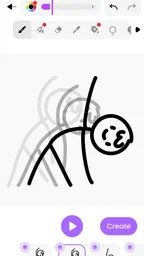
- Onion-skin guides help align drawings across frames.
- Useful for creating short animated clips on a phone.
- A lightweight concept suits quick creative sessions.
What could be better
- Detailed animation work can feel slow on a small screen.
- Drawing precision depends heavily on finger control.
- Complex projects may require many manually created frames.
- Export options may be limited compared with desktop tools.
- The free version may include ads or locked features.





