
Domino's Pizza USA review
 Analysis by Appsdrops
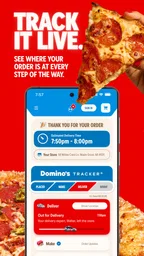
Choosing a pizza-ordering app is mostly about finding the option that fits how you like to order. I look for a clear way to choose familiar favorites, place an order without unnecessary fuss, and keep track of what happens next. Domino’s Pizza is built around that straightforward experience: order from Domino’s, then follow the progress of your food with Domino’s Tracker®.
What matters when choosing a pizza app
Before settling on an app, I’d think about where I plan to order from, whether I already have a go-to menu, and how much I value seeing an order’s progress. A dedicated restaurant app can be a natural fit when I know what I want from that chain. If I’m still deciding what to eat, or comparing restaurants in one place, a broader ordering service may suit me better.
That distinction is the key to understanding this app. It is not trying to be a universal food directory; its focus is Domino’s. The store description sums up the central idea neatly: order Domino’s favorites and follow the order with the Tracker. For someone who already knows they want Domino’s, that focus can make the app feel more direct than switching between several restaurant menus.
I also consider how much confidence I want after tapping the order button. A progress tracker is useful because it gives the ordering process a visible point of reference. It does not change the food itself, of course, but it can make the wait feel more organized than placing an order and having no in-app progress to check. That small convenience is a meaningful part of the experience here.
A focused way to order familiar favorites
The app’s strongest appeal is its clear purpose. I can use it when Domino’s is already the plan, rather than treating it as a place to browse every possible meal. That makes it easier to decide whether it belongs on my phone: if I regularly choose this chain, a dedicated ordering app is practical; if my restaurant choices change every time, a wider service may be a better starting point.
Its rating and broad reach suggest that many people have found a reason to keep it in their routine. Domino’s Pizza has a 4.6 average from around 2.4 million ratings, and it has passed 10 million installs. Those figures don’t tell me what any individual order will be like, but they do show that this is an established app rather than an obscure download.
Where this app wins
For me, the clearest advantage is having ordering and progress tracking together in one restaurant-specific experience. The Tracker® gives the app an identifiable feature beyond simply presenting Domino’s as a place to order from. When I want the familiar option and prefer to check how the order is moving along, that combination is exactly the sort of convenience I’m looking for.
A dedicated app can also make sense for repeat customers. Once I know which restaurant I want, I don’t need to start with a general search across unrelated places. The decision is already made, and the app is centered on carrying it through. That focus is especially useful when convenience matters more than discovering something new.
The app is free to download, which lowers the barrier to trying it. That does not mean the food itself is free; it simply means there is no stated download price for the app. For someone weighing whether to install a restaurant app, that makes experimentation easy: I can see whether the ordering approach suits my habits without paying just to get the app.
It is also a long-running product. Domino’s Pizza LLC released the app on February 21, 2012, and its current version is 13.11.3. The app is rated Everyone and requires Android 9 or later. Those details help set practical expectations about availability and compatibility, while the large number of ratings and reviews gives prospective users plenty of evidence that it has an established audience.
When another kind of service may fit better
A restaurant’s own app is not automatically the best choice for every meal. If I want to compare multiple restaurants before choosing, a general food-ordering service may be more convenient because its purpose is broader. If I’m deciding between different cuisines or want to explore options beyond Domino’s, opening a single-brand app may not match the way I’m approaching dinner.
Likewise, someone who rarely orders from Domino’s may have little reason to add a dedicated app to their phone. A general service, a restaurant’s ordinary ordering channel, or simply choosing another meal can be a better fit depending on the situation. That is not a weakness specific to this app; it is the trade-off that comes with a focused tool. Its usefulness rises when the restaurant is already part of the plan.
I would also separate the app experience from the restaurant experience. The app can help me place an order and follow its progress, but the overall outcome still depends on the order and the service behind it. A smooth digital journey is valuable, yet it cannot guarantee that every meal will suit every customer. I see the app as a convenience layer, not a promise about every part of the purchase.
The cost of switching
Trying the app is a low-commitment choice because the download is free. The bigger question is whether it earns a place in my regular routine. If I already order Domino’s often, using its own app may be a simple way to keep that process in one place and check the Tracker®. If I only order occasionally, I may prefer not to add another app unless the focused experience is genuinely useful to me.
Switching from a broader ordering service also depends on what I value most. If comparing restaurants is important, moving to a single-brand app narrows the focus by design. If I usually make up my mind before ordering, that narrower scope may feel efficient rather than limiting. I’d base the choice on my actual habits, not on the idea that one format is always better.
There is little reason to make the decision more complicated than that. I’d ask myself one simple question: when I’m ready to order, do I want Domino’s specifically, or do I want help choosing among a range of places? The answer points naturally toward either a dedicated restaurant app or a broader alternative.
Everyday use and expectations
For a regular customer, the appeal is easy to understand. A familiar restaurant, a direct ordering focus, and a way to follow progress form a practical package. I would expect the app to be most useful when I already know what I want and value seeing the order move along, rather than when I’m in the mood to browse widely or compare every possible option.
The Tracker® is worth calling out because it gives the experience a clear center. Many people don’t just want to submit an order; they also want a sense of what is happening afterward. Following progress can reduce the uncertainty of waiting and makes the app feel more connected to the full ordering journey. That is the main reason I’d choose this app over a bare-bones route for ordering from Domino’s.
At the same time, I wouldn’t install it expecting it to solve every food-ordering need. Its identity is tied to one brand, and that is precisely what makes it straightforward. People who value breadth should choose a service designed for breadth; people who value a direct route to Domino’s may prefer this dedicated option.
My recommendation
I recommend Domino’s Pizza to anyone who already enjoys ordering from Domino’s and wants a dedicated app for placing an order and following its progress. The focused approach is easy to understand, the Tracker® gives the experience a practical point of difference, and the app is free to download. Its established audience also makes it a familiar option for people looking for the official Domino’s ordering experience on their phone.
If you often compare restaurants or decide what to eat only after browsing, I’d lean toward a broader ordering alternative instead. That kind of service may fit your decision process better, while this app is strongest when your choice is already made. Neither approach is universally right; it comes down to whether you want variety or a direct path to one restaurant.
Overall, I see this as a sensible, brand-focused tool rather than an all-purpose food app. It does its best work for customers who know they want Domino’s, appreciate a dedicated ordering experience, and like being able to follow their order with the Tracker®. If that describes the way you order, it is an easy app to consider. If not, a multi-restaurant option will probably fit your routine more naturally.
What we like
- Order pizza and sides for delivery or carryout.
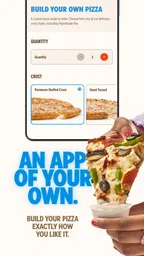
- Customize toppings and crust before placing an order.
- Track order progress with the Domino's Tracker.
- Save favorite orders for quicker repeat purchases.
- Find nearby stores and check their hours.
What could be better
- Some features may vary by location.
- Delivery fees and minimums depend on the store.
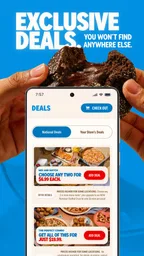
- Promotional offers may have location-specific terms.
- Account sign-in may be needed for some features.
- App availability and performance can vary by device.




