

Too Good To Go: Save Good Food review
 Analysis by Appsdrops
I think Too Good To Go makes the most sense when food shopping is a household activity rather than a strict list of exact ingredients. The app is built around finding food that a nearby shop has left unsold, so what you bring home is an opportunity, not a guaranteed match for tonight’s recipe. That can be a welcome change of pace: I might plan a meal around whatever turns up, or share a surprise bag with someone else instead of making a separate trip for a carefully chosen item.
That flexibility is also the main condition for enjoying it. If I need a particular brand, dietary product, or ingredient at a precise time, ordinary grocery shopping is the safer choice. But when I can adapt, food rescue becomes a practical way to discover local shops and make less food go to waste. As a free Food & Drink app from Too Good To Go Aps, it is aimed at people who want that combination of savings and a less wasteful routine.
When a surprise bag suits a shared household
The shared-use scenario is easy to picture: I am heading home, notice an appealing local offer, and check with the people I live with before reserving it. If everyone is open to a flexible dinner or snack, the bag can become a small shared plan. It may work especially well for a household that already likes trying baked goods, prepared food, or other shop finds without needing every item to be decided in advance.
The important distinction is between buying food and choosing a specific meal. With a conventional grocery app, I usually select exactly what goes into the basket. Here, the shop’s unsold food determines much of the outcome. That makes the experience less predictable, but it also gives the household a reason to be inventive: use the rescued items first, build a simple meal around them, or divide them among people who will actually eat them.
I would not treat a surprise bag as a dependable replacement for the weekly shop. It is better as an occasional supplement, especially when the household has room to improvise. A family that needs carefully controlled portions or specific ingredients may find the uncertainty inconvenient. A group of housemates with different schedules may also struggle if nobody is sure who will collect the food or when it will be shared.
Make the pickup part of the plan
One useful habit is to check the offer while already thinking about the route home, rather than reserving first and working out the logistics later. Collection is a real commitment: the person who claims the bag should be able to go to the shop at the stated time shown in the app. For a shared household, that means matching the opportunity to someone’s actual schedule, not assuming that another person can collect it at the last minute.
I would also agree in advance on what happens after pickup. If one person brings home a mixed selection and leaves it on the counter without explanation, the food may be overlooked or duplicated in the meal plan. A quick message saying what was collected and where it is being stored is simple, but it makes the app much more useful in a shared kitchen. This is not a special household tool inside the app; it is a practical routine that helps the surprise bag fit real life.
Another trade-off is distance. A tempting offer is not necessarily worthwhile if reaching the shop takes a separate journey that the household would not otherwise make. I find the strongest use case is a nearby pickup that can be combined with a commute, walk, or errand. That keeps the convenience and the food-saving purpose aligned instead of turning a bargain into an extra task.
Account boundaries and everyday coordination
For shared devices, I would keep the distinction between a household’s food plan and an individual account clear. The person using the app should understand which account is active and who is responsible for any reservation and collection. If several people share a phone, mixing up who made a commitment can create avoidable confusion, particularly when the pickup window is short or a person’s plans change.
I would not assume that the app provides household profiles, family controls, or a shared shopping list. Instead, the simplest coordination is to have one person handle a particular reservation and tell the rest of the household what to expect. That also avoids two people independently trying to solve the same dinner problem. For a household where everyone wants to browse and make separate decisions, individual use may be easier than treating one device as a communal account.
There is a useful division of responsibility here: one person checks whether an offer fits the route and timing, while the household decides whether it can use an unpredictable selection. The second question matters just as much as the first. A low-cost bag is not good value if nobody likes the likely food, cannot eat it, or has time to collect it. I would rather pass on an appealing listing than reserve it simply because it looks like a bargain.
Age, trust, and sensible supervision
The app has an Everyone content rating, which makes its general audience broad, but that does not mean every young person should independently arrange a pickup. In my view, the relevant issue is practical responsibility: someone needs to understand the collection details, travel safely, and follow through on the reservation. A parent or caregiver can help a younger household member assess whether an offer is suitable and who will collect it.
Trust also comes from keeping expectations realistic. The appeal is surplus food from local stores, not a promise that every bag will suit every person. If someone in the household has dietary restrictions, strong preferences, or a need to know the exact contents before committing, they should be cautious about relying on a surprise selection. I would check the shop’s offer details in the app and only proceed if the uncertainty is acceptable to everyone who is expected to eat the food.
For a shared phone, basic account care matters as much as food planning. Whoever is signed in should be the person who understands the reservation and can manage the collection. I would avoid leaving a device open for casual browsing if another person might accidentally commit to an offer. That is ordinary good practice for any app involving a real-world purchase or collection, rather than a claim about special family settings.
What it feels like compared with the usual alternatives
Compared with supermarket delivery or a standard grocery list, Too Good To Go gives up precision in exchange for a chance to find food that might otherwise go unsold. Compared with simply buying a discounted item at a shop, it can make browsing local surplus more deliberate. The difference is not that it removes the need to plan; it changes the kind of planning. Instead of choosing every item, I decide whether I can make use of whatever the offer provides.
That makes it a poor fit for a tightly timed dinner with guests, a recipe requiring exact ingredients, or a household that cannot accommodate unexpected food. It is more appealing when the fridge has some flexibility and the people eating are willing to adapt. I would also choose regular shopping if the trip to collect an offer is inconvenient or if the household needs a consistent supply of particular foods.
The app is well established: it has an average rating of 4.9 from around two million ratings, and it has been installed over 50 million times. Those figures suggest that many people find the basic idea worthwhile, but they do not remove the personal trade-off. The experience still depends on what local shops offer and whether a household can make a surprise selection work for its schedule and tastes.
Setup and the small decisions that improve the experience
After installing it, I would begin by thinking about which nearby areas are genuinely convenient, not just which listings look tempting. The point is to find offers that can fit existing routines. If the app shows a shop I pass regularly, that is more useful to me than an appealing option requiring a special detour. I would also decide who in the household is most likely to collect, so an offer is not reserved without a realistic plan.
Before committing, I would read the listing carefully and check its collection information. Then I would ask two questions: can someone get there at the right time, and can the household use an uncertain assortment? These checks take little effort and prevent the app’s central advantage—flexibility—from becoming its central frustration. If the answer to either question is no, waiting for another opportunity is sensible.
A further tip is to treat the first pickup as a learning experience rather than a promise to make the app part of every shopping trip. Notice whether the amount and style of food suit the household, how easy the route is, and whether the collection time works alongside work or school. That helps you decide which kinds of offers are worth watching for without assuming that every surprise bag will be equally useful.
Too Good To Go: Save Good Food is free, has an Everyone age rating, and is listed at version 26.11.1 for devices running operating system version 8.0 or later. It was released on January 14, 2016, and its 15,000 reviews give readers another signal of the attention it has received. I see those details as context; the more important question is still whether its flexible approach fits the way your household eats.
A household verdict built on flexibility
For a household that enjoys trying local food and can coordinate a pickup, I would recommend giving it a considered try. It can turn an ordinary trip home into a useful way to bring in food at a lower cost while supporting the idea of rescuing surplus. The best results come when someone checks the timing, tells the others what has been collected, and stays open to adjusting the meal around the contents.
I would skip it as a main food-planning tool if your household depends on exact items, has little room for surprises, or cannot reliably make collection times. It is not a substitute for a carefully planned grocery order, and a shared device does not automatically make a shared account or responsibility simple. But used as an occasional, coordinated extra, the app offers a genuinely different kind of local food find: less control over the basket, more room for improvisation, and a practical reason to make use of food that might otherwise be left unsold.
What we like
- Discounted surprise bags make surplus food more affordable.
- The app helps reduce food waste by rescuing unsold food.
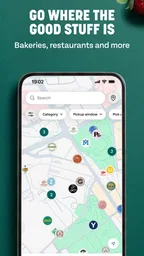
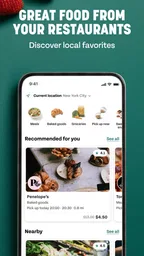
- Nearby listings make it easy to find participating businesses.
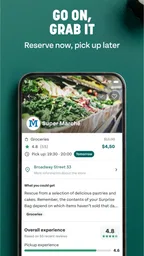
- Pickup times are shown before you place an order.
- New offers can make each food rescue feel like a discovery.
What could be better
- Bag contents are usually unknown until pickup.
- Pickup windows may be short or inconvenient.
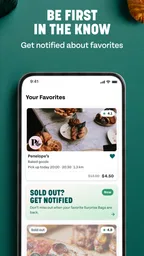
- Popular offers can sell out quickly.
- Food preferences and dietary needs may not be accommodated.
- Availability depends heavily on your location.





