Dunkin’ review
 Analysis by Appsdrops
I can see the appeal of Dunkin’ quickly: it turns a coffee stop into something I can plan around, rather than a queue I have to join before I know what I want. The first few visits are where the convenience is most obvious. I can browse the menu, make choices before arriving, and use the app’s rewards as part of an ordinary routine. That feels especially useful on a rushed morning, when deciding at the counter is one small task too many.
Still, a coffee-ordering app earns a lasting place on my phone only if it stays useful after the novelty of tapping through a menu wears off. Dunkin’ is a focused Food & Drink app from Dunkin’ Brands, Inc., and its central appeal is practical: order in advance and build rewards through repeat use. I’d recommend it most readily to people who already visit Dunkin’ with some regularity. If you rarely go, the app may be easy to try but harder to justify keeping in your daily routine.
What the first visits get right
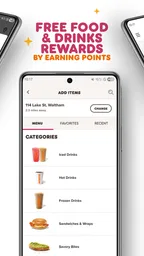
My first impression is that the app is built around a specific moment: choosing what to have before I reach the counter. That is a better fit for a habitual coffee run than a broad restaurant-discovery app. Instead of browsing places across town, I’m making a decision about a Dunkin’ visit I already expect to take. The difference matters. A focused tool can be genuinely quicker when I know where I’m going, even if it offers less variety than a general food-ordering service.
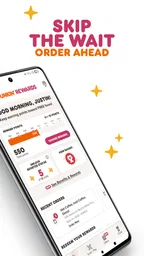
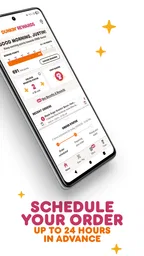
The order-ahead approach is most helpful when I have a short break or want to reduce the uncertainty of a busy stop. I can settle on a drink and food choice while I’m still at home or on the way, rather than trying to read a menu with people behind me. It does not eliminate every delay—getting to the store and collecting the order are still part of the trip—but it shifts some of the decision-making out of the queue. That is a small improvement I can appreciate repeatedly.
A realistic use case is a weekday commute with a familiar route. I can decide whether I want my usual coffee and something to eat before I leave, place the order as part of the trip, and avoid turning the stop into a long menu consultation. For an occasional visitor, the same process may feel like extra setup compared with simply ordering in person. The advantage depends less on the app itself than on whether a Dunkin’ visit is already part of the day.
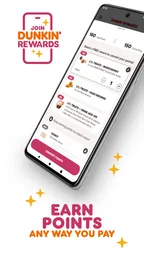
Rewards add a second reason to start using it. They make repeat visits feel connected rather than isolated, which can be satisfying if I’m already buying from Dunkin’. I wouldn’t treat rewards as a reason to spend more than I otherwise would, though. The sensible test is whether the app makes an existing habit smoother and gives something back along the way—not whether it persuades me to create a habit I didn’t want.
Small choices that make a routine easier
One useful habit is to settle on an order before the busiest part of the morning. If I’m still deciding between a drink and food while trying to leave home, order-ahead can simply move the indecision onto a screen. I get more value by using a familiar order as a starting point and changing only what I actually want that day. That keeps the convenience real rather than turning the app into another place to browse.
I’d also think about the journey, not just the menu. An advance order works best when the location fits a route I already take and I have a reasonable opportunity to pick it up. If my plans are uncertain, or I’m not sure which stop I’ll reach, ordering at the counter may be the more flexible choice. The app can prepare the purchase; it cannot make an inconvenient detour worthwhile.
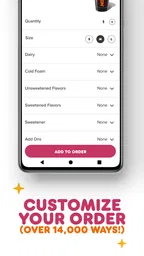
For someone trying the app for the first time, I’d start with a simple order rather than making a complicated customisation the test of whether the whole experience works. That is not a claim that the app handles every possible request in a particular way; it is a practical way to judge the core benefit. If choosing ahead feels straightforward for the items I usually buy, the routine may suit me. If it feels like more effort than ordering face to face, there is little reason to force it.
Whether the value holds up month after month
The longer-term question is whether convenience and rewards continue to matter once I’ve used the app several times. For a frequent Dunkin’ customer, they plausibly do: ordering ahead can become a familiar step, and rewards remain relevant because visits happen naturally. For someone who goes only now and then, the recurring value is thinner. The app’s case is tied to repeat use, so the more occasional my visits become, the less likely it is to feel essential.
That distinction is why I wouldn’t judge the app simply by how appealing it looks on day one. A good first experience can come from the novelty of exploring the menu or trying a new way to place an order. Lasting value comes from whether I still choose it on an ordinary Tuesday, when there is nothing new to discover. Dunkin’ is strongest when it removes a little friction from a purchase I would make anyway.
Compared with ordering in person, the app offers more time to consider the order before reaching the counter, while the counter gives me the simplest route when I want to ask a question or make a decision on the spot. Compared with a general delivery or restaurant app, Dunkin’ is more directly suited to a Dunkin’ routine, but it is not a substitute for a service that helps me choose among many restaurants. I’d keep both approaches conceptually separate: one is for a regular stop; the other is for broader discovery or delivery needs.
The rewards element can make consistency feel worthwhile, but I’d keep my spending habits in view. A reward is only a benefit if it accompanies purchases I already intended to make. If I begin adding extra visits just to chase progress, the app has stopped serving my routine and my routine has started serving the app. I see that as the main judgement call for any customer deciding whether the rewards make a meaningful difference.
Its reach suggests that many people find the basic proposition useful: the app has more than 10 million installs, and its average rating is 4.8 from around 662,000 ratings. Those figures are reassuring context, not a guarantee that it will fit every person’s commute or ordering style. My own recommendation would still depend on frequency. If Dunkin’ is already a regular stop, the app has a clear job; if not, popularity alone is not a reason to keep it.
The upkeep is light, but the habit is the real commitment
In maintenance terms, this is a relatively focused app: its value comes from using it when a Dunkin’ purchase is coming up, rather than from demanding constant attention. The practical burden is less about maintaining a complicated system and more about remembering to open it at the right time. If I place an order only after I’ve arrived and am already ready to speak to someone, the app’s main advantage has disappeared.
That makes it worth linking the app to a real cue in the day. I might check it when I’m planning a commute or taking a break, not repeatedly throughout the morning. The point is not to make a new phone habit for its own sake; it is to use the tool at the moment it can replace a bit of waiting or indecision. If I stop visiting Dunkin’, I have no strong reason to keep checking the app just because I once used it often.
The app is free and rated for Everyone, which lowers the barrier to trying it. Its current version is 2026.20.8, and it requires iOS 11 or later. That makes compatibility a straightforward consideration for people using older devices: I’d check the operating-system requirement before relying on it for a planned routine. The app’s initial release was April 13, 2016, but what matters to me as a user is whether the current experience fits my needs today.
There is also a practical trade-off in planning ahead. If I know what I want and where I’m going, preparing the order can make the stop feel more controlled. If I’m meeting someone, changing plans, or deciding based on what looks good when I arrive, pre-ordering is less compelling. I would not use it as a default for every visit; I’d use it when the visit is predictable enough for advance ordering to help.
Where the routine can become tiring
The most likely source of fatigue is repetition. A focused coffee app has a narrower purpose than a broader food platform, and that focus is useful only while I want what Dunkin’ offers. If I’m tired of the same stops, looking for a different kind of meal, or choosing between several nearby businesses, this app cannot solve that wider problem. In those moments, a general restaurant app or simply walking in somewhere else is the better option.
Another limitation is that order-ahead should not be mistaken for guaranteed time savings. It can move the order decision earlier, but the overall trip still depends on the route and the pickup experience. I’d avoid relying on it when I have no margin for a delay or when my plans might change at the last minute. The useful expectation is “less time deciding at the counter,” not “no waiting and no uncertainty.”
Rewards can also lose their pull if I don’t visit often enough to notice them. That is not a flaw for a frequent customer, but it does mean a casual visitor may find the reward side easy to ignore. I would not download the app solely for a distant possibility of earning something. The better reason is that I already want a convenient way to handle recurring Dunkin’ orders, with rewards as an extra rather than the whole point.
For a customer who prefers human interaction, has a question about an order, or wants to choose only after seeing the options in person, the counter may remain the more comfortable route. Likewise, someone who rarely buys coffee away from home may gain little from having a dedicated ordering app. Those are not failures of the product; they are signs that its narrow purpose does not match every routine.
My long-term verdict
Dunkin’ earns lasting space when it supports an existing habit instead of trying to create one. If I pass a Dunkin’ regularly, already know what I tend to order, and appreciate preparing a purchase before reaching the counter, I can see myself continuing to use it beyond the first week. The combination of advance ordering and rewards gives repeat customers a practical reason to return to the app, without making it necessary for every visit.
I’d skip it if my Dunkin’ visits are rare, my plans change constantly, or I prefer choosing in person. I’d also look elsewhere when I need a broad choice of restaurants rather than a smoother Dunkin’ stop. The app is intentionally specific, and that specificity is both its strength and its limit. It is not a general food guide, and it should not be expected to replace a conversation at the counter when personal assistance matters.
Overall, I think this is a useful routine app rather than an app that needs daily attention. Its 89,000 reviews and strong average rating suggest a substantial user base, but the best reason to keep it is much more personal: it should save me a little decision-making on visits I was already going to make. If that describes my week, I’d give it a try. If not, I’d order in person and leave the app off my home screen.
What we like
- The menu includes coffee drinks and a wide range of doughnuts.
- Mobile ordering can help reduce time spent waiting in line.
- The app offers rewards for eligible purchases.
- Saved payment options make checkout more convenient.
- Store locations and opening hours are easy to check.
What could be better
- Menu availability can vary by location.
- Rewards may require meeting specific purchase conditions.
- Some offers have short expiration periods.
- Mobile ordering depends on participating locations.
- The app provides limited value if you rarely visit Dunkin’.





