
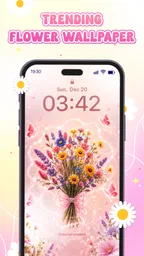
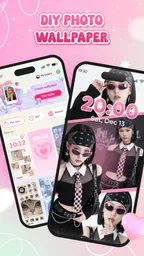
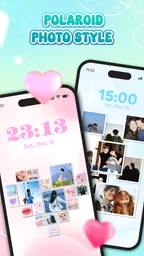
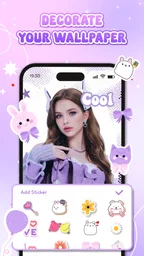

DIY Wallpaper Maker Collage review
 Analysis by Appsdrops
Changing a phone’s look can be as simple as picking a picture, but getting a wallpaper to feel personal takes a little more thought. DIY Wallpaper Maker Collage is built around that idea: it brings wallpaper creation and photo collage making together so you can shape an aesthetic screen from your own images. I like the appeal of that hands-on approach. Instead of settling for a background that almost fits, you can experiment with a composition that feels more like yours.
Making a wallpaper that feels personal
DIY Wallpaper Maker Collage is a free personalization app from LeafMotion Software. Its focus is straightforward: make a wallpaper yourself and use photo collages to give a screen a more customized look. That makes it especially appealing if you enjoy arranging pictures, building visual themes, or refreshing your device without turning the process into a major design project.
The app has a 4.1 average from around 11,000 ratings, and it has passed five million installs. Those figures suggest that DIY wallpaper creation has a broad audience, but the value is really in whether the workflow suits your habits. I would approach it as a creative tool for trying ideas, not as a substitute for a full-featured graphic design suite.
A practical baseline workflow
I’d start with a clear idea of what I want the screen to feel like. Maybe I’m after a calm collection of travel photos, a bright mix of favorite snapshots, or a simple collage built around one color. Choosing that direction first makes it easier to decide which images belong together and helps avoid adding pictures just because they’re available.
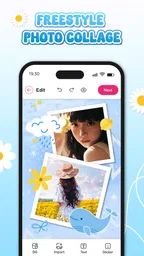
From there, the core process is the enjoyable part: select photos, arrange them into a collage, and shape the result into a wallpaper. I find that a small number of images often makes for a stronger starting point than trying to include everything at once. A main photo can anchor the design while the other pictures add context and personality.
It’s also worth considering how the finished image will work as a phone background. A collage may look balanced in an editing view but feel busy once it sits behind icons and other screen elements. I’d leave some visual breathing room and check that the main subject remains easy to notice. The goal isn’t simply to fit in more photos; it’s to make a background that still feels pleasant to look at every day.
The app’s DIY focus suits people who enjoy making small, expressive changes to their devices. If you already keep favorite photos in mind for a wallpaper, combining them into a collage gives you another way to use them. And if you’re not sure what style you want, treating the first attempt as a draft takes the pressure off. A few thoughtful changes can be more satisfying than aiming for a perfect design immediately.
Settings and choices worth checking
When I make a wallpaper, I pay attention to the decisions that affect the final image rather than rushing through the composition. Image selection is the first one. Photos with similar colors or a shared subject tend to feel connected, while a mix of unrelated pictures can make a collage seem scattered. That contrast can work as a deliberate style, but it helps to know whether I’m aiming for harmony or visual variety.
Placement matters just as much. I’d check that faces, landmarks, and other important details aren’t crowded by neighboring pictures. If one image is meant to be the focal point, it should read clearly at a glance. Supporting photos can add texture around it, but they shouldn’t compete so strongly that the overall design loses direction.
Before settling on a wallpaper, I’d also look at it as a screen background rather than only as an image. A strong collage can be attractive on its own yet too busy for regular use. Imagining icons and other on-screen elements over the design is a useful reality check. I tend to favor a layout that keeps the main visual idea intact without demanding attention every time I unlock the phone.
There’s no need to chase a complicated look just because a maker gives you room to experiment. A restrained composition can feel more polished, especially when the photos already carry personal meaning. On the other hand, a colorful, crowded collage can be exactly right if that’s the aesthetic you want. The useful habit is to judge the result by how it feels in daily use, not by how much effort went into making it.
Faster patterns for repeat wallpaper making
Once you’ve made a few wallpapers, a repeatable routine can save time without relying on any special hidden tools. I’d keep a mental shortlist of image combinations that work well: perhaps one group for a seasonal mood, another for family pictures, and a third for favorite places. Starting with a theme gives each session a purpose and makes photo selection less of a rummage.
It also helps to decide on the focal image before choosing the supporting ones. That simple order gives the collage a center of gravity. After that, I can select pictures that complement the main image rather than trying to force a collection of unrelated photos into one design. If the result still feels crowded, removing an image is often a better fix than adding more decoration or making the arrangement busier.
I’d treat the first version as a test and make one change at a time. Adjusting several parts of a composition all at once makes it harder to tell which choice improved the result. Instead, I might reconsider a photo, then look again at the balance, then decide whether the overall mix feels right. This is a simple creative habit, but it makes experimentation more purposeful.
Another useful pattern is to make wallpapers for specific moods rather than expecting one collage to suit every moment. A quiet, muted arrangement can feel different from a lively collection of bright snapshots. Thinking in terms of mood helps narrow down both the photos and the visual direction. It also makes the app easier to return to: each new wallpaper becomes a small project with a clear starting point.
These habits are especially handy if you enjoy changing your screen regularly. DIY Wallpaper Maker Collage is about making something yourself, so the satisfaction comes from the choices you bring to it. A little planning helps the creative part feel quick rather than repetitive, and it encourages designs that reflect what you actually want to see on your device.
Where the creative limits become useful
A wallpaper maker is only as effective as the ideas and images you bring to it. If the source photos have very different lighting, colors, or visual styles, the finished collage may feel less cohesive. That isn’t necessarily a flaw in the app; it’s a design challenge that can be addressed by selecting a more compatible set of pictures or embracing the contrast intentionally.
Collages also have a natural balance to manage. Each extra image adds another point of interest, but it can make the whole design harder to read. I’d resist the urge to include every favorite photo in one wallpaper. Saving a few pictures for another composition can give each finished design a clearer identity and keep the background from feeling overloaded.
It’s helpful to keep expectations grounded, too. The app is presented as a DIY wallpaper maker and photo collage tool, so I’d judge it by how well it supports that creative purpose. People looking for a broad professional design environment may have different needs. For someone who mainly wants to build an aesthetic screen from personal photos, a focused app can be a more approachable place to begin.
The best results may take a little patience. A first arrangement might not look quite right on the screen, and that’s normal. I’d rather make a modest revision than abandon the idea or pile on extra elements. Over time, noticing what makes a wallpaper readable and cohesive becomes part of the fun—and that experience carries into the next design.
Who is likely to enjoy it?
This app makes the most sense for people who like personalization and want their wallpaper to reflect their own photos. It may also suit anyone who enjoys simple creative projects and prefers experimenting with a collage over choosing a ready-made background. If you frequently change your device’s appearance, making a design around a new theme can give that routine a more personal touch.
DIY Wallpaper Maker Collage is free, carries an Everyone age rating, and requires Android 8.0 or later. It was released on February 13, 2026, and its current version is 1.2.3. Those details make it easy to see the intended audience: a general-purpose creative app for everyday wallpaper customization rather than a niche tool aimed only at experienced designers.
What I appreciate most about the concept is that it makes personal photos part of the screen’s design. A wallpaper can be more than a background chosen in a hurry; it can bring together memories, colors, and places in a way that feels distinctly yours. The strongest use case is also the simplest: start with a handful of meaningful images, build a composition around one clear idea, and refine it until it feels comfortable to live with.
A satisfying tool for everyday customization
DIY Wallpaper Maker Collage is an appealing option if you want to create an aesthetic phone background from your own photos. Its focus on wallpaper making and photo collages gives the creative process a clear purpose, while a repeatable routine—choose a theme, pick a focal image, keep the layout readable, and review the result on-screen—can help you get more from each session.
I’d recommend it to anyone who enjoys personalizing a device and doesn’t mind taking a little time to arrange pictures. It’s most rewarding when you approach each wallpaper with a simple plan instead of trying to squeeze in every idea at once. The result can be playful, sentimental, or understated, depending on the images you choose.
My verdict is that this is a friendly, focused choice for turning personal photos into a more individual screen. It won’t be the right fit for every kind of design work, but that isn’t the point. If making your own wallpaper sounds more appealing than picking a generic background, this app offers a straightforward creative direction and plenty of room to develop a style that feels like yours.
What we like
- Create personalized wallpapers from photos and design elements
- Collage layouts make it easy to combine multiple pictures
- Useful for refreshing a phone's home or lock screen
- A simple editing workflow suits casual users
- Custom designs can make a phone feel more personal
What could be better
- The available design choices may feel limited
- Some features may require payment
- Editing can be awkward on a small screen
- Export quality may vary with the source photos
- Ads may interrupt the design process





