

Discount Tire review
 Analysis by Appsdrops
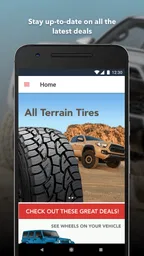
When I need to compare tire or wheel options, I prefer to start with the vehicle details rather than browse a broad catalog and guess what fits. Discount Tire is aimed at that practical shopping task: it is a free auto-and-vehicle app from Reinalt-Thomas Corporation, built around finding tires and wheels. My impression is that it is most useful as a focused starting point for a purchase, not as a complete substitute for speaking with a tire specialist when fitment or installation questions get complicated.
Where the shopping process can get stuck
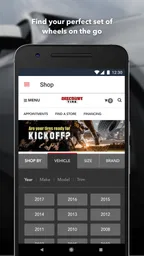
The first challenge with any tire-shopping app is knowing what to search for. A tire’s size may be printed on its sidewall, but many drivers do not keep that information handy. If you are unsure which details the app needs, pause before browsing and check the vehicle information or the current tire markings. Starting with a confident vehicle selection is more useful than comparing products that may not suit your car.
That distinction matters because a visually appealing option is not automatically an appropriate one. Tire and wheel choices have to make sense for the vehicle, and a search result should be treated as a candidate to verify rather than a reason to assume every specification is interchangeable. I would use the app to narrow the field, then confirm any uncertain fitment detail before committing.
Another possible sticking point is expecting a shopping app to answer every question about a purchase. Tire decisions can involve more than choosing a model: you may be weighing driving conditions, replacement timing, wheel appearance, and the practicalities of getting the work done. The app’s clear purpose is selection, so users who want tailored advice for an unusual setup may still need a direct conversation with a tire professional.
The product is called Discount Tire in the app store, and its short description is simply the retailer’s name. That makes it sensible to approach it as a retailer-specific tool rather than a neutral comparison engine covering every seller. If your main goal is to compare offers across several unrelated retailers, a general search or other shopping options may suit you better.
Make the first search more useful
A small preparation step can prevent a lot of unproductive browsing: identify the vehicle carefully, and, if you are replacing tires, keep the existing tire size available to check. If you are shopping for wheels as well, think about whether your priority is a particular look, a replacement need, or a matched set. Those are different tasks, and clarifying yours first helps you judge whether the results are relevant.
For example, if one tire has been damaged and you are trying to get back on the road, your immediate question is likely compatibility and replacement. If you are planning a full change of wheels, appearance and matching the rest of the vehicle may matter more. I would avoid treating these two situations as the same browsing session: write down what needs replacing and what you are still deciding before comparing options.
The app has an average rating of 3.4 from around 1.1 thousand ratings, alongside 497 written reviews. That gives a prospective user a reason to keep expectations measured: it is a retailer app with a useful shopping focus, but the overall experience is not universally smooth. I would judge it by whether it helps with your specific tire or wheel search, rather than assuming a polished rating guarantees an effortless purchase.
Setup checks before blaming the app
If a search is not producing sensible choices, first check the information you entered. A small mistake in the vehicle selection or tire size can make a catalog appear irrelevant, even when the app itself is working normally. Re-enter the details slowly and compare them with the information on the vehicle or the existing tire. This is a basic check, but it is more productive than repeatedly opening the same search with uncertain inputs.
It is also worth separating a product question from a technical problem. If you can browse but cannot decide between two options, the issue may be that your requirements are still unclear. If the app is not loading or a step is behaving unexpectedly, close and reopen it, then try again with a stable connection. These are general first steps, not a guarantee that every issue can be fixed on the phone.
The current version is 3.10.7, and the stated minimum operating-system requirement is 8.0. If the app behaves poorly, checking that your device meets that requirement and that you are using a current installation is a sensible starting point. I would also make a note of what you were doing when the problem appeared; that makes it easier to explain the issue if you need assistance.
The app is rated for Everyone, which makes its audience broad, but that does not mean every shopping decision is simple enough to make without help. A first-time buyer may need more explanation than an experienced driver, especially when comparing tire specifications. I would use the app to get oriented and collect options, then seek clarification when a specification or fitment choice is not clear.
Recovering a stalled shopping workflow
When I lose my place in a shopping process, I find it useful to return to the decision rather than repeat every step at random. Keep a short note of the vehicle details, the tire size you are checking, and the options that seemed relevant. If you need to restart a search, those notes let you rebuild it without relying on memory or assuming the previous selections were saved.
A realistic example is noticing a worn tire while getting ready for a commute. You may want to see what replacement choices are available, but you do not necessarily have time to research every technical distinction. I would use the app to identify plausible choices, save or record the details outside the browsing session if needed, and finish the decision when I can verify the specifications calmly. Rushing through a purchase because the car is needed tomorrow is a poor reason to skip a fitment check.
If an order-related or service-related step is unclear, avoid making repeated selections just to see what happens. Back out carefully, confirm the information you have entered, and use the retailer’s available support route if the next step remains confusing. That is especially important when the uncertainty concerns the selected product or the practical arrangements for getting the tires fitted.
The app has more than 500 thousand installs, so it has reached a substantial audience, but popularity alone does not tell me whether a particular search or device issue will be resolved smoothly. I would treat it as one part of the buying process: useful for exploring the retailer’s tire and wheel selection, while personal advice and careful confirmation remain valuable when the decision is not straightforward.
When the app is not the cause
Not every disappointing result points to a software fault. If a search returns options that do not match what you expected, recheck the vehicle and size details first. If your concern is that a particular tire may not suit your driving, that is a product-selection question. If the screen freezes or a page fails to load, that is more likely to be a technical issue. Telling these situations apart helps you choose the right next step instead of repeating the same action.
There are also moments when a different tool is simply better. Drivers who want a broad, side-by-side view of many retailers may prefer a general shopping search. Someone who already knows the exact tire and only needs a technical fitment confirmation may get more value from a qualified specialist. And if you are still deciding what kind of tire suits your regular roads and weather, expert guidance can be more useful than browsing product names alone.
That does not make the app unhelpful; it sets a fair boundary for what a retailer-focused shopping tool can do. I see its strength in helping a shopper begin with a concrete vehicle or product need. Its weaker point is that no catalog can replace a careful check when the vehicle has a nonstandard setup or the buyer is unsure what a specification means.
Discount Tire was released on October 2, 2018, and remains free to install. I would not read either fact as a promise about every current screen or every shopping workflow; the useful question is whether it helps you narrow your choices today. Its focused purpose makes more sense for someone already considering this retailer than for someone who wants an entirely independent guide to tire buying.
Who should use it, and my practical verdict
I would recommend trying the app if you are shopping for tires or wheels through Discount Tire and want to explore the selection from your phone. It is especially practical when you have your vehicle details ready and a clear goal, such as replacing worn tires or looking into wheel options. The fact that it is free lowers the barrier to trying it, and its focused scope keeps the task tied to the retailer rather than turning into a general automotive reference.
I would skip it as my main resource if I needed extensive education before I could even identify what to buy, if I wanted to compare every retailer at once, or if my vehicle setup raised technical questions I could not confidently answer. In those cases, use a specialist or a broader comparison method first, then return to the app if Discount Tire is part of your shortlist.
For the smoothest experience, prepare the vehicle and tire information, make one clear search at a time, and keep a note of promising options. If results seem wrong, verify your inputs before assuming the app has failed. If a technical problem persists, retry the basic steps and seek help through the retailer’s available channels rather than guessing at a purchase.
Overall, I see Discount Tire as a convenient, retailer-specific place to start a tire or wheel search, with the usual trade-off that focused browsing is not the same as independent comparison or personal fitment advice. Its 3.4 average rating suggests a mixed user experience, so I would approach it with realistic expectations. Used thoughtfully, it can help turn a vague shopping task into a shortlist; the final choice still deserves a careful compatibility check.
What we like
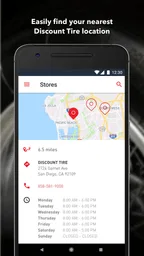
- Find a nearby Discount Tire location with the store locator.
- Check tire prices and product details before visiting.
- Book an appointment for tire service through the app.
- View available service options for your vehicle.
- Access your account details while on the go.
What could be better
- Appointment availability may vary by location.
- Some services still require an in-person visit to confirm details.
- The app is most useful for existing Discount Tire customers.
- Tire inventory and pricing can change between visits.
- Store-specific information may not cover every service question.





