
Dash Cam: Dashcam Viewer review
 Analysis by Appsdrops
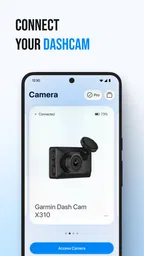
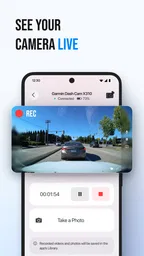
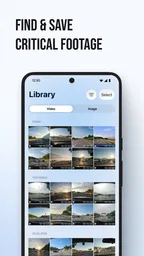
If you use a dash cam, reviewing footage should feel straightforward: find the clip you need, watch it, and save it for later when appropriate. Dashcam Viewer is built around that practical job. It is an app for watching and downloading dash cam videos, with support for brands including Redtiger, Viofo, Rexing, and others. That focused purpose makes it worth considering if you want a mobile companion for managing recordings rather than a general driving or navigation tool.
What to consider before choosing a dash cam viewer
The right viewer depends first on how you handle your recordings. Some drivers are happy to view footage directly on their dash cam or another device, while others prefer having a phone-based option for checking a clip soon after a drive. If you fall into the latter group, the key question is whether an app supports your camera and makes the basic viewing-and-downloading routine convenient.
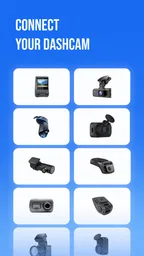
Compatibility should be your first check. Dash cams vary, and an app that works with one brand may not suit another. Dashcam Viewer names Redtiger, Viofo, and Rexing among the supported options, along with more brands. If your camera is from one of those manufacturers, that gives you a useful reason to investigate the app. I’d still make sure your particular setup is compatible before relying on it for an important recording.
Next, think about what you actually need from a viewer. If your priority is simply to watch and download dash cam videos, a focused app can be a better match than a broader driving utility packed with unrelated tools. On the other hand, if you want mapping, route tracking, camera settings, or advanced editing in the same place, you should compare those needs separately rather than assuming every dash cam app covers them.
Ease of use matters, too. A recording is most valuable when you can locate and review it without turning a simple task into a project. The app’s central promise is clear, which is a good starting point for drivers who want a dedicated way to handle footage. My practical advice is to judge it by how well it fits your existing camera and your own routine, not by a long list of features you may never use.
A focused companion for recorded footage
Dashcam Viewer is categorized among auto and vehicle apps, and that’s a natural home for it. Rather than presenting itself as a full driving assistant, it concentrates on dash cam videos. That makes the app’s role easy to understand: it is meant to help you watch and download recordings from a supported camera system.
The store summary calls out support for Redtiger, Viofo, Rexing, and more. For owners of those brands, that broad compatibility message is the most relevant part of the pitch. It means the app is aimed at people with dash cams from multiple manufacturers, not just drivers committed to one named camera family. Since compatibility can depend on your specific equipment, I’d treat the brand list as a reason to check the fit, not as a guarantee for every model or setup.
The app is free to install, which lowers the barrier to trying it. It also offers in-app purchases, with items ranging from $1.99 to $79.99. That range is worth keeping in mind if you are comparing it with alternatives: the initial download does not necessarily tell you the full cost of every optional purchase. I’d look at what is included and whether any paid option matters to your use before spending.
Where Dashcam Viewer stands out
The strongest point is its straightforward purpose. When I’m choosing a utility app, I appreciate being able to tell quickly what it is designed to do. Here, the focus is on dash cam video playback and downloads, rather than a sprawling collection of driving features. If you regularly need to review footage on a mobile device, that clarity may be more valuable than a crowded interface with tools you don’t use.
Its support for several familiar dash cam brands is another plus. Drivers often choose a viewer based on the camera already installed in their car, so an app that speaks to more than one brand can be more appealing than one tied to a single manufacturer. Redtiger, Viofo, and Rexing are specifically named, with additional support indicated as well. For users whose cameras fit, that makes dash cam video viewing and downloading the central benefit to explore.
The app has an average rating of 4.3 from around 11,000 ratings, and it has been installed over 100,000 times. Those figures suggest that plenty of users have encountered it, although ratings alone cannot tell you whether it will work smoothly with your individual camera. I’d use them as background context, then give priority to compatibility and the actual features you need.
It is also rated for everyone, so its store age classification is broad. The app’s listed developer is Driving Theory Test LLC. Those details can help you identify the product when searching the app store, especially if several similarly named dash cam utilities appear in your results.
When another kind of app may suit you better
Not every driver needs a dedicated viewer. If you only check footage occasionally and your camera’s own tools already meet your needs, adding another app may not improve your routine. A basic file-transfer or media-viewing approach could be enough for some people, depending on their camera and how recordings are stored. The important thing is to choose a method that reliably gives you access to the footage you care about.
There are also broader dash cam companion apps. Those may be a better fit if you want camera setup, device controls, or other management features alongside playback. I wouldn’t assume Dashcam Viewer includes those extras just because it supports dash cams; its stated emphasis is watching and downloading videos. If controls beyond that are essential, compare apps based on the exact functions your camera supports.
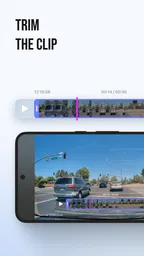
Some drivers may prefer a computer-based workflow, especially if they routinely review long recordings or organize files on a larger screen. Others may want a video editor for trimming or sharing clips. These are different needs from simply viewing and downloading footage, so a specialized editor or desktop tool could fit better. You don’t need to replace a workflow that already works unless mobile access would make a meaningful difference.
In short, the app makes the most sense for someone who wants a phone-oriented way to handle dash cam recordings and owns a compatible camera. It may be less compelling if you are looking for a complete driving toolkit, detailed editing suite, or a solution that works regardless of camera brand.
Considering the cost of switching
Trying a new viewer can involve more than installing it. You may need to learn a different way to locate recordings, establish a connection with your camera, or move clips into the places where you normally keep them. Those steps depend on your setup, so I’d avoid switching in the middle of a situation where you urgently need a particular video. Test the app with an ordinary recording first and make sure the process suits you.
Because Dashcam Viewer is free to install, the initial commitment is small. In-app purchases range from $1.99 to $79.99 per item, so check the purchase options before deciding that the app is entirely cost-free for the features you want. A sensible approach is to start with the free experience, confirm that your camera works with it, and only consider an optional purchase if it clearly solves a need.
The app’s listed release date is May 7, 2026, and its current version is 1.1.2. It requires Android 9 or later. If you’re using an older device, the operating-system requirement is especially important to check before planning a switch. For everyone else, the most useful test remains practical: can you access the recordings you want, and does the workflow feel easier than your current method?
There are 135 written reviews alongside the ratings. Reading a handful of recent comments in the app store may help you spot experiences related to your camera brand or phone setup. Keep in mind that other people’s results are not a substitute for testing your own equipment, but they can help you decide what to verify first.
My recommendation
I’d recommend Dashcam Viewer to drivers who want a dedicated app for watching and downloading dash cam videos and whose cameras are among the supported brands. Its focused purpose is easy to understand, the free installation makes it approachable to try, and the named support for Redtiger, Viofo, Rexing, and others gives owners of those systems a clear reason to take a closer look.
I would not choose it blindly as a universal dash cam solution. First confirm that your camera and phone setup are a good match, then test a routine clip before depending on the app for an important recording. If you need camera controls, editing, or a broader driving feature set, compare apps in those categories instead; a more specialized viewer is only the right choice when viewing and downloading are the jobs you actually want done.
Overall, this is a sensible option for drivers who value a straightforward mobile route to their dash cam footage. Its appeal comes from a clear use case rather than a promise to do everything. If that use case matches your needs and your camera is compatible, Dashcam Viewer is worth trying. If not, sticking with your camera’s existing tools or choosing an app built around your other priorities may be the better call.
What we like
- Records your drives for later review.
- Can help document events on the road.
- A focused tool for dashcam footage.
- Useful for checking recorded journeys.
- May provide helpful evidence after an incident.
What could be better
- Recording can use substantial storage.
- Long sessions may drain your battery.
- Video quality depends on your device camera.
- Mounting your phone securely is essential.
- Local traffic laws may restrict recording.





