



Crunchyroll: Anime Streaming review
 Analysis by Appsdrops
When I want anime without turning the search into its own project, I reach for Crunchyroll. It is an entertainment app from Crunchyroll, LLC, built around watching anime rather than mixing it into a general-purpose video feed. That focus is its main advantage: if anime is what you came for, the app makes more sense than a broad streaming service where the genre is only one corner of a much larger catalogue.
My experience is that it works best when I already have a show in mind or want to browse within anime. It is less compelling if I expect every title I might hear about to be available, or if I mainly want films, live-action series, and assorted video in one place. The catalogue is the reason to try it; the practical question is whether its playback and browsing fit the way you watch.
What watching feels like in everyday use
The app’s reputation is substantial: it has a 4.6 average from around 4.5 million ratings, with more than 147,000 written reviews. Those figures suggest it has become a familiar destination for a lot of anime viewers, but they do not guarantee a flawless session on every device or network. I would treat them as a sign of reach, not a promise that playback will always be instant.
Crunchyroll is free to install, and it has passed over 100 million installs. In-app purchases range from $9.99 to $179.99 per item, so it is worth checking the current subscription or purchase details in the app store before deciding to pay. I would start by seeing how the free experience fits your routine, then weigh any paid option against how often you watch and what access it offers at the time.
For someone new to anime, the dedicated focus can be helpful rather than intimidating. You can make the app your starting point for exploring series instead of relying on recommendations scattered across unrelated services. At the same time, a large library can make choosing harder: I find it useful to search for a specific title, keep a short list of shows I genuinely intend to try, and avoid treating the front page as a task to complete.
Speed depends on more than the app
When a stream starts quickly, the experience feels effortless; when it hesitates, it is not always obvious whether the cause is the app, the device, or the connection. I avoid judging performance from a single launch. On a stable connection, I expect a straightforward viewing session, but I would not assume that every episode will load equally quickly under crowded Wi-Fi or mobile data conditions.
A useful habit is to test a short episode or a few minutes of a show before settling in for a long watch. That gives you a practical sense of whether your current network and device are handling playback comfortably. If the picture stalls, I first check whether other streaming apps are also struggling, then try closing and reopening Crunchyroll. This simple comparison helps separate a local connection problem from an app-specific hiccup without guessing at technical causes.
Switching between browsing and watching can also affect how fast the app feels. Searching, opening a series page, and starting an episode are different tasks from simply resuming a show. If you are on an older phone or have several apps running, give the device a moment rather than repeatedly tapping controls. Rapidly issuing the same command can make it harder to tell whether the app is responding or still processing the first request.
Long sessions and busy viewing moments
Crunchyroll makes most sense during a dedicated anime session: a quiet evening, a commute with a reliable connection, or a break when you want to continue a series rather than browse general entertainment. In those situations, the focused catalogue saves time. I can go from deciding what to watch to watching it without being pulled into unrelated video categories.
Heavy-use moments expose the trade-offs. A long sequence of episodes puts more pressure on battery, mobile data, and device warmth than a quick check of a show page. If I plan to watch away from home, I think about those limits before starting: use a dependable connection when possible, keep an eye on data use, and avoid beginning a lengthy session when the phone is already low on battery. These are sensible precautions for streaming, not a claim that Crunchyroll consumes a particular amount of power or data.
There is another small but useful workflow: decide what you want to watch before leaving a good connection. Browsing a large anime collection on a weak network can be more frustrating than watching once you have already found the series. I also try to remember the exact title or use the app’s search rather than repeatedly scrolling through recommendations. That cuts down on unnecessary loading and makes a short viewing break feel less like a hunt.
For families, the Teen content rating is an important cue, but it is not a substitute for checking whether a particular show suits the person watching. Anime covers a wide range of tones and subjects, so I would not assume that a dedicated anime service means every series is appropriate for every age. A parent or guardian should look at individual titles and decide what fits their household.
Reliability, interruptions, and recovery
I judge a streaming app not only by whether it starts a show, but by how easy it is to recover when something goes wrong. If playback pauses or the app stops responding, I would first wait briefly, then try a single pause-and-resume or reopen the episode. If that does not help, restarting the app is a reasonable next step; restarting the device or switching networks can help identify whether the issue is broader than Crunchyroll.
That approach is more useful than repeatedly tapping play or jumping between several episodes. Too many quick actions can leave you unsure which request the app is handling. If the same problem returns on different connections, it is reasonable to check for an app update or consult the app store’s support information. If it happens only on one network, the connection is the likelier place to investigate first.
I would also keep expectations realistic around consistency. A streaming session can be smooth one day and less comfortable another because network quality and device condition change. The app’s broad adoption is reassuring in a general sense, but it cannot make a weak signal strong or an overworked device responsive. For someone who needs uninterrupted viewing, testing the setup ahead of a trip or a planned watch is better than discovering a problem halfway through.
Device limits and choosing between services
Crunchyroll is a better fit for a device that can handle video streaming comfortably and has enough battery for the length of the session. On a phone that is already sluggish, crowded with background activity, or running low on power, browsing and playback may feel less pleasant regardless of the service. I would close apps I do not need and make sure the device has a stable connection before concluding that Crunchyroll itself is the bottleneck.
Compared with general streaming alternatives, its strength is specialization. A broad service may be more convenient if you want anime alongside dramas, films, and other genres, especially when you share one subscription with people who watch different things. Crunchyroll is the more natural choice when anime is the main event and you want a place organized around that interest. The trade-off is that a focused service will not replace a general library for every kind of viewing.
It is also not automatically the right choice for someone who watches only an occasional anime title. If the few shows you want are already available through a service you use, adding another app may not improve your routine enough to justify the extra commitment. Conversely, frequent viewers are more likely to value a dedicated destination and its depth. I would compare the titles you actually plan to watch rather than choosing solely because the catalogue sounds broad.
Who I would recommend it to
I would recommend Crunchyroll to friends who regularly follow anime, like exploring series within the genre, or want a dedicated app instead of searching across general entertainment platforms. It is especially useful when you have a clear show in mind and want to spend your viewing time watching rather than deciding which service to open.
I would suggest a different option to someone whose viewing is mostly live-action, who wants a single all-purpose streaming library, or who has a device and connection that already struggle with video. For occasional viewers, the free install is an easy way to assess the fit, but the in-app purchase range makes it sensible to read the current terms before paying. No one should treat the presence of a large catalogue as a reason to buy before checking whether the shows they care about are available to them.
Crunchyroll has been available since December 20, 2010, and its longevity helps explain why it is such a recognizable name in anime streaming. Still, the right choice comes down to your own viewing habits: how often you watch, whether you value a specialized library, and how well your device handles streaming. I find it most satisfying when those pieces line up.
My performance verdict
For anime fans with a decent connection and a capable device, Crunchyroll is a focused, practical place to watch. Its biggest everyday strength is that it keeps anime at the centre, while its main limitations are the usual streaming dependencies and the fact that specialization may not suit every household. I would test it with a show you genuinely want to watch, pay attention to how it behaves on your usual network, and only then decide whether its paid options make sense.
In short, it is a strong fit for regular anime viewing, not a universal answer for every streaming need. Choose it when anime depth matters more than an all-in-one catalogue; choose a broader alternative when your watchlist spans many genres or you only dip into anime now and then.
What we like
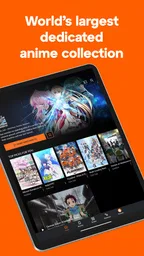
- A large catalog covers many anime genres and series.
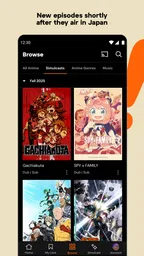
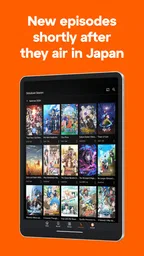
- New episodes often arrive shortly after their Japanese broadcast.
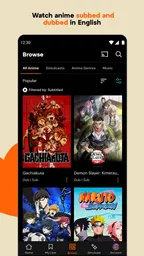
- Subtitles are available in multiple languages for many shows.
- Watchlists make it easy to keep track of series.
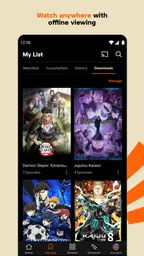
- Offline downloads are available with eligible plans.
What could be better
- Some titles are unavailable in certain regions.
- The free viewing option includes frequent advertisements.
- Dub availability varies by show and language.
- Offline downloads require a paid subscription.
- Streaming quality depends on your connection and plan.





