
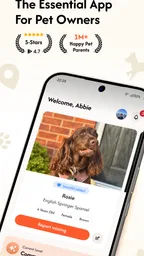

Crumb: Keeping Your Pets Safe review
 Analysis by Appsdrops
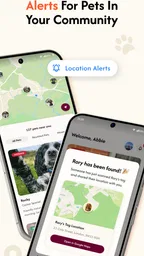
When a pet goes missing, every minute can feel important—and it’s easy to get overwhelmed while trying to decide what to do next. Crumb is built around a simple community-minded goal: helping bring lost pets home faster. I see its value less as a replacement for the steps an owner takes nearby and more as a way to connect people who may be able to help. That makes it a timely option to consider before a stressful situation arises, as well as when a pet is already missing.
Crumb is a free House & Home app from Crumb Pet. It has earned an average rating of 4.6 from around 6,600 ratings, with roughly 1,100 written reviews and over 100,000 installs. Those figures suggest that people are finding a reason to try it, though an app’s usefulness in a lost-pet situation will naturally depend on the community and circumstances around each case. The idea is straightforward; getting value from it depends on being able to use it calmly and clearly when it matters.
Making sense of Crumb when a pet is missing
The app’s central promise is easy to understand: join a community that can help bring lost pets home faster. That purpose gives Crumb a practical focus rather than making it another general-purpose household tool. If you’re looking for a lost pet app, the main question is whether it helps you take a clear next step and make it easier for others to understand how they might help.
In a stressful moment, even a simple app can feel confusing if you’re unsure where to begin. You may be worried, short on time, or trying to coordinate with family and neighbors at once. My advice is to approach Crumb with a small, steady sequence: open it, read the available prompts, and work through the task in front of you rather than rushing through screens. Clear, accurate information is more useful than hurried details that others might misunderstand.
It also helps to keep expectations grounded. A community can increase the number of people who may notice a missing pet, but it cannot guarantee a reunion. Crumb’s purpose is to support community involvement, not to remove the need for direct action. I’d use it alongside sensible local steps, such as telling people nearby and contacting appropriate local services when needed.
Where people can get stuck
The first hurdle may be knowing what the app expects from you. If you’re new to Crumb, take a moment to look over the screens and wording before trying to complete anything important. If a prompt is unclear, pause and reread it instead of guessing. In a lost-pet situation, accuracy matters: names, descriptions, and other details should be checked before you share them.
A second source of friction is the emotional pressure of the situation itself. People often try to do several things at once, which can lead to missed steps or inconsistent information. I find it more helpful to divide the task: one person can focus on the app, while another handles calls or checks the immediate area. If you’re on your own, deal with the most urgent real-world safety concerns first, then return to the app when you can give it your attention.
It’s also worth remembering that community participation takes time. Installing an app does not mean every nearby person will see or respond to a post right away. If you don’t get an immediate result, that alone doesn’t tell you whether the app is working. Keep using other appropriate channels rather than relying on one route to reach people.
Setup checks before you need them
The easiest time to learn an app is before an emergency. You can install Crumb, open it, and familiarize yourself with its layout while you’re not under pressure. Crumb is free, rated for Everyone, and its current version is 2.4.0. It was released on April 22, 2025, and requires Android 9 or later. Checking that your device meets the minimum operating-system requirement is a sensible first step if you’re using Android.
After opening the app, take a minute to confirm that it loads normally and that you can move through the available screens. If something appears stuck, close the app and reopen it, then check whether your device has a working internet connection. These are basic checks rather than special fixes, but they can resolve common problems caused by a temporary interruption or an app that simply needs a fresh start.
Keep your phone’s operating system and the app reasonably up to date through the app store. Updates can help with compatibility and stability, while an older device setup can sometimes make an otherwise straightforward app harder to use. If you share responsibility for a pet with someone else, it may be useful for each person to understand the app independently, rather than having only one household member know how to get started.
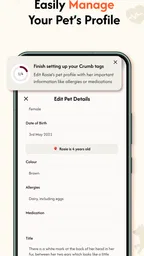
For a smoother experience, think ahead about the information you may need in an urgent situation. Keeping essential pet details and a recent photo accessible on your device can save time when you need to communicate with other people. This is general preparation, not a claim about a particular Crumb feature. The practical point is to avoid searching through scattered files while you’re already worried.
Recovering your workflow if something goes wrong
If Crumb doesn’t open or a screen fails to load, start with the simplest checks. Confirm that your connection is working, then close and reopen the app. If the problem continues, restart your phone and try again. These steps won’t fix every technical issue, but they can help distinguish a temporary device or connection hiccup from a problem that needs further attention.
If you’re partway through a task and the app stops responding, avoid repeatedly tapping buttons in frustration. Give the screen a moment, then check what’s visible before continuing. That reduces the chance of accidentally repeating an action or entering information twice. If you need to begin again, review the details carefully so that anything you share remains consistent and easy for other people to understand.
When the app works but you’re unsure what to do next, return to the basic purpose: help the community understand that a pet is missing and how it might assist. Read each prompt fully and use plain, direct wording. If a detail is uncertain, don’t present a guess as fact. You can update your approach as you learn more, but clear communication from the start makes it easier for others to respond sensibly.
For persistent technical trouble, check the app store for an available update and consult the support options presented there. You can also note what happened, what device you were using, and which basic troubleshooting steps you tried. A concise description is more useful than a vague report that the app is broken, especially if you need someone to help identify the source of the problem.
When the app may not be the cause
Not every slow or quiet response points to an app fault. A weak connection, a device that is struggling, or limited community activity in a particular area can all affect what you experience. The app may open correctly and still not produce an immediate response, because community help depends on people seeing information and choosing to act.
That distinction matters when you’re deciding what to do next. If the screen is functioning but no one has responded yet, continue with appropriate local outreach instead of repeatedly reinstalling the app. If the app itself will not load, basic connection and restart checks make sense. If it is working but the situation is urgent, focus on reaching people and services directly as well.
It’s also possible for worry to make ordinary delays feel like a technical failure. I’d take a breath, check whether the app is responding, and then separate the two questions: “Can I use the app?” and “Have I reached enough people yet?” The first is about the device and software. The second is about communication and timing, and may call for several complementary steps.
A practical verdict for pet owners
Crumb has a clear, meaningful purpose: bringing a community together to help lost pets get home faster. I like that the idea is easy to grasp, and the app’s free price makes it accessible to people who want to try a community-based approach. Its rating of 4.6, based on around 6,600 ratings, gives prospective users a useful snapshot of how it has been received, while the real-world outcome will still depend on each situation.
I’d recommend getting familiar with Crumb before you need it. Check that it opens on your device, learn your way around, and keep important pet information easy to find. That preparation can reduce avoidable friction when you’re under pressure. If you’re already dealing with a missing pet, use the app thoughtfully, share clear information, and keep pursuing suitable local options rather than waiting for one channel alone to solve the problem.
The most useful way to think about Crumb is as one part of a broader lost-pet response: a community tool that may help spread the word, paired with careful preparation and direct action. It won’t make a difficult situation simple, but its focused purpose gives pet owners a practical reason to keep it in mind. For anyone who values community support and wants another way to help missing pets, Crumb is worth exploring.
What we like
- Tracks your pet's location with a compatible GPS device.
- Location history can help retrace your pet's movements.
- Geofence alerts can notify you when your pet leaves a safe zone.
- Sharing access can help family members coordinate pet care.
- A focused interface keeps essential safety tools easy to find.
What could be better
- Live tracking depends on a compatible device and an active connection.
- GPS accuracy can vary indoors or in areas with weak coverage.
- Frequent location updates may drain the tracking device's battery.
- Geofence alerts may arrive late when network coverage is poor.
- Some features may require a paid plan or compatible hardware.





