
Club Car Wash Mobile App review
 Analysis by Appsdrops
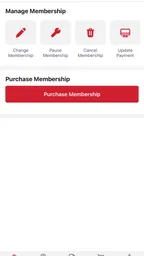
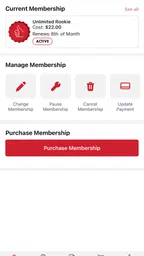
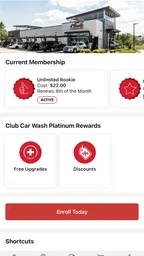
I judge a car-wash app less by how many screens it has than by whether it saves me time when I’m already in the car, deciding whether to stop. Club Car Wash Mobile App is aimed at a specific job: helping customers manage a Club Car Wash membership. That focus gives it a clearer purpose than a general motoring app, but it also means its usefulness depends on whether you wash with this business and want to handle membership matters on your phone.
Club Car Wash Mobile App is a free app in the auto and vehicle category, developed by Club Car Wash Operating, LLC. Its current version is 20.4.0, and it is rated for Everyone. The app has a 4.8 average from around 900 ratings, with more than 100,000 installs. Those figures suggest a well-used product, though they don’t tell me whether it suits a driver who only visits a wash occasionally.
What speed should a member expect?
The useful promise here is not that every wash task happens instantly; it is that membership management can happen on a phone instead of becoming one more errand at the wash. If you already know you want a Club Car Wash membership, having the app available can make it easier to deal with the account side on your own time. I’d think of it as a companion for membership decisions, not a substitute for the wash itself or a guarantee of a faster line.
That distinction matters when you’re in a hurry. A phone app can shorten the administrative part of a visit, but it cannot make a busy site less busy. I would set it up before a rushed trip rather than expect to install it, work out the account process, and make a decision at the entrance. The most practical speed gain is removing a task from the moment you arrive.
If you are comparing it with simply asking staff for help, the app is most appealing when you prefer handling routine membership matters independently. A conversation at the site may still be the simpler route if you have a one-off question or are unsure whether membership fits your washing habits. The app’s narrow purpose is a strength for existing members, but it is not automatically the fastest choice for someone who just wants a single wash.
Make membership decisions before the drive
My advice is to open the app when you have a quiet moment, not while pulling into a wash. That small change avoids juggling traffic, a phone, and an account decision at once. It also gives you time to check that you’re using the right account before you need it. For anyone managing a household vehicle routine, handling the membership side ahead of time can make a recurring stop feel less like another chore.
I would also keep expectations grounded: the app is described as a way to manage a wash membership, not as a broad route planner, vehicle-maintenance tool, or directory for every car wash. If you need those things, a maps app or a general motoring service is a better fit. This is a focused tool for a relationship with Club Car Wash, rather than a universal wash-finding solution.
When usage gets heavy
The app’s value is likely to grow with repeated use. A driver who visits Club Car Wash often has more reason to keep membership details close at hand than someone who washes a car only a few times a year. In a busy week, being able to deal with the account on the phone could be more convenient than postponing it until the next visit. That is a meaningful everyday benefit, even if it is less dramatic than a feature that changes how the car wash itself works.
Consider a realistic scenario: you notice the car is dirty before a weekend trip, and you are already planning to stop at Club Car Wash. If the membership is part of your routine, having the app ready before leaving home lets you handle the account side without making the visit your first opportunity to sort it out. The useful habit is preparation: check the app while parked, then put the phone away before driving. That reduces distraction and makes the app’s convenience practical rather than theoretical.
A different kind of heavy use is managing a membership over time rather than simply opening the app at a wash. In that situation, I would treat the app as a place to keep membership tasks from slipping through the cracks. I would still verify important account decisions carefully instead of tapping through in a rush. A mobile interface is convenient, but convenience is not a reason to skim terms or assume that every account change has taken effect without checking the resulting screen.
Where frequent use may not pay off
There is a trade-off to installing a dedicated app for one business. If Club Car Wash is not a regular stop for you, the app may spend most of its time unused, while a quick conversation at the wash or a general-purpose payment and maps setup may cover your occasional needs. I would not install it just because I sometimes need a car wash; I would install it if managing a Club Car Wash membership is likely to be a recurring part of my routine.
Frequent users should also separate account convenience from service convenience. The app can support the membership relationship, but it does not change the fact that your visit still depends on the location and the time you choose. If you arrive during a rush, having the app does not promise a shorter queue. For a schedule-sensitive wash, choosing a less pressured time may matter more than opening the app sooner.
Reliability and everyday confidence
For an account-focused app, reliability is about more than whether it opens. I want to feel confident that I can reach the membership information I need when I plan a visit and that I can tell what state my account is in. The app’s strong user rating and substantial install base are encouraging signs of adoption, but I would not treat popularity as a guarantee that every device or account experience will be identical.
In practical use, I’d make a simple distinction between an app being available and a task being complete. If you make a membership change, pause long enough to confirm that the app reflects it before relying on the change at the wash. This is a sensible habit for any account-management tool, especially when the next step happens in person. It also gives you a clear recovery path: if something looks wrong, you can address it before arriving rather than discovering the problem at the point of use.
I would avoid depending on the app as the only way to remember essential account details. A phone can be out of battery, a connection can be poor, or an update can interrupt a session. That does not mean the app is unreliable; it is simply a reason to keep a little margin when a membership task matters. For ordinary planning, opening it before you leave is more reassuring than waiting until you are at the entrance.
Updates, sign-in, and recovery habits
The current release is version 20.4.0. I’d keep the app reasonably current through the app store, particularly if you use it regularly, because staying on the supported release is a straightforward way to reduce avoidable compatibility trouble. If an account screen seems stale or a task does not appear to finish, I would first reopen the app and check the account state rather than immediately repeating a change. That prevents a second attempt from creating confusion.
If you change phones, I would make sure you can access the account before you need the app during a wash visit. This is not a special trick; it is basic preparation for any membership app. The key point is to treat the phone as a convenient doorway to the membership, not as the membership itself. That mindset makes a temporary sign-in or device issue less stressful.
Device fit and practical limits
The minimum operating-system requirement is version 12, so owners of older devices should check compatibility before planning to rely on it. If your phone is supported, I would still consider how you use it: a membership app has little value if your device is usually left at home, shared with someone who cannot access the account, or kept offline when you visit. Those are ordinary setup considerations, not reasons to expect a particular performance problem.
I can’t responsibly promise that the app will feel instant on every phone or claim that it uses very little battery or storage. Those experiences can vary by device and conditions. My practical recommendation is to install it while you have a stable connection, open it once before a planned visit, and make sure you can reach the membership area you expect to use. If the app is sluggish on an older or crowded phone, doing that check in advance gives you time to use another route rather than troubleshoot at the wash.
The Everyone age rating makes the audience broad, but the app’s usefulness is still tied to an adult’s real-world membership needs. For a family that shares responsibility for washing a vehicle, agree on which person manages the account and which phone will be used. That avoids the familiar problem of one driver arriving with a phone that does not contain the relevant account. The app can be convenient, but a clear household routine is what makes that convenience dependable.
How it compares with the usual alternatives
Compared with a general car-wash finder, this app is more specialized: it is for managing a Club Car Wash membership, not choosing among every nearby wash. Compared with handling membership questions only at the site, it offers the appeal of doing account-related tasks on your own schedule. And compared with a broad vehicle app, it avoids trying to cover unrelated needs such as maintenance reminders or navigation. That focus is useful if you are already a customer and unnecessary if you are not.
For a one-time wash, I would use whichever option gets me a clear answer with the least setup, which may simply be asking staff. For a regular member, I would rather have the company’s own app ready than repeatedly rely on memory or postpone account tasks. For someone who switches between many wash chains, a general-purpose approach may be more convenient overall, because a single-brand app cannot manage memberships across other businesses.
My performance verdict
I see Club Car Wash Mobile App as a practical, narrowly focused companion rather than an essential app for every driver. Its strongest case is a person who already uses Club Car Wash and wants membership management to fit into a phone-based routine. Free access lowers the barrier to trying it, and the high average rating gives a prospective member some reassurance, though neither fact guarantees a perfect experience on every device.
The main limitation is equally clear: its value depends on your relationship with this particular wash business. It is not a general-purpose car-care toolbox, and it cannot make a busy location move faster. I would skip it if you wash infrequently, prefer to handle everything in person, or need one app to cover several competing chains. I would give it a try if Club Car Wash is part of your regular routine and you want to sort out membership matters before the next visit.
My best-use advice is simple: install it when you are not in a hurry, check that your account is accessible, and confirm important changes before relying on them at the site. Used that way, it can remove a small but recurring bit of friction. That is not a flashy performance claim; it is the kind of modest convenience that makes a dedicated membership app worth keeping for the right driver.
What we like
- Lets members manage their wash club account on the go.
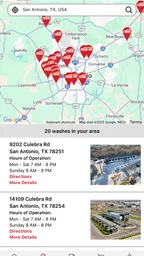
- Makes it easy to find nearby Club Car Wash locations.
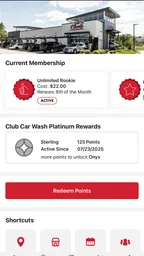
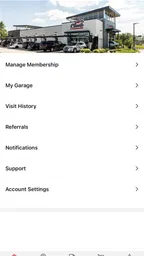
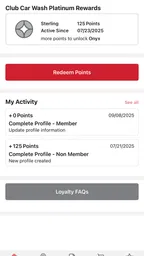
- Provides quick access to membership details and options.
- Helps users locate wash services before visiting.
- Offers a convenient alternative to managing an account in person.
What could be better
- Features may vary by location.
- Account tools are most useful to existing members.
- Location information depends on having an internet connection.
- Some account changes may require contacting customer support.
- The app may be less useful for customers who visit only occasionally.





