





Chorefriend: Cleaning Schedule review
 Analysis by Appsdrops
I can see why a chore tracker might feel useful during the first few days and then quietly disappear from someone’s phone. The real test is whether it helps a household keep up with ordinary work without turning cleaning into another project to manage. Chorefriend: Cleaning Schedule is a home-planning app from System Two GmbH, built around tracking chores and organizing household routines. My take is that its promise is appealing for people who need a shared sense of what must be done, but its lasting value depends on keeping the setup simple enough to maintain.
From a promising first week to a routine that lasts
In the first week, the most useful change a chore planner can make is visibility. Instead of relying on memory, a household can put recurring jobs in one place and see what has been handled. That matters most when “the kitchen is usually my job” or “someone should clean the bathroom” has become an unspoken assumption rather than an agreed plan.
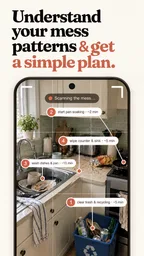
The app’s focus on chores and home planning makes it a more fitting choice for recurring household work than a general-purpose notes app. A note can hold a list, but it rarely gives the same feeling of an ongoing routine. I would start with only the tasks that repeatedly cause friction: taking out rubbish, wiping the counters, changing sheets, or cleaning shared spaces. A short starter list makes it easier to judge whether the planner actually helps.
There is a useful distinction between a schedule and a reminder. A schedule says what needs attention over time; a reminder interrupts you at a particular moment. Chorefriend is positioned as a tracker and planner, so I would treat it primarily as the place to organize the work, not assume it will replace every calendar alert or household conversation. If a task depends on a specific appointment or an unusual event, a calendar may still be the clearer tool.
For a realistic example, imagine two people sharing an apartment and both arriving home tired. They have agreed that one handles the bathroom while the other takes care of the floors, but the agreement keeps slipping because neither remembers when each task was last done. A tracker can make the routine easier to discuss and follow. The important benefit is not a perfect home; it is reducing the small negotiations that recur whenever nobody knows whose turn it is.
I would also use the first week as a trial of the routine, not just the app. If a task feels too vague, make it more concrete in your own planning: “clean the kitchen” can mean several different things, while “wipe the counters” is easier to recognize as finished. That small change helps a chore list stay actionable rather than becoming a collection of chores everyone interprets differently.
What the ratings suggest, and what they cannot decide for you
Chorefriend has a 4.5 average from around 4,300 ratings, with over 50,000 installs. That suggests a meaningful audience has tried it, but household habits vary enough that popularity alone cannot tell me whether it will suit your home. The key question is whether everyone who needs to participate is willing to check the same plan.
The app is free to install and is rated for Everyone. It includes optional in-app purchases, with items priced from $6.99 to $69.99. I would consider the free experience first and decide whether the basic planning approach fits before spending anything. A paid tier is only worthwhile if it adds something your household will genuinely use; paying will not solve a routine that is too complicated or a list that nobody checks.
Why the second month is the real test
Novelty can make any new organizer feel productive. The more useful test comes later, when the initial enthusiasm has faded and the app has to fit around work, errands, and the occasional week when nobody has energy for a full cleaning session. For Chorefriend, month-to-month value comes from whether a household can return to its plan without having to rebuild it or renegotiate every task.
A practical way to keep that value is to separate essential chores from optional ones. If every small job appears equally urgent, the list can feel like a constant backlog. Keep the recurring basics visible, and avoid loading the plan with occasional deep-cleaning ambitions unless they matter to your household. This is not a special feature claim; it is a way to make any chore system less punishing, especially when the app is meant to support normal life rather than dictate it.
Another useful habit is to review the schedule when the household changes, not just when something goes wrong. A new work pattern, a guest staying over, or a shift in who is home more often can make an old division of labor unfair. A planner is most helpful when it gives you a shared starting point for adjusting responsibilities. It should not be treated as an unquestionable referee: people still need to agree on what “done” means and what is reasonable.
This is where a dedicated chore planner can beat a paper list. Paper is quick, visible, and requires no screen, but it can be hard to keep current when tasks repeat or several people need the same information. A shared phone-based plan can be easier to revisit. On the other hand, a simple whiteboard may work better for a family that naturally gathers in the kitchen but rarely opens a household app. The best system is the one people already remember to consult.
Compared with a generic notes app, a chore-focused tool is more naturally suited to maintaining recurring household work. Compared with a full calendar, it can keep chores from competing with appointments and work events. But if your household has only a handful of occasional tasks, a basic note or a weekly conversation may be less effort. Chorefriend makes the most sense when repetition and shared visibility are genuine problems, not merely because a digital system seems more organized.
The upkeep cost: keeping the planner from becoming another chore
Every tracker asks for some maintenance. Someone has to decide what belongs on the list, keep responsibilities realistic, and remove tasks that no longer apply. That burden is easy to underestimate. If one person becomes the app’s unpaid administrator—adding everything, checking everyone else, and chasing updates—the system can make household work feel less fair rather than more manageable.
I would avoid entering every possible task on day one. Begin with a few recurring jobs, agree on who owns them, and see whether the arrangement survives a normal week. Then add another task only when there is a clear reason. This gradual approach is especially helpful in shared homes, where people may have different standards for cleanliness. The planner can make expectations visible, but it cannot settle disagreements about how often something should be done.
One non-obvious trade-off is that a more complete schedule can be less useful than a partial one. Listing every tiny action may create the appearance of control while making the app tiresome to open. A compact routine gives people fewer decisions and makes missed work easier to spot. If the list begins to feel like a second job, prune it before abandoning the system altogether.
Another is the difference between tracking completion and building cooperation. Marking a task as finished can make progress easier to see, but a household still needs an agreed way to handle jobs that are delayed or shared. I would use the app to support a quick check-in, not as evidence in an argument. When a task is repeatedly left undone, the underlying issue may be workload or timing rather than forgetting.
Chorefriend is currently version 1.0.29 and requires Android 8.0 or later. The app was released on June 28, 2026, so its time in the market is still relatively short. That makes it sensible to focus on the routine it helps you build today, rather than assume that any organizer will remain the right choice indefinitely. The developer is System Two GmbH, and the app’s current release is a practical starting point for deciding whether its approach fits your home.
Where fatigue can set in
The main risk with a chore tracker is not that it fails to list tasks; it is that the list becomes a steady reminder of everything left undone. People who already feel overwhelmed by household responsibilities may find a visible backlog discouraging. If that sounds familiar, keep the plan focused on a few high-impact jobs and allow for weeks when the routine needs to be lighter.
There can also be friction when not everyone wants to use an app. A planner only improves coordination if the people responsible for chores can access and understand the plan. If one housemate prefers a paper checklist, or a partner rarely checks their phone for household updates, the digital approach may need a visible companion such as a short shared note. I would not force the app to become the sole source of truth if that makes participation harder.
People who want automatic household management, elaborate task automation, or a tool that resolves responsibility disputes should be cautious. A chore planner can organize agreed work; it cannot create agreement or make an unfair division fair by itself. Likewise, someone who cleans opportunistically and has no trouble remembering recurring tasks may gain little from adding another place to check.
The app’s Everyone age rating makes it broadly suitable from a content perspective, but that does not mean every household member will find a digital tracker comfortable. The practical test is whether the people involved can use the plan without it feeling like surveillance or a scorecard. If completion marks start provoking resentment, discuss the routine and adjust it rather than escalating the tracking.
Who should keep it, and who should move on
I would recommend giving Chorefriend a try if recurring chores are often forgotten, household responsibilities feel blurry, or a shared home needs a simple place to organize its routine. It is especially worth considering when the same few jobs need attention every week and people are open to checking a phone-based plan. The strongest use case is not an immaculate home; it is a household that wants fewer reminders and clearer expectations.
I would skip it if your current checklist already works, if your chores are too infrequent to justify ongoing tracking, or if the people involved will not consult a shared app. A calendar is better for chores tied to dates and appointments; a paper list is better when visibility on a wall matters more than updating from a phone; a plain note is enough for a short, temporary list. The right alternative depends on the source of the problem.
My long-term verdict is cautiously positive: Chorefriend is most valuable when it makes a small, agreed household routine easier to repeat, not when it tries to account for every possible task. Its free entry point gives people room to test that idea before considering the in-app purchases. I would start modestly, check after a few weeks whether anyone still uses the plan, and keep only the parts that genuinely reduce household friction.
What we like
- Recurring schedules help turn household chores into manageable routines.
- Task assignments make it easier to share responsibilities with housemates.
- A clear task list helps everyone see what needs attention.
- Flexible chore planning can suit different household routines.
- A focused cleaning app avoids clutter from unrelated features.
What could be better
- Household members may need reminders to keep the schedule up to date.
- The app is less useful for people who prefer a paper checklist.
- Shared plans work best when everyone participates consistently.
- Setting up chores and routines can take time at first.
- Its usefulness depends on the features available in your app version.





