



Chilis review
 Analysis by Appsdrops
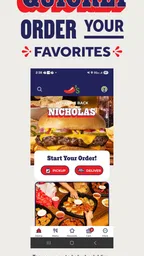
When I’m deciding whether to use a restaurant app, I want it to make the useful parts of planning a meal simpler: choosing a nearby location, checking what’s on the menu, and arranging food for the occasion. Chilis is focused on those practical jobs for people who already have a reason to visit or order from Chili’s. It is a free lifestyle app from Brinker International, and I’d treat it as a convenient companion to the restaurant rather than a general dining guide.
What matters when choosing it
The key question is whether you expect to use Chili’s specifically. If you do, having the restaurant search, menu browsing, and ordering options together can save the small but annoying step of switching between a search app, a menu page, and a way to place an order. If you are still choosing among many restaurants, a broader dining or map app is usually a better first stop.
I’d also think about how you normally get your food. The app is relevant whether you want to plan a pickup or look into delivery, but those are different situations: pickup gives you more control over when you collect a meal, while delivery is useful when leaving home is inconvenient. The app’s value depends less on how often you use restaurant apps in general and more on whether Chili’s is already in your rotation.
The app has a 4.2 average from around 43,000 ratings, with more than five million installs. That suggests it has reached a substantial audience, but ratings alone don’t tell me whether a particular restaurant is convenient or whether ordering will suit a particular meal. I’d use it to plan and then check the details for the location and order I actually need.
Finding a restaurant before committing
One useful habit is to search for a location before deciding what to order. A restaurant that looks convenient on a map may not be the right stop for a particular trip, so I’d check the location first and then browse the menu with that destination in mind. This avoids building a plan around a restaurant that turns out to be out of the way.
This is especially handy when meeting someone or choosing food during a busy day. I can use the location search to narrow down the practical option, then look through the menu without having to make the decision at the counter. For a familiar chain, that small bit of preparation can matter more than a long list of extra app features.
Browsing with a purpose
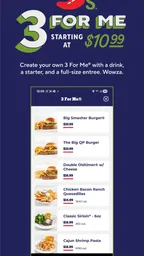
Menu browsing is most helpful when I use it to answer a specific question: what kind of meal fits the group, what sounds good today, or whether I want to order before I arrive? Looking through options in advance gives me time to compare choices at my own pace rather than holding up a line or making a rushed decision with other people waiting.
A practical tip is to settle the basics before starting an order: the location, whether the meal is for pickup or delivery, and what everyone wants. That sequence keeps the app’s core tasks in a sensible order. If I start by browsing casually and only later figure out where the food should go, I can end up repeating part of the process.
When ordering is the real advantage
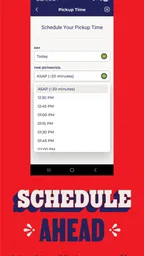
For a planned pickup, I’d use the app when I already know which Chili’s I want and would rather arrange the meal before reaching the restaurant. It can make a busy evening easier: for example, after work I can check a location, look over the menu, and place an order for the trip home instead of deciding everything at the last minute.
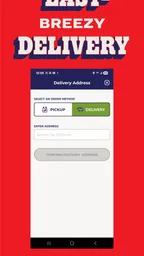
Delivery is the other useful case, particularly when going out is awkward or inconvenient. I’d still start by confirming that the location and the order type fit my situation, rather than assuming every restaurant-related option works the same way in every circumstance. The app brings the choice into one place, but the best option still depends on where I am and how I want to receive the meal.
Where this app has an edge
Its strongest advantage is focus. Instead of asking a general restaurant app to help me discover every possible place to eat, this one is designed around Chili’s: find a restaurant, inspect the menu, and arrange pickup or delivery. That makes it more direct when the restaurant is already part of the plan.
It can also help with group decisions. I’d browse the menu before meeting friends or family, then use that time to agree on the kind of meal everyone wants. This is a more useful workflow than opening an app only once everyone is ready to order, especially when preferences differ and nobody wants to choose under time pressure.
There’s a less obvious benefit to separating location choice from food choice. I can first decide which restaurant makes sense for the route, then consider the menu for that specific stop. That’s a better way to plan than picking a meal first and discovering later that the restaurant is inconvenient. It is a small workflow improvement, but one that can prevent avoidable detours.
Where another option may fit better
If I’m not set on Chili’s, a general map or restaurant-discovery app is the more natural starting point. Those tools are better suited to comparing different places or deciding what kind of food I want. This app is narrower by design, so it shouldn’t replace a broader search when the important question is “Where should we eat?” rather than “Which Chili’s should we use?”
Likewise, someone who prefers to order from multiple restaurants in one place may find a multi-restaurant ordering service more convenient. The trade-off is that a single-restaurant app keeps the experience centered on Chili’s, while a broad ordering app is better for comparing alternatives. I’d choose based on the decision I’m making, not assume one tool needs to cover both jobs.
The app is also less compelling if I rarely visit Chili’s and only want occasional restaurant ideas. In that case, installing a dedicated app may add little to my routine; looking up a location when needed may be enough. It is most worthwhile for someone who expects to check the menu or arrange a meal more than once in a while.
What to expect from setup and regular use
The app is free and is rated for Everyone, so the basic decision to try it is straightforward. It first appeared on December 15, 2011, and its current version is 9.2.5; it requires operating system version 7.0 or later. I’d still check that my device can run it before relying on it for a meal, particularly if I use an older phone.
As with any restaurant app, convenience depends on the order matching the real plan. Before completing an order, I’d review the selected location and whether I chose pickup or delivery. Those checks are easy to overlook when ordering in a hurry, but they are the details most likely to matter once the meal is underway.
Switching to the app doesn’t require changing how I eat at Chili’s. I can still decide in person when that is easier; the app is an extra route for people who want to plan ahead. That low commitment is a strength: I can use it for a menu check or a particular pickup without making it the center of every restaurant decision.
My recommendation for the right kind of diner
I’d recommend Chilis to people who already choose Chili’s often enough to benefit from having restaurant search, menu browsing, and ordering in one place. It is particularly useful when I want to make a decision before arriving, coordinate a group meal, or arrange pickup or delivery without starting from a broad search for restaurants.
I would skip it as a primary dining app if I’m mainly comparing unrelated restaurants, or if Chili’s is only an occasional possibility. A general map or multi-restaurant service will fit those habits better. The clearest way to judge this app is to ask whether Chili’s is already a likely choice: if it is, this focused tool can make the next meal easier to organize; if it isn’t, its narrower purpose may not earn a regular place on the phone.
What we like
- Browse the menu and check prices before visiting.
- Find nearby locations using the restaurant locator.
- Order eligible items for pickup or delivery.
- Join My Chili’s Rewards to earn points on qualifying purchases.
- Customize many menu items to suit your preferences.
What could be better
- Rewards and ordering features may vary by location.
- Delivery availability depends on your address.
- Menu prices can differ between restaurants.
- Some app features may require an account.
- Promotions may have exclusions or expiration dates.





