

Cars & Bids review
 Analysis by Appsdrops
I’d consider Cars & Bids if I were looking for a car with enthusiast appeal rather than simply the cheapest way to get from A to B. The app is built around automotive auctions, so its value is less about browsing an endless general marketplace and more about finding a vehicle that attracts knowledgeable buyers and sellers. That focus is refreshing, but it also means a first-time user should arrive with a plan: the excitement of a listing is no substitute for checking whether the car and the auction terms suit your budget.
Cars & Bids is a free Auto & Vehicles app from Cars & Bids, LLC. It has a 4.8 average from around 800 ratings, and more than 50,000 installs. Those figures suggest an established audience, though they don’t tell you whether any particular car is right for you. The app is rated for Everyone, runs on Android 10 or later, and its current version is 26.9. I’d treat it as a focused tool for exploring enthusiast-car auctions, not a general-purpose vehicle finder.
What to expect from an enthusiast auction app
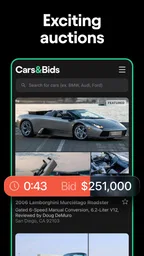
The first useful distinction is between browsing cars and shopping for ordinary transportation. On a broad classifieds service, I might filter for a practical body style, a nearby seller, and a price range, then compare a large number of routine options. Cars & Bids is aimed at people who care about the character of a vehicle: its model, condition, history, and appeal to other enthusiasts. That narrower audience can make browsing more rewarding when I have a particular kind of car in mind.
It also changes how I would judge a listing. A striking photo or an unusual specification may draw me in, but the purchase decision should rest on the full listing and the questions that remain after reading it. I would look for details that matter to the exact car, note any unclear points, and avoid assuming that a lively auction means the vehicle has been independently inspected or that every risk has disappeared. An auction creates a deadline; it does not make due diligence optional.
For someone who enjoys researching cars even without an immediate plan to buy, the app can serve as a way to follow the market and learn what kinds of vehicles are appearing. That is a different use from opening it only when a daily driver fails. If I’m after a dependable, ordinary commuter and have no interest in auction timing or enthusiast models, a conventional dealer or classifieds app may be a more direct fit.
Set up around a real buying goal
On a first visit, I’d keep setup simple. Before spending time scrolling, I’d decide whether I’m browsing for enjoyment, researching a specific model, or seriously considering a purchase. That small distinction prevents a common mistake: treating every appealing listing as a candidate. If I’m shopping, I’d write down my acceptable budget and the questions that would make me walk away, then use those as a personal checklist while viewing cars.
I’d also make a short list of the models or types I genuinely want to understand. Enthusiast auctions can be absorbing, and an attractive car can pull attention away from practical constraints such as intended use, maintenance tolerance, or whether I can arrange a proper inspection. A clear shortlist helps me compare like with like instead of letting the latest interesting listing reset my priorities.
Before taking any consequential step, I’d read the relevant instructions in the app carefully. Auction participation can involve commitments and timing that are different from contacting a seller through a standard classified listing. I would not assume that installing the app, creating an account, or viewing a car means I’m ready to bid. The calmest approach is to understand what the app asks of a participant before treating a listing as a purchase opportunity.
Make the first useful action a careful comparison
A reassuring first success does not need to be winning a car. I’d choose one listing that interests me and turn it into a small research exercise: identify what I like about it, note what the listing clearly explains, and separate those facts from questions I still need answered. Then I’d compare it with another example of the same general kind of vehicle, rather than comparing it with a completely different car just because the photos look appealing.
This workflow is especially useful for a first-time bidder. It makes the app helpful before any money is at stake and exposes whether my interest is serious or simply momentary. If I can’t explain why this particular car suits me, or I haven’t thought through what I’d do after a successful bid, I’m not ready to participate. Saving that realization for the browsing stage is much better than discovering it under auction pressure.
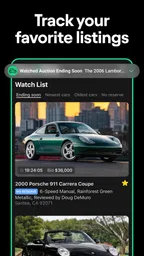
For a more grounded decision, I’d keep a separate note with the listing’s key details and my unresolved questions. That is a practical safeguard when I’m looking at several cars over multiple sessions: memory tends to preserve the paint color and forget the caveat that mattered. I’d revisit the listing before acting and verify that the points I care about are still clear. This simple habit turns casual browsing into useful research without pretending the app can make the decision for me.
Where first-time users can get confused
The biggest adjustment is understanding that an auction listing is not the same as a typical “contact seller and negotiate” post. The pace and structure can make a car feel like a limited-time opportunity, but urgency is not evidence that it is a good purchase. I’d avoid bidding simply because other people are interested or because the end of an auction is approaching. A personal ceiling, decided before the final moments, is more reliable than trying to calculate affordability while emotions are running high.
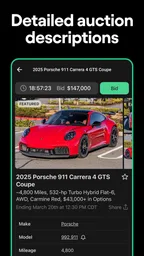
Another point of confusion is what a detailed listing can and cannot establish. Written information and images can help me assess a car, but they are not a substitute for resolving important uncertainties. If a particular mechanical, title, or ownership question would change my decision, I’d seek a clear answer before committing rather than filling the gap with optimistic assumptions. The right level of checking depends on the vehicle and the stakes; the app should be one part of that process, not the whole process.
I’d also distinguish between watching an auction and being prepared to buy. Browsing is low pressure, while bidding can create real obligations under the platform’s terms. A first-time user should read those terms and understand the practical next steps before participating, including how they would handle payment, transport, and any inspection arrangements. Those details matter especially when a car is not local or when the buyer has limited experience arranging a vehicle purchase.
Who will enjoy it, and who may prefer another route
I think the app is best for people who enjoy researching cars and can be patient about finding the right one. It makes sense for an enthusiast who has a model in mind, a collector comparing interesting examples, or a curious shopper who wants to follow auction activity before making a decision. Its focused audience is a strength when the vehicles and community fit what I’m looking for.
It is less compelling if my only priorities are the lowest price, a nearby car, or a quick purchase with familiar dealership support. A general classifieds app may offer a broader mix of everyday vehicles, while a dealer may be more suitable for someone who wants a conventional buying process. I would also skip auction participation if I’m not comfortable setting a firm limit, researching a vehicle independently, or dealing with the logistics that can follow a sale.
There is a trade-off in the enthusiast focus, too. A car that feels special to one buyer may be too niche for another, and emotional appeal can make it easy to overvalue a rare-looking specification. I’d ask whether I want the car itself or just the excitement of seeing it in an auction. If the answer is mostly the latter, following listings without bidding is a perfectly sensible way to use the app.
Turn browsing into a sensible next step
For an everyday scenario, imagine I’m considering a weekend car but have not bought through an auction before. I’d browse a few listings to learn what types of vehicles catch my attention, then narrow the search to one model family or use case. I’d compare examples, record questions, and decide what condition or history concerns would rule a car out. Only after that would I read the participation requirements and decide whether an auction is a sensible way for me to buy.
If I find a serious candidate, I’d slow down rather than speed up. I’d review the listing again, resolve material questions, make sure the total commitment fits my finances, and think through collection or transport. If any of those steps is uncertain, I’d wait or look elsewhere. That is not a failure to use the app well; it is a sign that the research is doing its job.
My overall view is that Cars & Bids is worth trying if enthusiast vehicles are the point, not just a means of getting around. Its free access makes it easy to explore, and the focused auction setting can be more engaging than broad vehicle listings for the right shopper. I’d recommend starting with observation and comparison, then moving toward bidding only when I understand the car, the process, and my own limit. For a first-time user, that measured path is the most useful feature of all: the app can help you discover what you want, while leaving the final judgment where it belongs—with you.
What we like
- Listings focus on enthusiast and collector vehicles.
- Auction format gives buyers a clear bidding deadline.
- Seller descriptions often include detailed vehicle history.
- Saved searches help track cars that match your interests.
- Bidding activity can make market interest easy to gauge.
What could be better
- Auction timing may not suit buyers who need more time.
- Winning bids can rise beyond a buyer's planned budget.
- Vehicle condition and history still require independent checks.
- Some listings may be far from your location.
- A successful bid can create a binding purchase commitment.





