






CarParts.com review
 Analysis by Appsdrops
When I need a replacement part, the hard part is often not finding something that looks right; it is working out whether it will actually fit my vehicle. CarParts.com puts that compatibility question at the center of its appeal. It is a free automotive shopping app from Carparts, and its focus on matching parts to a vehicle makes it more useful than a general marketplace when I want to narrow a search before comparing options.
Why fitment matters more than a huge catalog
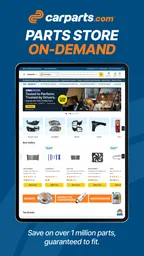
The app is built around shopping for auto parts, with a catalog described as containing more than a million items. That breadth is valuable only if it helps me reach parts relevant to my car, and the promise of guaranteed fitment is the point I would pay closest attention to. A large catalog without vehicle matching can create more uncertainty; a fitment-focused search can help turn a vague hunt into a shorter list worth checking.
In my view, this is the right starting point for people who already know what they need in broad terms but are unsure which version belongs on their vehicle. It may be a replacement component after wear, damage, or a routine repair. Rather than browsing generic listings and trying to infer compatibility from photos, I can use the app as a focused shopping route for parts intended for a particular vehicle.
That does not make fitment a substitute for careful buying. Vehicle details matter, and parts with similar names can differ by configuration or application. I would treat a compatibility match as a helpful filter, then read the item information closely before ordering. The useful distinction is that the app aims to reduce the chance of browsing irrelevant parts, not remove the need to confirm that a listing suits the job I have in mind.
How the fitment-first approach helps
In everyday use, vehicle matching is most valuable before I have settled on a particular product. If I am replacing a part and only know its common name, a broad search can return choices that look nearly identical. Starting with the vehicle gives the search a more practical frame: I can focus on options associated with my car instead of trying to compare every result in the wider parts market.
A small but worthwhile habit is to get the vehicle information ready before searching. I would check the exact model details from the car’s documents or another reliable source, especially if I am buying for a family member’s vehicle or a car I do not drive often. This avoids choosing based on a casual description such as “the same model as mine,” which may not be precise enough for a fitment-sensitive purchase.
I would also separate identifying the part from choosing the listing. First, I would use the app to narrow the catalog around the vehicle and the part category. Then I would compare the product description and any visible compatibility details against the repair need. That two-step approach is more reliable than searching a part name, seeing a plausible result, and treating the first match as automatically correct.
The app is especially handy as a research tool even when I am not ready to buy immediately. I can use a focused search to understand what kinds of replacement options appear for my vehicle, then pause to check the repair plan or ask a mechanic a more informed question. For a DIY owner, that can make the next conversation less vague: instead of asking only “Which part do I need?”, I can discuss a specific type of replacement and verify the fit before spending money.
A realistic repair-shopping situation
Imagine noticing that a component needs replacing shortly before a weekend repair. I would open CarParts.com, identify the vehicle carefully, and look for the relevant part rather than jumping between unrelated shopping results. Once I had a short list, I would compare the descriptions and confirm that the choice fits the repair I am planning. If I were still uncertain about the exact part, I would stop there and verify it with a trusted repair guide or mechanic instead of guessing.
That workflow is less about tapping through an app quickly and more about avoiding a costly mistake. Ordering the wrong component can waste time even when returning or replacing it is possible, because the repair may be delayed and the vehicle may remain unusable. A fitment-oriented search is therefore most useful when I treat it as an early checkpoint: it helps me narrow the field before I commit, while leaving room for a human double-check where the repair is complicated.
There is another practical advantage to keeping the search organized around one vehicle. If I am helping a relative, shopping for a second car, or dealing with a vehicle I do not know well, I would avoid switching between searches without noting which car each result belongs to. Confirming the vehicle before each search is a simple safeguard against carrying the wrong assumption into the order.
Where I would still slow down
The app’s central strength also sets a boundary: fitment is only as useful as the vehicle information and product details I provide and review. I would not buy a safety-critical or technically complex part based solely on a quick search result. If the repair depends on a specific trim, engine, production variation, or specialist diagnosis, I would verify those details independently and consult a professional when needed.
Another tradeoff is that shopping for parts is not the same as diagnosing a problem. A noise, warning light, or change in how a car drives may have several possible causes. Finding a compatible replacement does not prove that the selected part is the source of the issue. I would use the app after I have a reasonable diagnosis, not as a replacement for one.
Compared with a general online marketplace, a dedicated parts app can offer a more relevant path into the catalog because the vehicle is central to the search. A local parts counter may be the better option when I want to explain a symptom, ask follow-up questions, or have someone help identify a component in person. A mechanic is the stronger choice when the repair itself is beyond my experience. CarParts.com makes the most sense between those extremes: it supports focused product research and shopping, but it cannot inspect the vehicle or decide what has failed.
I would also avoid treating a broad catalog as a reason to buy more than I need. When several products appear suitable, I would compare the actual listing details and keep the repair goal in view. The sensible purchase is not necessarily the one that appears first or the one with the most familiar name; it is the one that matches the vehicle and the job. Taking a moment to check that relationship is a better use of the app than browsing endlessly.
Who is likely to get the most from it
I think the best fit is a car owner who is comfortable researching a repair, wants to shop for replacement parts, and values vehicle-specific filtering. It can also help someone who is preparing for a mechanic visit and wants to understand the range of parts associated with a repair. The app is free, so it is easy to try as a search and comparison tool before deciding whether it belongs in a regular maintenance routine.
It may be less useful for someone who expects an app to diagnose a fault, explain a full repair procedure, or replace advice from a parts specialist. If I do not know what has failed, I would start with diagnosis. If I need a part immediately and want a person to check the selection face to face, a local supplier may suit me better. And if a repair is unfamiliar or safety-sensitive, I would involve a qualified mechanic rather than relying on a shopping search alone.
The app has an average rating of 4.7 from around 20,000 ratings, alongside roughly 1,500 written reviews, and it has passed 500,000 installs. Those figures suggest that many people have tried it, but I would still judge it by whether its vehicle-focused shopping process suits my own task. Its Everyone age rating makes it broadly accessible, while the current version is 1.0.10 and supports Android 7.0 or later.
Overall, I would recommend CarParts.com to a friend who already has a likely repair in mind and wants a more targeted way to look for the matching part. Its fitment-centered approach can save effort at the start of a search, provided I enter vehicle details carefully and inspect the product information before ordering. The main caution is simple: compatibility filtering helps with selection, but it does not diagnose a car or guarantee that I have identified the right repair. Used with that distinction in mind, it is a practical automotive shopping app rather than a substitute for mechanical advice.
My recommendation: use CarParts.com to narrow and compare parts for a known vehicle, then verify the exact match before purchase. If your main need is diagnosis, hands-on guidance, or urgent specialist help, start with a mechanic or local parts expert instead.
What we like
- Search by vehicle details helps narrow down compatible parts.
- Product listings include fitment information for many vehicles.
- The app makes it easy to browse a wide range of car parts.
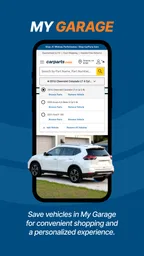
- Saved vehicle details can simplify future product searches.
- Order tracking helps you follow purchases after checkout.
What could be better
- Compatibility details may not cover every vehicle trim.
- Some parts may be unavailable for local delivery.
- Shipping costs can increase the final purchase price.
- Returns may require extra time and effort to arrange.
- Product photos may not show every detail of a part.





