

Car Play Connect for Android review
 Analysis by Appsdrops
I can see the appeal of bringing a phone’s maps, calls, music, and car information onto a car display. The harder question is whether that convenience becomes part of a routine or feels like one more connection to manage. Car Play Connect is an Auto & Vehicles app from LeoStudio Global Ltd. that aims to make the phone-to-car link more useful, though the value depends on how well it fits your existing setup and habits.
What feels useful in the first week
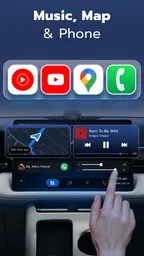
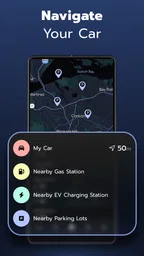
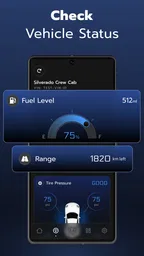
The first few drives are where the idea is easiest to appreciate. Instead of switching between phone apps before setting off, you can use a car-oriented display for navigation, calls, music, and car status. That can make a familiar commute feel tidier, especially if your car screen is basic or you want a more unified view of the things you check while driving.
I’d treat the initial setup as a short test, not assume that every car and phone combination will behave identically. Connect the phone while parked, check that the display is readable from the driver’s seat, and try each function you actually expect to use. A map that looks fine while stationary may be less comfortable to glance at on a bright road, and a music control is only useful if it works with your normal listening routine.
A practical first-week test is to use the app on one ordinary route rather than a long trip. Start navigation before moving, make sure audio behaves as expected, and see whether incoming calls are easy to handle without hunting through menus. This reveals more than tapping through the interface at home: the important question is whether the setup reduces distraction rather than merely moving familiar phone tasks onto another screen.
The app is free to install and is rated for Everyone. It has a 4.3 average from around 4.1 thousand ratings, with over 100 thousand installs. Those figures suggest that people have given it a meaningful try, but they cannot tell me whether it will suit a particular vehicle. Compatibility and the quality of the car display remain central to the experience.
Make the first connection a deliberate one
Before relying on it for a route, connect while parked and confirm what the display actually shows. Try a short destination, then test music and a call with the car safely stationary. If something is unclear, change one part of the setup at a time; otherwise it is difficult to tell whether a problem comes from the phone, the vehicle, or the app.
One useful habit is to decide in advance which jobs belong on the car display. Navigation and a quick call may be enough. If you try to manage every phone task through the in-car interface, the screen can become another source of attention rather than a calmer alternative. I’d keep the phone’s role simple and use the car display only for tasks that genuinely benefit from being visible there.
Does the convenience survive month to month?
The strongest case for this kind of app is repetition. If you make the same commute, regularly need directions to unfamiliar places, or want calls and music available in one car-focused place, small savings in attention can add up. The app’s value is not that it makes driving new; it is whether it removes a few annoying steps each time you set off.
It may be especially useful in a car where the built-in system feels limited, provided the phone connection and display work reliably. Compared with using separate phone apps, a combined car view can reduce switching. Compared with a well-integrated system already built into the vehicle, however, it has to earn its place by being simpler or more useful. If your car already handles navigation, calls, and media smoothly, another layer may bring little lasting benefit.
For a realistic example, imagine a weekly drive to a place you do not know well. You can set the destination before leaving, keep directions visible, and use the same setup for music or a call when appropriate. The useful detail is to prepare the route while parked and avoid adjusting options mid-journey. That workflow makes the phone-to-car connection serve the trip instead of turning every drive into a screen-management session.
Car Play Connect is at version 3.2.6, and it requires Android 8.0 or later. That gives prospective users a straightforward compatibility check: confirm the phone meets the minimum requirement, then test the app with the actual car display rather than assuming that a supported Android version guarantees a smooth connection. The developer is LeoStudio Global Ltd., and the app sits within the practical, utility-focused side of vehicle apps rather than being a navigation service by itself.
The upkeep that can make or break the habit
Any phone-based car setup asks for a little maintenance. Keep the phone charged, connect it before driving, and occasionally check that the display and audio are behaving the way you expect. If you change phones or cars, repeat the parked setup test rather than trusting an old routine to transfer perfectly. These are modest tasks, but they matter because a connection that fails at the start of a rushed trip quickly loses its appeal.
I’d also avoid treating the app as a replacement for careful driving. A larger display does not make browsing safe, and the convenience of having several functions together can tempt you to do too much at once. Set a destination and choose audio before moving; handle anything that needs attention after pulling over. The best version of this setup is the one that leaves you with fewer reasons to touch the screen on the road.
In-app purchases range from $4.99 to $99.99 per item. That is worth keeping in mind before spending: first establish whether the basic connection is useful in your car and whether you will use it regularly. I would not pay for extras simply because the app is installed. A recurring-use tool should prove that it solves a recurring problem before it earns more of your budget.
Where the routine can become tiring
The main friction is dependence on a chain of devices. The phone, car display, connection, and app all have to cooperate. If you only drive occasionally, or your built-in system already does what you need, the effort of connecting and checking another setup may outweigh the convenience. The same is true if you prefer a dedicated navigation unit or a car system that works without relying on your phone.
There is also a difference between having several functions in one place and having them all work equally well for your personal routine. You might value navigation but rarely use the car display for calls, or prefer the controls in your usual music app. In that case, focus on the function that matters most and judge the app on that. A broad feature set is not automatically a reason to keep an app if only one part fits your day.
Another source of fatigue is checking the setup too often. If you find yourself repeatedly confirming the connection, changing the display, or reaching for the phone, the arrangement is not simplifying the drive. Try a consistent pre-drive sequence—connect, set the destination, select audio, then put the phone aside. If that still feels cumbersome after several normal trips, a vehicle’s native system or a simpler phone mount may be a better match.
Who should keep it, and who should move on
I’d consider keeping Car Play Connect if your car’s display is limited, you routinely use navigation and media together, and the connection behaves consistently enough to become automatic. It is also worth trying if you want a single car-focused place for common phone tasks without immediately replacing your vehicle’s setup. Its free entry point makes that first test easy, while the in-app purchases make it sensible to be selective about spending.
I’d skip it if your car already offers a dependable integrated experience, if you rarely need directions or calls on the display, or if connecting the phone becomes a chore. Drivers who want a dedicated navigation device may prefer that option for a simpler, separate setup. And if your vehicle’s display or connection is the weak link, no app can turn that into a reliably comfortable experience by itself.
My long-term verdict is practical rather than enthusiastic: this app earns space when it becomes part of a calm pre-drive routine, not just because its first impression is appealing. Give it a week of ordinary trips, pay attention to whether it saves effort, and avoid buying extras until you know what you use. With 467 reviews and an Everyone age rating, it has a substantial audience, but the right decision still comes down to your car, your phone, and whether the connection keeps making everyday driving simpler.
What we like
- Connects a compatible Android phone to supported car infotainment systems.
- Can make navigation apps easier to view while driving.
- Voice controls can reduce the need to handle the phone.
- Offers a familiar interface for accessing selected phone features.
- May provide a convenient alternative to replacing older car hardware.
What could be better
- Compatibility depends on the car and phone model.
- Some features may require a paid upgrade.
- Connection issues can interrupt use in the car.
- A stable connection may depend on the cable or wireless setup.
- It is not an official Apple CarPlay app for Android.





