Car Play Connect Auto Sync review
 Analysis by Appsdrops
Car Play Connect Auto Sync is aimed at drivers who want their Android phone and car display to work together with less fuss. I’d approach it as a connection tool rather than a replacement for a car’s built-in system: its value depends on whether your phone, vehicle, and preferred driving setup cooperate. That distinction matters, because a wireless dashboard can make a familiar journey smoother, but it cannot make an incompatible car compatible by itself.
What to expect from a wireless car connection
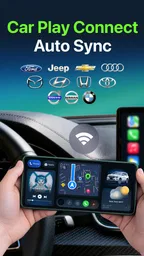
In the Auto & Vehicles category, the app is developed by MONIQ TAP., CO LTD. Its central idea is straightforward: help connect an Android phone to a car display and make that connection easier to repeat. The name may suggest a broad Apple CarPlay experience, but the short description identifies the product as “Car Play,” while its stated focus is Android. I would check that distinction carefully before installing if you specifically need an iPhone-based setup.
The app is free to download and is rated for Everyone. Its current version is 2.5, and it requires Android 8.0 or later. It has an average rating of 4.4 from around 19,000 ratings, with more than a million installs. Those figures suggest that many people have tried it, but they don’t tell me whether it will work with a particular head unit. Compatibility is still the practical question to settle first.
The trust question is also worth keeping in view. A phone-to-car connection happens in a personal setting: the phone may contain contacts, navigation destinations, messages, and other information a driver would not want to expose casually. I would not assume that a dashboard connection necessarily grants access to all of those things, or that it grants access to none. Before relying on the app, I’d pay attention to the permission prompts Android actually shows and decide whether each requested access makes sense for the function I want.
Check compatibility before changing your routine
My first step would be to verify that the car’s screen or receiver supports the kind of Android connection the app is intended to facilitate. A phone app cannot substitute for missing hardware or an unsupported connection method. If your car already has a native Android-compatible interface, this app may be useful as a connection layer; if the car only has a basic display, the app alone should not be expected to turn it into a full smart dashboard.
I’d also confirm that the phone is running Android 8.0 or newer and that the car’s own connection instructions are available. Pairing problems are often easier to diagnose when you know which part is responsible: phone settings, the car’s receiver, a cable, or the app. Trying to set up everything at once can make a simple mismatch look like an app failure.
A useful first-run routine is to keep the car parked, open the app, and follow the vehicle’s normal connection process rather than experimenting while driving. If the connection fails, change one thing at a time: check the phone’s connection settings, inspect the car’s input selection, then retry the app. This is not a hidden feature; it is a practical way to avoid losing track of which change helped.
Where the app can help in everyday driving
Imagine leaving for work on a rainy morning. You get into a car you use regularly, start the vehicle, and want the phone connection ready before pulling away. A tool built around auto connection can be appealing in that moment because it aims to reduce repeated setup. The benefit is not a dramatic new driving capability; it is less fiddling with menus when your attention should be on the road.
That convenience is most useful for drivers who make frequent short trips or regularly move between the same phone and car. If you have to reconnect manually every time, even a small reduction in setup friction can make a difference. On the other hand, if you only connect a phone occasionally, or your vehicle already reconnects reliably on its own, installing another app may add little value.
I would treat automatic connection as a convenience to verify, not a guarantee. Test it over several ordinary starts while parked safely, including a phone restart or a brief disconnect if that reflects your normal routine. If it behaves inconsistently, a manual connection may be more predictable than building your departure routine around an automation that sometimes misses.
Permissions, privacy, and moments to pause
Car connectivity can bring sensitive information close to a shared screen. Before approving any permission, I’d ask what the app needs for the specific task I’m trying to use. A request that appears while setting up a connection deserves a deliberate look, especially if the phone is used by other people or contains work contacts and private destinations.
Android’s permission controls give users a way to review and change access at the system level. I’d use those controls rather than tapping through prompts just to get to the dashboard. If a permission is optional for the way I use the app, denying it may be a reasonable choice; if denying it prevents the connection I need, I’d weigh that trade-off before continuing. The important point is to make the choice consciously, not to infer a privacy promise from the app’s purpose.
There is a difference between seeing a permission prompt and understanding a developer’s broader data practices. I wouldn’t treat the prompt alone as a complete account of what happens to information, and I wouldn’t assume that a connection app collects or shares particular data without evidence. For a cautious setup, I’d review the app’s privacy information in the app store, keep Android and the app updated, and avoid granting access that does not fit my intended use.
Shared vehicles create another data-sensitive situation. If someone else will use the same car screen, consider what may remain visible after a trip and whether the phone is paired in a way you are comfortable with. Disconnecting when you no longer need the setup and reviewing the car’s saved-device list are sensible habits. Those steps are useful regardless of whether the app’s automatic connection works perfectly.
Control the setup instead of surrendering it
I’d begin with the smallest setup that lets me test the core connection. Connect the phone while parked, check which Android prompts appear, and see how the car behaves on the next start. That gives you a clear baseline before adding permissions or changing several phone settings. If something feels unnecessary, pause and decide whether the lost convenience is worth the access being requested.
It is also worth deciding in advance how you want the system to behave when another person is driving. A phone that reconnects automatically may be convenient for its owner but awkward in a shared car. If the vehicle allows saved devices to be managed, remove or disable connections you no longer use. If the app or Android presents a way to stop its access, learn where that control is before you need it in a hurry.
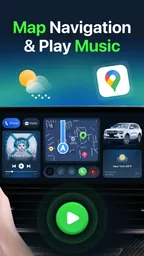
For navigation and audio, compare the experience with what your car already offers. A built-in system may be the better choice if it connects consistently and requires fewer permissions or fewer steps. A direct cable connection may be preferable if wireless pairing is unreliable or if you want a more predictable link. Car Play Connect Auto Sync makes most sense when your existing setup is compatible but the repeated connection process is the part you want to improve.
Costs, alternatives, and who should pass
The download is free, but the app also offers in-app purchases ranging from $4.99 to $79.99 per item. I’d test the basic connection before paying for anything and check what a purchase actually unlocks in the app. A wide price range makes it especially important not to assume that every feature is included in the free version or that an upgrade is necessary for ordinary use.
If you already have a stable manufacturer-provided connection, I’d stick with it unless this app solves a specific irritation. If your phone is an iPhone and your main goal is Apple CarPlay, I’d choose an option designed for that platform instead of relying on a name that could be read as a promise of iOS support. And if your vehicle has no compatible smart-display hardware, investigate the hardware requirements before expecting an app install to provide them.
The strongest reason to try this app is a clear, modest one: you have an Android phone, a compatible car setup, and repeated connection steps that you want to simplify. Its audience size and 4.4 average rating make it a familiar option, but neither can replace your own compatibility test. MONIQ TAP., CO LTD has made a free entry point available, while purchases are there for users who decide they need more after understanding the app.
A cautious recommendation for the right driver
I’d recommend giving Car Play Connect Auto Sync a careful trial if you want an easier Android-to-car connection and are comfortable checking permissions as they appear. Set it up while parked, test reconnecting on a few normal trips, and keep an eye on whether the app actually saves time in your car. If it does, the convenience may justify keeping it in your routine.
I would skip it if you need a guaranteed solution for unsupported hardware, want an iPhone-first CarPlay tool, or prefer not to add another app to an already reliable system. My overall view is cautiously positive: the idea is practical, the free download lowers the barrier to testing, and the main decision is whether it works with your particular vehicle without asking for access you do not want to grant. Let that real-world fit—not the promise of automatic connection alone—guide your choice.
What we like
- Connects your phone to compatible car displays for easier access.
- Can make familiar mobile features easier to use while driving.
- A simple interface can help reduce time spent navigating menus.
- Wireless connection may be available on supported devices and cars.
- Useful for drivers who want phone connectivity in their vehicle.
What could be better
- Features depend on your car and phone supporting the required connection.
- Wireless use may drain your phone battery faster.
- Connection setup can vary between vehicle models.
- Some functions may require a stable internet connection.
- The app cannot add CarPlay support to an incompatible vehicle.





