

Camy — Live Video CCTV review
 Analysis by Appsdrops
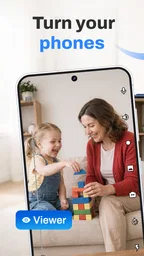
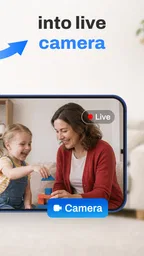
Turning spare phones into a way to keep an eye on home sounds simple, but a useful surveillance app also needs to be understandable and manageable in everyday life. Camy is built around that idea: it turns phones into a live-stream video surveillance system. I find that premise appealing because it gives an existing device a practical job, rather than requiring a dedicated camera as the starting point. Whether it feels comfortable to use, though, depends on more than the central feature. Clear navigation, readable information, and the realities of using a phone in different situations all matter.
How Camy fits into a home-monitoring routine
At its core, Camy is a home and household app for viewing a live video stream from a phone used for surveillance. That direct purpose makes it easier to understand than an app that tries to cover several unrelated tasks. I can picture setting up a phone to watch a room while I’m elsewhere, then checking the stream when I want a visual sense of what is happening. The appeal is practical, especially for someone who already has an extra phone available.
The app is free to install, with optional in-app purchases listed from $0.99 to $99.99 per item. It has a 4.6 average from around 33 thousand ratings, and more than a million installs. Those figures suggest that many people have tried it, though popularity alone cannot tell me whether its interface will suit every household or user. Its content rating is Everyone, and it is developed by Prometheus Interactive LLC.
For a home-monitoring tool, a focused purpose can support inclusivity: users do not need to learn a complicated set of unrelated concepts before understanding why the app exists. Still, a simple premise is only the first step. The quality of the experience also rests on how easily someone can find the important controls, make sense of the live view, and use the app under the conditions they actually face at home.
Readability and finding your way around
When I consider readability, I look for more than text size. People may be using a monitoring app while moving around, in a hurry, or with limited attention. Clear labels and a predictable layout can make the difference between feeling in control and having to stop to work out what a button does. Camy’s single central job gives it a natural opportunity to keep the experience straightforward, but the usefulness of that simplicity depends on how the interface presents the viewing and device roles.
A live camera view is inherently visual, which can be convenient for users who prefer seeing a room rather than interpreting a string of status messages. At the same time, visual information is not equally accessible to everyone. Someone with low vision may find it harder to inspect details in a video, while a person with hearing loss may not notice an audio cue if the app uses one. I would approach Camy as a visual monitoring option, not as a complete substitute for every other kind of home alert or check-in.
In an inclusive interface, important actions should be easy to distinguish from secondary options, and the app should avoid relying on color alone to communicate a state. Those are useful qualities to look for when trying Camy, especially if a household member has low vision or color-vision differences. I wouldn’t assume that a camera feed is self-explanatory in every circumstance: lighting, distance, and the amount of motion in a room can all affect how easy it is to interpret what is on screen.
Motor and sensory considerations
Using any phone app involves physical interaction, and home monitoring can become less comfortable if it demands frequent tapping or precise gestures. Someone with reduced dexterity, tremors, or pain in their hands may prefer an experience where the key task can be completed with a small number of deliberate actions. For Camy, I would pay attention to how comfortably I can switch between the phone being watched and the phone used to view the stream, and whether the controls feel easy to reach and identify.
People who use built-in accessibility tools on their phones may also want to check how the app behaves with their preferred text settings, screen reader, or other interaction options. I can’t treat the app’s core video function as proof that every control is accessible through those tools. A live image may be useful to someone who can see it clearly, but it will not provide the same information to a blind user unless the surrounding experience offers meaningful alternatives. That distinction is worth considering before relying on video monitoring as the only way to check a space.
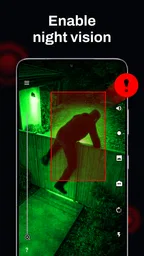
Sensory needs vary widely. A quiet, uncluttered screen may be easier for someone who is easily distracted, while another person may benefit from explicit feedback that confirms an action has worked. The most comfortable arrangement is also affected by the room itself: a bright window, a dark corner, or a busy background can make a live view harder to scan. I’d test the app in the actual setting where it will be used, rather than judging the experience only in a calm, well-lit room.
There is also a difference between watching a stream and being alerted to a change. Camy’s stated purpose is live video surveillance, so I would not assume that it replaces a dedicated alarm, a doorbell, or another safety system. For users who cannot keep a screen in view, a live stream may be less useful unless their broader routine includes a way to check it at the right time. Matching the tool to the user’s sensory preferences and daily habits is more important than expecting one app to cover every need.
Access in different situations
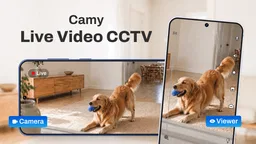
The phone-based approach can be helpful in households where people move between rooms or need to check a space from another location. It may also be a practical way to put an otherwise unused device to work. For a caregiver, a family member, or someone who wants a visual check on a room, the idea is easy to grasp: one phone provides the camera view, and another is used to watch the live stream. I like that this concept does not require the user to begin by shopping for a separate camera.
However, situational access is not just about having a phone. The person setting up the monitoring arrangement needs to be comfortable handling devices and keeping them positioned for the intended view. A household with limited access to spare phones may not find the same value in the approach. Someone who relies on a single device throughout the day may also have a different experience from someone who can leave a second phone in place.
Different living arrangements call for different expectations. In a shared home, people should agree on where a phone is placed and what spaces are being monitored. In a small apartment, positioning may be constrained by furniture or the need to keep walkways clear. If a user has mobility limitations, it may be inconvenient to adjust a device that has been placed out of reach. These are ordinary practical issues, but they shape whether a monitoring routine feels empowering or burdensome.
Language and familiarity can matter, too. A clear, consistent interface can help a person who is less confident with technology, while a confusing setup may turn a simple idea into a frustrating task. I would introduce the app gradually: identify which phone will provide the camera, which device will be used to view the stream, and who in the household is responsible for checking it. That kind of shared understanding can make the arrangement easier to maintain without assuming that every family member has the same comfort level or abilities.
Where the experience may still fall short
The central limitation is built into the concept: a live video system depends heavily on visual information and on having devices available for its roles. That can be a real advantage for many users, but it is not universal. People who are blind or have significant low vision may need other ways to confirm what is happening in a room. People who cannot comfortably operate a touchscreen may need help with setup or routine controls. I would not choose a visual monitoring app as the sole solution when a household member needs information in another format.
There is a practical learning curve even when the goal sounds straightforward. Someone has to decide where to place the camera phone, make sure it has a useful view, and become familiar with checking the stream. A user who is anxious about technology may benefit from another person walking through the process with them. This is not a special flaw unique to Camy; it is part of turning a phone into a monitoring device. Still, it means that “easy to understand” and “easy for every person to use independently” are not the same thing.
Another consideration is expectation. A live video view can show what is in front of the camera, but users should not assume it offers a full picture of household safety. It does not replace a personal check-in, an emergency plan, or a system chosen specifically for a person’s support needs. I’d treat Camy as one possible tool in a broader routine, not as a guarantee that every important event will be noticed or understood.
Cost can also influence access over time. The app is free, but it includes optional purchases spanning $0.99 to $99.99 per item. That wide range makes it sensible to review any purchase carefully and decide whether it fits the household’s needs and budget. For users who share a phone or rely on assistance when managing purchases, clear communication within the household can prevent confusion. The key is to evaluate the free experience first and avoid paying for anything without understanding what it adds.
An inclusive verdict for household use
Camy has a clear, practical idea: use phones as a live video surveillance system for the home. I see the strongest fit for people who want a visual check on a room and already have devices they can assign to monitoring. Its focused purpose makes the concept approachable, and the fact that it is free to install lowers the barrier to trying it. The app has been available since April 1, 2019, and its current version is 6.1.3.
For accessibility-minded users, the best approach is to test the experience against real needs rather than relying on the promise of a live stream. Check whether the text and controls are comfortable to use, whether the video is easy to interpret in the intended room, and whether the app works with the phone’s accessibility settings. If a user needs nonvisual feedback or has difficulty with touch controls, consider whether someone can assist and whether another kind of monitoring would be more suitable.
My overall view is that Camy can be a handy addition to a home routine, particularly for users who value a straightforward visual check and can manage two phones for the task. Its usefulness will depend on the person, the room, and the way the household shares responsibilities. The best inclusive choice is the one that fits the user’s abilities and daily context, rather than asking everyone to adapt to a camera-first approach.
For households that match that use case, it is worth exploring as a convenient phone-based option. For others, it may work best alongside a different alert or support method. I would start with a low-pressure trial, involve the people who will rely on it, and make sure the setup feels understandable and comfortable before building it into a regular home-monitoring routine.
What we like
- Turns an unused phone into a handy remote camera.
- Supports live viewing from a paired device.
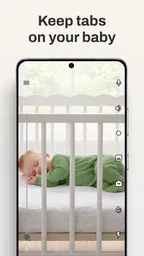
- Can help keep an eye on pets or a room while away.
- Offers a low-cost alternative to buying a dedicated camera.
- Useful for checking a space without being there in person.
What could be better
- Both devices need a reliable internet connection for remote viewing.
- The camera phone must stay powered and positioned well.
- Continuous streaming can drain battery and use mobile data.
- A phone camera may offer limited viewing angles and image quality.
- Privacy depends on securing the account and connected devices.





