BlueDriver OBD2 Scan Tool review
 Analysis by Appsdrops
I judge a vehicle diagnostic app less by how many readings it can display than by whether it helps me make a calmer, better-informed decision when a warning light appears. BlueDriver is built around that practical job: it works with a compatible OBD2 scan tool to help a driver investigate vehicle trouble. That makes it more hands-on than a general car-maintenance log, but it also means the app is only part of the setup. If you are considering it, think about whether you want to read diagnostic information yourself and follow up on it, rather than simply receive reminders or book a repair.
What the diagnostic workflow is good for
In the Auto & Vehicles category, this free app is made by Lemur Vehicle Monitors. It has been available since January 20, 2014, and its current version is 8.12.2. Its broad appeal is reflected in more than one million installs, while an average rating of 3.5 from around seventeen thousand ratings suggests that drivers’ experiences are mixed rather than uniformly glowing. I would treat it as a useful tool to assess for your own car and habits, not as a guaranteed substitute for a mechanic.
The key distinction is that this is not a diagnostic solution that works by itself. You need a compatible OBD2 scan tool to connect with the vehicle, and the app helps you work with the resulting diagnostic information. That dependency matters before you install: the app alone will not let you plug a phone into a car or reveal a fault. I would check that the tool and vehicle are compatible before relying on this workflow, especially if you are buying hardware specifically for a particular car.
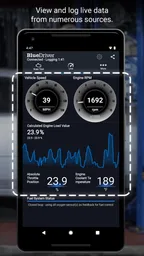
For a driver who already has the right equipment, the appeal is straightforward. Instead of guessing what a dashboard warning might mean, you can use a phone-based diagnostic workflow to gather information before deciding what to do next. The value is not that a code automatically tells the whole story; it is that a better starting point can make a conversation with a repair shop more focused. I find that distinction important: a diagnostic result can guide questions, but it should not be mistaken for a complete inspection or an instruction to replace a part.
Trust starts with knowing what role the app plays
When I assess trust here, I separate the function I can evaluate from claims I cannot responsibly make. BlueDriver is positioned as a vehicle diagnostic companion, and the scan tool is central to its use. That gives the app a clear, bounded purpose, but it also means the usefulness of the experience depends on the connection between the phone, the tool, and the vehicle. If something does not connect or the result is confusing, the app cannot turn that situation into certainty by itself.
I would also avoid treating a diagnostic screen as a verdict. A warning can have several possible causes, and the app’s role is to help you inspect diagnostic information, not to physically test a component or assess the full condition of a vehicle. A careful user can make better use of the information by noting the exact warning, the circumstances in which it appeared, and any changes in how the car behaves. That context is often more useful to a technician than a code read in isolation.
The app is rated for Everyone, which is a content-age classification, not a promise that every automotive task is suitable for every driver. I would use it from a parked vehicle and leave repairs that require tools, training, or safety precautions to someone qualified. It is a sensible boundary: reading information on a phone and working under a vehicle are very different activities.
What to check before relying on it
My first practical check would be compatibility. Confirm that the scan tool you plan to use is suitable for your vehicle, then make sure you understand how the connection is meant to work before you are counting on it beside the road. If your car is older, unusual, or has a warning that needs immediate attention, a quick compatibility check and professional advice are more prudent than assuming the app will resolve the issue.
My second check would be whether you want to interpret diagnostic information at all. Some drivers enjoy learning enough to ask informed questions and compare a possible repair with what a professional finds. Others would rather have a mechanic handle diagnosis from the start. Neither approach is wrong; BlueDriver makes more sense for the first group. If you mainly want reminders for oil changes, a maintenance calendar, or a simple way to schedule service, a maintenance-focused app may fit better.
There is a useful trade-off between convenience and context. A phone can make a scan easier to view and discuss, but the reading is still only one piece of a vehicle’s story. A code can point toward a system or condition without proving which part has failed. I would save the wording of the result and describe symptoms clearly, rather than arriving at a shop with a firm diagnosis based only on an app.
A realistic use case: the warning light on an ordinary day
Imagine a warning light appears on the way home, but the car still feels normal. Once parked safely, a driver with the compatible scan tool can use the app to gather diagnostic information before deciding whether to call a shop immediately or arrange an appointment. The useful outcome is not necessarily fixing anything in the driveway. It may be learning enough to explain the warning, ask whether the vehicle should be driven, and avoid authorizing work based on a guess.
I would not use that scenario to justify ignoring a warning. If the car is behaving abnormally, a warning indicates an urgent problem, or you are unsure whether it is safe to continue, prioritize the vehicle’s safety and professional help. A scan is most helpful when it supports a sensible next step; it is not a reason to keep driving a car that feels unsafe.
A less obvious benefit of this workflow is that it can help you prepare for a service conversation without pretending to replace one. Before speaking with a mechanic, write down when the warning started, whether it has appeared more than once, and what the vehicle was doing at the time. Pairing those observations with the diagnostic information gives the technician a more useful account than saying only, “The light came on.” This is a practical habit, not a special app feature, but it makes a scan more valuable.
Controls, choices, and data-sensitive moments
For privacy-conscious drivers, the important question is what the app asks permission to access and what choices it visibly offers during setup and use. I would review permission prompts on the phone when they appear, allow only what seems necessary for the function I am using, and revisit the operating system’s app settings if I later want to change a choice. I would not assume that a particular permission is required or that the app follows a particular data practice without checking the actual prompt and current policy.
There are also moments when a user can make a more deliberate choice about sharing information: when showing a diagnostic result to a mechanic, sending a screenshot, or discussing the car in a public setting. A scan result may be useful in a service conversation, but you do not need to share more of your phone screen or account details than the discussion requires. I would show the relevant result directly and keep unrelated personal information out of view.
Before connecting, I would also think about the setting. A diagnostic session in a private driveway is different from handling a phone at a busy roadside stop. Park first, keep attention on the car and surroundings, and do not troubleshoot through the screen while driving. That advice is not a special privacy setting; it is a straightforward way to keep a useful tool from creating a new distraction.
Where it sits among the alternatives
Compared with a basic code reader, an app-and-tool setup can make diagnostic information more convenient to view on a phone and easier to bring into a service discussion. A standalone reader may be preferable if you want a dedicated device and do not want to use a phone. A repair shop remains the better option when the issue calls for hands-on testing, when a warning is urgent, or when you do not feel comfortable interpreting the result.
It also differs from general car apps that focus on fuel, maintenance reminders, or vehicle records. Those can be more useful if your priority is keeping a service schedule rather than investigating a warning. BlueDriver is a narrower choice: its value is tied to diagnostic work and compatible hardware. That focus is a strength for curious owners, but a mismatch for anyone expecting a full vehicle-management app or a phone-only scan.
The 3.5 average rating alongside thousands of reviews is a reason to set realistic expectations, not a conclusion that the app will or will not work for your particular setup. In my view, connection compatibility, the quality of the diagnostic information for your situation, and your willingness to follow up matter more than a headline rating. The app is free, but the overall experience still depends on having the required scan tool, so I would consider the complete setup rather than the download alone.
Who I would recommend it to
I would recommend giving BlueDriver a look if you own a compatible scan tool, want to understand diagnostic information before speaking with a repair shop, and are comfortable treating results as clues rather than final answers. It can be especially useful for someone who keeps a car for a long time and wants a more informed starting point when a warning appears. The app’s current version is 8.12.2, so I would keep it updated and check its on-screen instructions when setting up a particular phone and tool.
I would skip it if you want a complete diagnosis without compatible hardware, if you have no interest in reading vehicle information, or if you need an immediate answer to a serious mechanical or safety issue. A mechanic is the better choice when the car needs physical inspection; a basic maintenance app is a better fit when all you want is a service reminder. The right alternative depends on the problem you are trying to solve, not on which tool sounds more advanced.
My cautious verdict
My take is that BlueDriver can be a worthwhile diagnostic companion when the hardware and vehicle are a good match and the user is patient about interpreting results. Its most practical role is helping turn a dashboard warning into a clearer conversation and a more considered next step. I would not treat it as a remote mechanic, a guarantee that a repair is needed, or a reason to delay help when a car seems unsafe.
If I were deciding whether to use it, I would first confirm the scan tool fits my vehicle, then install the app and pay attention to the choices presented during setup. I would use it while parked, record the symptoms alongside any diagnostic result, and bring both to a qualified technician when the issue calls for expertise. That measured approach captures the app’s real strength: it can make a driver better prepared, while leaving diagnosis and repair decisions grounded in the full condition of the vehicle.
What we like
- Connects to a phone over Bluetooth without a cable.
- Works with both Android and iOS devices.
- Stores vehicle reports for later reference.
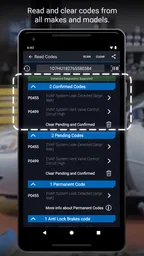
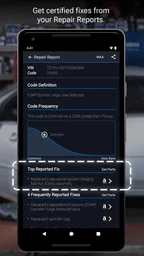
- Offers repair suggestions based on diagnostic trouble codes.
- Can check emissions readiness before a smog test.
What could be better
- Requires a separate BlueDriver sensor to use the app.
- Advanced features may vary by vehicle make and model.
- Live data readings can be difficult for beginners to interpret.
- Some diagnostic codes may need professional follow-up.
- The app is useful only with an OBD-II compatible vehicle.





