
BlinkDrama: Short Dramas & TV review
 Analysis by Appsdrops
BlinkDrama is built around watching fiction in short bursts, which makes it a different kind of entertainment app from a conventional TV streamer. I see its main appeal in the way it fits a spare moment: a few minutes between tasks can be enough to follow a dramatic scene rather than commit to a full-length episode. That format is convenient, though it also asks viewers to accept a faster, more compressed style of storytelling.
Reading the screen and finding a story
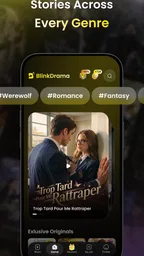
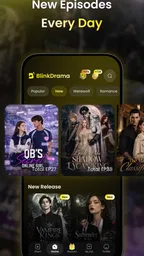
As an entertainment app for short dramas, movies and reels, BlinkDrama is aimed at people who want video choices ready to hand rather than a long planning session. Its interface has one important job: help viewers move from browsing to watching without making a small-screen session feel like work. In my view, that matters especially for people who find dense menus or sprawling catalogues tiring.
The app is published by Atlas Ventures Culture & Technology Limited. Its current version is 3.6.0, and it requires Android 7.0 or later. Those details help set expectations about compatibility, but they do not guarantee that every device will feel equally comfortable to use. Screen size, text scaling, display settings and a person’s own preferences can all change how easy an app is to navigate.
If you tend to lose your place when switching between entertainment apps, a practical approach is to keep a viewing session simple: open BlinkDrama when you are ready to watch, choose one story, and avoid treating it like a catalogue you need to exhaust. Short-form collections can encourage quick browsing, but repeated decisions can be tiring. A small personal rule—such as stopping after one drama or a set amount of free time—can make the experience feel more intentional.
The audience response suggests that the app has found a substantial group of viewers: it averages 4.5 stars from around 538,000 ratings, with more than 10 million installs. Those figures indicate broad use, not that its presentation will suit every viewer. I would treat them as a reason to consider trying it, rather than proof that navigation or content will work for an individual’s needs.
Short episodes can be easier to fit in, not automatically easier to follow
Brief viewing can be helpful when sustained attention is difficult or a long episode is impractical. It can also create a different challenge: rapid scenes and frequent emotional turns may leave little breathing room. If you process dialogue or plot more comfortably at a slower pace, the compact format may feel hectic instead of accessible. I would sample a story when you have enough time to judge its rhythm, rather than deciding from a few seconds of browsing.
For viewers who rely on subtitles, clear speech, audio description, adjustable text or other specific presentation options, it is sensible to check the controls on the actual device before settling in. I would not assume that any particular accessibility feature is available simply because the content is video. If a feature is essential to your enjoyment, confirm it in the app itself and test it with a short scene before investing time in a longer viewing session.
Touch, sound and the viewing environment
Short-drama browsing is naturally suited to touchscreens, but quick taps and swipes can be awkward for someone with limited dexterity, tremors or pain. A useful habit is to pause before selecting a title and make deliberate, single taps rather than trying to move rapidly through choices. If accidental selections are a concern, use the app in a stable position and avoid browsing while walking or carrying something in the same hand.
The sensory side deserves equal attention. Dramatic video can combine faces, movement, music and dialogue in a compact space, so the pace may feel intense to someone sensitive to visual motion or sudden changes in sound. A quieter setting, a lower device volume and a short trial session can help you decide whether the presentation is comfortable. These are general viewing adjustments, not a promise that every scene can be customized.
One non-obvious trade-off with bite-sized drama is that “short” describes the units of viewing, not necessarily the amount of attention a story asks for. If you watch several installments in a row, the cumulative time and emotional intensity can add up. I find it more useful to think of the format as flexible stopping points than as guaranteed lightweight entertainment.
When the format fits everyday life
A realistic use case is a person waiting for a delayed appointment, with a few minutes available and headphones on. BlinkDrama can make that gap feel more engaging than repeatedly checking a social feed. For that situation, I would choose a title with a clear beginning point, keep the sound at a comfortable level and stop when the appointment is called. The short-drama format is at its best when it can be picked up and put down without turning every pause into an obligation.
It is less suitable when you have only a moment and need to stay alert to announcements, conversation or your surroundings. Video competes for attention, even when the story comes in short pieces. In a shared room, public transport or a quiet waiting area, using headphones may be considerate, but it may also make it harder to hear what is happening around you. If awareness matters, saving the show for a calmer setting is the better choice.
Compared with standard streaming services, BlinkDrama’s focus is the quick, compact story rather than a long film or a full-length television episode. Compared with general social-video feeds, it is more specifically oriented toward dramatic viewing. That focus can be a welcome change if you want fiction rather than an unpredictable stream of unrelated clips. On the other hand, viewers who prefer slow character development, a large-screen film experience or more control over how they watch may be happier with a conventional streaming app.
Cost and commitment before you settle in
BlinkDrama is free to download, but it includes in-app purchases priced from $0.99 to $149.99 per item. That is a broad range, so I would check each purchase carefully rather than assume that every story or viewing option is included at no cost. If you are trying the app with a limited budget, take a moment to review any payment prompt before continuing. This is particularly useful when a quick episode turns into a longer browsing session and a purchase offer appears at an impulsive moment.
The content rating is Mature 17+, an important consideration for younger viewers and families. I would not hand the app to a teenager on the assumption that short videos are automatically suitable for them. Adults who share a device should also keep the age rating in mind when choosing what to watch together. The app’s format may feel casual, but its intended audience is not the same as an all-ages children’s video service.
Its release date is May 20, 2026, and the version information gives a useful reference point if someone is checking compatibility or comparing their installation with current app details. For day-to-day use, though, the more important question is whether the viewing style and on-screen controls suit you. A recent version number cannot substitute for trying the actual experience on your own device.
Who may want another option
I would skip BlinkDrama if you strongly prefer complete, uninterrupted episodes, dislike serialized cliffhangers, or find fast visual storytelling exhausting. It is also not the right pick if you need a particular accessibility control and cannot confirm that the app provides it. In those cases, a conventional streaming service with content and playback options that match your needs is a more dependable choice than hoping a short-form app will fit.
It may also be a poor match for anyone who wants entertainment that can run unobtrusively in the background. Short dramas are built around watching the screen and following what happens; they are not simply audio to leave on while doing something else. If you have limited data, a small screen that causes strain, or a setting where headphones are inconvenient, consider those practical constraints before making it part of your routine.
For viewers with varied abilities, the most useful test is a small one: install the app, browse at a comfortable pace, and watch a short segment in the setting where you expect to use it. Check whether the text and controls are workable for you, whether the pace is comfortable, and whether the sound can be managed without losing awareness. That simple trial answers more than a general promise about accessibility ever could.
A considered recommendation
BlinkDrama makes sense for adults who enjoy dramatic fiction but want it in compact sessions, and its 4.5-star average reflects a sizeable audience for that style. I like the clear use case: a quick story can fill a real gap in the day without requiring the commitment of a full episode. Its free entry point makes it easy to explore, provided you keep in-app purchases and the Mature 17+ rating in view.
My recommendation is conditional rather than universal. Try it if short, screen-focused drama sounds enjoyable and you can watch in a place where quick scenes will not interfere with something important. Look elsewhere if you need slower pacing, specific accessibility options that you have not verified, or a more traditional television experience. The best reason to choose BlinkDrama is not that short videos suit everyone; it is that this particular format may make fiction easier to fit into the moments you actually have.
What we like
- Short episodes make it easy to watch during brief breaks.
- A focused catalog helps viewers find vertical dramas quickly.
- Romance and suspense offer appealing options for drama fans.
- Episode previews can help you decide what to watch next.
- New stories can provide fresh viewing choices over time.
What could be better
- Some episodes may end on cliffhangers that require more viewing.
- The short format may leave character arcs feeling rushed.
- Availability of titles can vary by region.
- Frequent viewing may use substantial mobile data.
- Some content may require payment or in-app purchases.





