
Blink Charging Mobile App review
 Analysis by Appsdrops
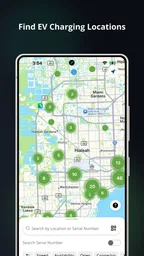
Finding a charger is only part of the job; I also want to know whether I can rely on the information while I’m already out and short on time. Blink Charging Mobile is an Auto & Vehicles app from Blink Charging built around locating EV chargers. Its focus is useful, but the experience naturally depends on having a working connection when you need to search and make decisions. I’d treat it as a practical tool for planning and checking options, not as a substitute for thinking ahead on a longer drive.
Where a network connection matters
The app’s central task—finding a charger—makes connectivity part of the experience rather than a minor convenience. When I’m choosing where to stop, I need current map information to appear promptly and clearly enough to compare nearby possibilities. A weak signal can turn a quick check into a delay, especially if I’m relying on the app at the moment I need to make a turn or decide whether to continue.
That matters most when I’m away from familiar routes. At home, I can plan around places I already know; on an unfamiliar trip, the app is more valuable precisely because I don’t know the local charging landscape. I would search before setting off, then check again when I’m closer to the area. That simple two-step habit reduces the chance of making a last-minute decision based on a map that has not finished loading.
I also wouldn’t assume that seeing a charger on a screen answers every practical question about a stop. A location can be useful as a destination while still requiring a little judgment about the route, timing, and whether it fits my plans. I’d use the app to identify candidates, then keep a backup in mind if the stop is important. A charger search is most reassuring when it is part of a plan, not the whole plan.
The app is free, which makes it easy to try as an additional resource rather than committing to a paid service. It has an average rating of 3.9 from around 7,000 ratings, and more than 100,000 installs. Those figures suggest that it has found an audience, though they don’t tell me whether it will suit every route or charging routine. I’d judge it by how well it helps with the places I actually travel.
Useful on commutes, errands, and unfamiliar trips
For a regular commute, I’d use Blink Charging Mobile less as something to stare at every day and more as a quick planning check when my routine changes. If I’m heading to a new part of town, I can look for charging options before leaving rather than improvising after I arrive. The same approach works for errands: check the area around the destination, decide whether a charging stop fits naturally, and avoid turning the trip into a search exercise once I’m parked.
On a longer drive, I’d use it differently. I would check the route in advance, identify a plausible stop, and keep another option in mind rather than assuming the first result is the only sensible choice. This is a useful distinction: a charger-finding app can narrow the search, but the driver still has to decide how much risk to accept if a stop is inconvenient or the connection becomes unreliable. I find that kind of modest preparation more valuable than expecting any single app to manage the whole journey.
A realistic example is an afternoon visit to a neighborhood I rarely enter. Before leaving, I’d search around the destination while I still have time to compare locations. If the first candidate doesn’t fit the visit, I can look for another nearby option instead of discovering the mismatch after I arrive. If I’m already on the road, I’d make that check while stopped safely, not while driving. That is a small workflow change, but it makes a location app considerably more useful and less distracting.
It may be particularly handy for drivers who want a dedicated way to look for Blink Charging locations without relying solely on broad map searches. Compared with a general mapping app, a charging-focused app can feel more directly aligned with the task. On the other hand, drivers who already have a dependable route-planning tool that covers their charging needs may not gain much by adding another app. I’d compare the results in the places I travel before deciding which one deserves a regular spot on my phone.
What to do when a search stalls
Connectivity problems are not unique to this app, but they matter more when the search is time-sensitive. If a map or results take too long to appear, I’d first avoid repeatedly tapping around and creating more confusion. I’d check whether the phone has a usable connection, give the screen a moment to respond, and try the search again once reception improves. If I’m driving, I’d pull over safely before doing any troubleshooting.
For an important trip, the best recovery plan is to reduce dependence on a last-second lookup. I’d note a primary charging destination and an alternative while I have a stable connection, then keep the trip flexible enough to use either. This is not a special feature claim about the app; it is a practical way to handle the ordinary uncertainty of mobile service. The more unfamiliar the route, the more useful that preparation becomes.
There is also a difference between an app being slow to show information and a location being unsuitable for my needs. I would not treat a delayed search as proof that no chargers exist nearby, nor would I treat a visible result as a guarantee that the stop will work perfectly for my plans. When the decision has real consequences—such as choosing a stop far from other options—I’d allow extra time and verify my route through another trusted source if necessary.
This is where Blink Charging Mobile’s limitations become clear. A phone-based charger search is only as convenient as the conditions around it: reception, a charged device, and enough time to make a considered choice. If I routinely travel through areas with unreliable service, I would not want this to be my sole planning method. A second source or a preselected alternative is a sensible companion, not a sign that the app has failed.
Keeping mobile use practical and data-conscious
Because the app’s purpose involves searching for locations, I’d use it intentionally rather than leaving it open throughout a whole journey. I can make the decisions that require a map before setting out, then reopen it when I reach a planned stopping point or need to reassess. That keeps the interaction focused and avoids unnecessary screen time while I’m on the move.
Anyone mindful of mobile data can follow the same habit: do the search when convenient, avoid repeatedly refreshing without a reason, and use a stable connection when one is available. I can’t assume particular data-saving controls or offline behavior, so I wouldn’t plan around either. Instead, I’d treat access to a live connection as part of using a location-based app and prepare for the occasional gap in coverage.
For safety, I’d make charger decisions while parked or ask a passenger to handle the search. Maps encourage quick glances, but even a short interaction can distract from driving. The app is best used as a planning aid at home, at a stop, or before pulling away—not as something to operate while navigating traffic. That advice applies especially when the search is frustrating, since troubleshooting tends to hold attention longer than a simple check.
The developer is Blink Charging, and the app is rated for Everyone. It is listed as free, which lowers the barrier to trying it, though I’d still consider whether it duplicates tools I already use. The current version is 3.1.43, and it requires Android 10 or later. iPhone users should check the app store for device compatibility before installing, rather than assuming that the Android requirement applies to iOS as well.
Who will benefit—and who may prefer another tool
I’d recommend giving it a try if you drive an EV, want a straightforward way to search for Blink Charging locations, and are comfortable using a phone app as one part of your planning. It makes particular sense when you regularly visit new areas and want a charging-focused search alongside your usual navigation. The app’s appeal is practical rather than elaborate: it addresses a specific question that comes up before or during a trip.
I’d be less inclined to recommend relying on it alone if your journeys regularly pass through poor-coverage areas, if you need a single tool to handle every aspect of route planning, or if your current map app already shows the charging options you need clearly. In those cases, a broader navigation app may be more convenient, while a second charger-finding source can provide useful cross-checking. There is no benefit in juggling apps if one trusted option already does the job.
My advice is to test it on a familiar, low-pressure trip first. Search for a place you know, see whether the results help you make a decision, and notice how smoothly the app fits into your routine. Then try it in an unfamiliar area before depending on it for a critical stop. That gives you a realistic sense of whether the search experience and your local connectivity work well together.
A measured verdict on staying connected
For me, Blink Charging Mobile is most useful when I treat connectivity as an aid that can vary, rather than something to take for granted. It can help narrow down where to look for a charge, especially when I’m planning ahead or visiting an unfamiliar area. Its strongest practical role is as a focused search companion; its weaker role would be serving as the only source of guidance on a demanding journey.
The app was released on October 4, 2022, and its current version is 3.1.43. I wouldn’t choose it based on those details alone. What matters more is whether its location search supports the routes and charging habits I actually have. Since it is free, trying it alongside an existing map app is a low-commitment way to find out, provided I don’t assume it replaces preparation or a backup plan.
Overall, I’d keep Blink Charging Mobile in mind as a useful option for EV drivers who want a direct way to look for charging locations and are prepared to work around ordinary mobile-network limits. I would not make it my only plan when timing or coverage is uncertain, but as one part of a sensible travel routine, it has a clear purpose. Use it before you need the answer urgently, and it is much more likely to feel helpful than stressful.
What we like
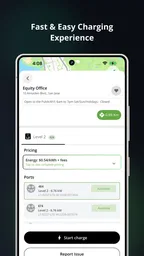
- Start a charging session from the app when you are at a compatible Blink station.
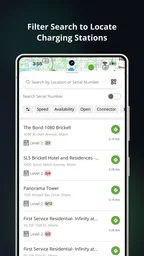
- Filter stations by connector type to find a charger that fits your vehicle.
- View station details before deciding where to charge.
- Track charging session progress from your phone.
- Save favorite chargers for quicker access on repeat visits.
What could be better
- Station availability may not reflect real-time conditions.
- Some stations require a separate payment method or account setup.
- Charging prices can vary by station and may be difficult to compare.
- App features depend on a reliable mobile data connection.
- A station can be listed even when its charger is temporarily out of service.





