Beauty Camera - Selfie Sticker review
 Analysis by Appsdrops
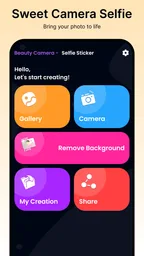
I can see the appeal of a beauty camera most clearly in a shared-device moment: someone wants a quick selfie, another person wants to tidy the background, and nobody wants to open a full photo editor just for one image. Beauty Camera - Selfie Sticker is built around that sort of lightweight photo-making, with filters, stickers, and background removal in one place. I’d consider it for casual portraits and playful edits, rather than as a replacement for a careful photography or retouching workflow.
Making a quick selfie work for more than one person
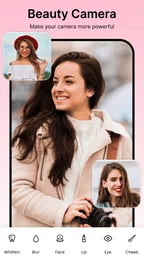
On a household tablet or a phone passed between friends, a camera app needs to be easy to approach without assuming that everyone wants the same look. One person may prefer a natural portrait, while the next wants a decorative sticker or a changed backdrop. The mix of beauty effects and playful tools makes this app more flexible for that kind of informal use than a camera that only captures images or a filter app focused on one visual style.
The practical benefit is that the editing idea can stay simple: take or choose a portrait, try a treatment, then decide whether the result is worth keeping. Background removal is especially useful when the setting distracts from the person in the frame. A busy room, an untidy shelf, or an awkward crop can pull attention away from a selfie; isolating the subject gives you a way to make the image feel more composed without staging a new photo.
I would still treat a shared device as shared space, not as a guarantee of separate personal work areas. Before handing the phone over, I’d finish or save my own edits and let the next person make their own choices. That small habit matters with any photo app: a sticker or filter selected for one person’s portrait may not suit the next person’s image, and it is easier to avoid confusion when each user starts fresh.
Choosing effects without over-editing
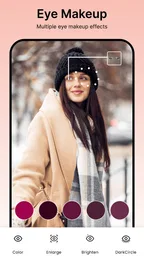
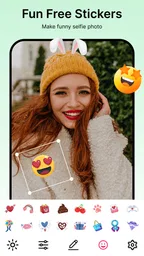
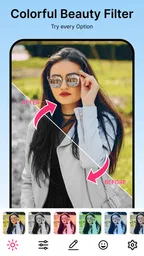
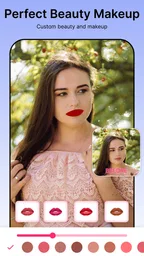
Beauty effects are most useful when they support the photo rather than become the whole subject. I’d compare a filtered result with the original before settling on it, especially for a profile picture or a portrait meant to look recognisably like the person. Stickers are a better fit when the goal is deliberately lighthearted, such as a birthday greeting or a casual chat image, rather than a polished headshot.
A useful workflow is to decide what the photo needs before opening the effects. If the lighting and expression already work, a subtle filter may be enough. If the background is the distraction, try removing or changing it before adding decoration. If the image is meant to be silly, stickers can carry the mood without piling on several other effects. This order helps keep the edit readable and makes it easier to back away from a result that feels too busy.
That restraint is also a sensible way to handle portraits of other people. I’d ask before changing someone else’s appearance or sharing an edited image, even when the edit is intended as a joke. The app’s playful tools make experimentation inviting, but an edit that feels harmless to the person holding the phone can look different to the person in the photo.
Setting expectations on a shared phone
Beauty Camera is a free beauty app from Ghanshyam Sahu, and its current version is 5.0. The overall idea is approachable: selfie effects and stickers sit alongside a tool for separating a person from the background. That combination can make it a handy option when different people want different kinds of quick edits, but I would not assume that one person’s preferred setup or editing style will suit everyone in the household.
For a shared phone, the main boundary is practical rather than technical: agree on whose photo is being edited and where the finished image should go. I’d avoid leaving someone else’s portrait open for the next user, and I’d check the final picture before sharing it. Those habits are more dependable than expecting a camera app to manage household identities or keep separate personal spaces.
It is also worth keeping purchases in mind. The app is free to install, while in-app purchases are listed at $5.49 per item. If several people use the same device, I’d make sure everyone understands that paid items may be available before letting a child or guest explore the app. The price detail does not change the basic use case, but it is a reason to keep purchase decisions with the device owner.
Who is likely to enjoy it, and who may want another tool
I’d recommend giving it a try if you often make casual selfies, enjoy decorating pictures, or want a straightforward way to make a portrait stand out from its surroundings. It may suit someone who would otherwise bounce between a camera, a sticker app, and a separate background editor for simple results. Its appeal is the compact combination, not deep control over every part of an image.
If you mainly want natural-looking photos with reliable exposure and colour, your phone’s built-in camera may be the better first stop. If you need precise cut-outs, careful edge refinement, layers, or a repeatable professional finish, a dedicated photo editor is a stronger choice. Background removal can be helpful, but it is the sort of operation where hair, transparent objects, and busy outlines can make a clean result harder to achieve. I would inspect those edges rather than assume every cut-out will look convincing.
Likewise, someone who dislikes beauty filters may find the app’s central idea less relevant. Filters can change the mood of a selfie quickly, but a quick effect is not the same as a carefully controlled retouch. If your priority is keeping skin texture and appearance close to the original, use the least noticeable treatment or stick with an unedited camera image.
Age, trust, and sensible supervision
The app is rated for Everyone, which makes it broadly suitable for a general audience, but that label does not replace a parent’s judgment about a particular child or shared device. A younger user may enjoy stickers and creative backgrounds, while an adult may be more concerned about which photos are being edited, saved, or shared. I’d set those expectations in ordinary conversation instead of assuming an age rating answers every household question.
With children, I’d keep the focus on making a fun picture rather than treating beauty effects as a standard for how someone should look. Letting them experiment with a silly sticker or an imaginative background can make the activity feel like creative play. I would be more cautious about repeated appearance-altering filters, especially if a child starts treating the edited face as the version that looks “right.”
The app has an average rating of 3.9 from around four thousand ratings, and it has been installed over a million times. I take that as evidence that it has found an audience, not as a guarantee that every tool will behave perfectly for every face or photo. The small number of written reviews compared with the rating count also means I would judge it by trying a few ordinary images myself rather than relying on a handful of comments to predict the experience.
Trying it without turning editing into a chore
For a first session, I’d use a non-important selfie and test one tool at a time. Start with a filter, compare it with the original, then try a sticker or background removal separately. This makes it easier to see what each treatment contributes and avoids spending time untangling a stack of effects. If the cut-out looks rough around hair or clothing, changing the source photo may help more than adding another effect on top.
A realistic everyday use would be taking a quick portrait before a family call or making a lighthearted image for a group conversation. In that situation, speed and a cheerful result matter more than fine-grained editing controls. For a formal portrait, a business profile, or an image where a believable background is essential, I’d choose a more controlled tool and spend longer checking the result.
Compatibility is another practical consideration: the stated minimum operating system is version 8.0. The app is free to download and is rated Everyone, so it is easy to consider for a casual trial, while the optional purchases are worth bearing in mind on a shared device. Its release date is March 11, 2026, and I would still check how it feels on the specific phone or tablet before making it part of a regular photo routine.
A household-friendly option with clear limits
My overall take is that Beauty Camera - Selfie Sticker works best as a casual, shared-device creative option: quick portraits, playful stickers, and a convenient way to make the background less distracting. It can save a little effort when the desired result is simple, and its mix of tools gives different users room to make different kinds of pictures.
I would not choose it as the household’s only photo tool. For dependable everyday camera quality, use the phone camera; for detailed edits or high-stakes portraits, reach for a more capable editor. And when several people share a device, keep photo ownership, purchases, and sharing decisions clear. With those boundaries, this app is worth trying for light, informal edits—provided everyone understands that quick beauty effects are a creative option, not a requirement for looking good.
What we like
- Offers quick filters for polished selfies.
- Sticker effects add playful options to photos.
- Simple controls make basic edits easy to find.
- Works well for casual portrait touch-ups.
- Lets users preview effects before taking a photo.
What could be better
- Some effects may look less natural than expected.
- Frequent ads can interrupt editing.
- Advanced editing tools may be limited.
- Certain stickers or filters may require downloads.
- Photo results depend heavily on lighting quality.





