



Beauty Camera - Makeup Camera review
 Analysis by Appsdrops
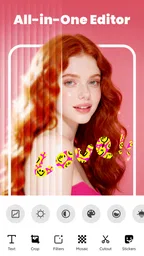
I like a selfie editor best when it lets me focus on the photo instead of wrestling with menus, and Beauty Camera - Makeup Camera puts that idea front and center. It brings makeup effects, stickers, filters, and AI editing into one beauty-focused app, with tools intended for both selfies and video. My overall impression is of a playful editing space that can help a quick portrait feel more polished, while still leaving room to experiment. The main thing to keep in mind is that an editing session can depend on how smoothly the app and the services behind its tools connect.
A beauty editor built for quick creative sessions
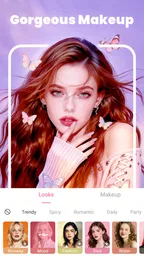
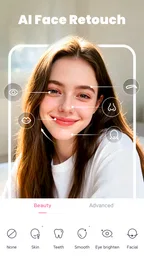
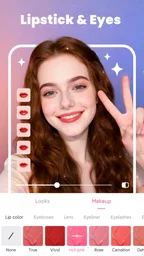
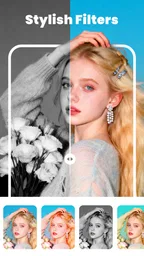
Beauty Camera - Makeup Camera is a free beauty app from Mobile Minds Dev. Its central appeal is easy to understand: take or choose a selfie, then try makeup, stickers, filters, or AI editing to shape the result. I see that mix as useful for people who want a few expressive options in one place rather than treating beauty retouching, decoration, and visual effects as entirely separate tasks.
The app’s emphasis on both photos and video gives it a broader feel than a simple still-image filter tool. A selfie might call for a subtle touch, while a short video could benefit from a more playful look. Having several kinds of effects to explore makes the experience feel adaptable, whether I’m aiming for a tidy profile picture or something more colorful to share with friends.
Beauty editing is personal, so the most successful result is not always the most dramatic one. I prefer tools that let me compare looks and stop when the image still feels like me. The combination of makeup effects and filters suggests that Beauty Camera is designed for this kind of visual trial and error: start with the original, test a treatment, and decide whether the change improves the mood of the shot.
The app has a 4.7 average from around two thousand ratings, and it has passed half a million installs. Those figures suggest that many people have tried it, but they don’t tell me which particular effect will suit my own photos. For that, the practical test is whether the controls feel comfortable and whether the finished image matches the look I had in mind.
Where connectivity enters the editing flow
Connectivity matters most when an app combines ordinary editing with AI-driven tools or content that may need to load. In a strong connection, the experience can feel more fluid: I can move from choosing a photo to exploring an effect without a long interruption. If the network is inconsistent, those same transitions may feel less immediate, especially when a feature needs a response from an online service.
I would treat AI editing as the part of the experience where a stable connection is most worth having, rather than assuming every option behaves the same way. A filter or sticker may feel like a quick local choice, while an AI operation can involve more processing. The sensible approach is to try the feature when the connection is reliable and give it a moment to complete instead of repeatedly tapping controls when nothing seems to happen.
That distinction is useful when planning an edit. If I’m getting ready to post a photo while out and about, I can begin with a straightforward look and save more involved experimentation for a time when the network is steady. That’s not a criticism of the app; it’s simply a practical way to avoid turning a casual selfie session into a wait for a tool to respond.
Using it in everyday mobile situations
Beauty Camera fits naturally into short phone sessions. I can imagine opening it while getting ready, during a break, or when I want to make a recent portrait feel more finished. The makeup and filter combination is especially suited to quick decisions: choose a direction, compare a few options, and keep the result that feels right.
On a commute or in a crowded public place, connectivity can fluctuate from moment to moment. In that setting, I’d keep expectations flexible and avoid relying on a network-sensitive operation at the exact moment I need to finish an edit. A little patience can make a difference; waiting for a connection to settle is often less frustrating than restarting the same action several times.
The app’s video angle also makes it relevant to people who enjoy more than static portraits. A short clip may be a fun place to try a beauty effect or a sticker, but video editing can make a phone session feel more involved than applying one filter to a photo. I’d choose a convenient moment and a stable connection before spending time on a clip I want to share promptly.
For social use, the appeal is straightforward: a polished selfie or an expressive video can be ready to pass along once the edit is complete. I wouldn’t assume that every sharing step happens inside the editor, though. The useful way to think about Beauty Camera is as the place to create the visual treatment, with the rest of the phone experience handling whatever comes afterward.
When an effect pauses or does not respond
Any mobile editing session can be interrupted by a weak signal, a busy connection, or an operation that takes longer than expected. If an effect appears to stall, I’d first pause rather than tap repeatedly. Then I’d check whether the connection is behaving normally and give the current action a chance to finish. This keeps a temporary delay from becoming a confusing series of duplicate attempts.
If the app still feels unresponsive, returning to the editing screen and trying a simpler effect can help me distinguish a momentary connection issue from a broader problem. I’d also keep the original photo in mind as the starting point, so I don’t feel pressured to force an edit through at all costs. For a casual beauty app, being able to step away and resume later is a better experience than rushing through a look I don’t like.
It’s also worth pacing experimentation. Rather than changing several things at once, I prefer to test one filter or makeup treatment, look at the result, and then decide what to try next. That approach makes it easier to understand whether a delay belongs to one particular action and keeps the creative process manageable on a small screen.
When a session is interrupted, a practical recovery routine is simple: stop repeating the action, make sure the phone has a usable connection, then reopen or retry the edit when things feel stable. I wouldn’t promise that this fixes every issue, but it’s a calm first response that avoids wasting time. If the image is time-sensitive, choosing a simpler treatment may be the quickest route to a finished result.
Keeping a thoughtful approach to data
Beauty editing often involves personal photos, so I like to be deliberate about what I choose to work on and share. Before using a photo, I consider whether it’s one I’m comfortable editing in the app and whether I actually want the finished version to leave my device through a separate sharing action. That habit is useful with any photo editor, especially when a tool includes AI-assisted processing.
I also try to distinguish editing from posting. Making a selfie look brighter or more playful does not mean I need to publish it immediately. I can review the final image, decide whether it still feels authentic, and choose what to do with it afterward. This small pause is a good way to keep control over personal images without making the editing process feel overly serious.
For people who are careful about mobile data, it makes sense to reserve more involved AI experiments for a connection they’re comfortable using. A quick filter test and an extended editing session don’t necessarily have the same demands, so I’d pay attention to how the app behaves in my own situation rather than assume every tool uses the network in the same way. The useful principle is simple: be intentional with both the image and the connection.
Value, version, and who may enjoy it
The app is free to start, with optional in-app purchases listed from $1.99 to $19.99 per item. That gives curious users a way to try the beauty-editing concept before deciding whether any paid option is worthwhile. I’d explore the basic experience first, then consider a purchase only if it clearly adds something I would use regularly.
Beauty Camera is currently at version 1.5.1 and supports Android 6.0 and later. It is rated for everyone, which makes its intended audience broad, though younger users should still make thoughtful choices about personal photos and sharing. The straightforward beauty-and-selfie focus is likely to appeal most to people who enjoy experimenting with their appearance in pictures or adding a light decorative touch to video.
What I appreciate most is the range of creative directions gathered under a clear theme. Makeup effects can support a more polished look, filters can shift the overall mood, and stickers can make a portrait feel less formal. The AI editor adds another kind of possibility, though I’d approach that part with realistic expectations about connectivity and allow a little extra time when the network is not at its best.
My connectivity verdict
As a beauty camera and selfie editor, this app makes its purpose easy to grasp: it offers makeup, stickers, filters, and AI editing for photos and video. I see it as a handy option for quick portrait experiments and playful finishing touches, particularly if I enjoy trying different looks before choosing one to keep. Its strongest appeal is that creative variety, not a promise that every editing moment will work identically under every network condition.
Connectivity is best treated as part of the workflow. A steady connection is a sensible choice for AI-assisted edits and any moment that seems to take longer to load, while simpler creative choices can help when I’m short on time. If I stay patient, avoid repeated taps during a pause, and make considered choices about personal images, the experience feels easier to manage.
My verdict: Beauty Camera is a lively, approachable choice for beauty-focused selfies and video, with enough types of effects to make casual editing fun. I’d recommend it to someone who wants to play with makeup looks, filters, and stickers on a phone, and who is comfortable allowing network-dependent moments to take the time they need. It works best as a creative companion for experimenting, reviewing the result, and sharing only when the final image feels right.
What we like
- The interface is simple to navigate for quick photo edits.
- Makeup effects let users preview different looks in photos.
- Beauty filters can soften the appearance of skin.
- Edited images are easy to share from the app.
- It offers a convenient way to enhance selfies on a phone.
What could be better
- Some filters may make faces look overly smooth or artificial.
- Results can vary depending on lighting and camera quality.
- Certain effects may require an internet connection.
- Frequent ads can interrupt the editing process.
- Advanced editing controls may be limited compared with dedicated photo editors.





