

Beauty Camera -AI Photo Editor review
 Analysis by Appsdrops
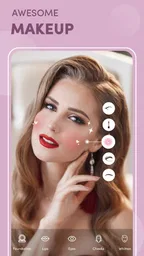
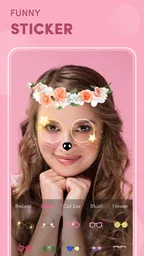
When I want a quick portrait edit without turning a casual photo into a full editing project, I look for a tool that keeps the basic choices close at hand. Beauty Camera -AI Photo Editor is aimed at that kind of use: it is a beauty-focused photo app from Kamrej Apps, built around camera effects, filters, and makeup-style editing. Its appeal is straightforward, but the best results depend on treating the effects as finishing touches rather than applying everything at once.
A quick portrait editor for everyday photos
The app sits in the beauty category, where convenience matters as much as control. I would consider it for polishing a selfie before sharing it, giving a portrait a different mood, or experimenting with makeup looks on a photo. It is free to install and rated for Everyone, which makes trying it a low-commitment option. Some items are offered through in-app purchases at $7.99 per item, so it is worth checking whether a particular effect is included before building a workflow around it.
Beauty Camera has an average rating of 4.4 from around 3,600 ratings, and it has passed 1 million installs. Those figures suggest that the app has found an audience, but they do not tell me whether its particular look will suit every face or photography style. Beauty editing is personal: a filter that feels lively on a bright outdoor selfie may look heavy on a dim indoor portrait.
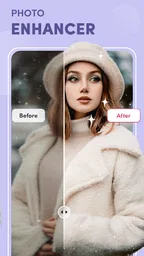
My practical advice is to begin with one change at a time. Pick a photo with a clear face and decent light, try a filter or makeup effect, and compare the result with the original before adding anything else. That simple check helps preserve skin texture and natural expression, two details that can disappear when multiple beautifying effects are layered together.
Where it fits among beauty apps
Compared with a general photo editor, this app puts portrait-oriented effects and makeup tools closer to the center of the experience. A broad editor is usually a better choice when I need careful color correction, precise cropping, or detailed work across landscapes and objects as well as faces. A beauty camera is more appealing when the goal is a quick, face-focused adjustment rather than a complete retouching session.
It also serves a different purpose from a social app’s built-in filters. Those are convenient when I am editing only for that platform, while a dedicated beauty editor can be more useful when I want to prepare an image before deciding where to share it. I would still keep the original photo: it gives me a clean fallback and makes it easier to judge whether the finished edit genuinely improves the picture.
Small choices that make edits look better
One useful workflow is to choose the final crop before spending time on effects. A close crop can make a makeup treatment feel more prominent than it did on the full image, while a wider frame may leave the face looking balanced. I would frame the image first, then adjust the look, so I am judging the treatment in the context in which people will actually see it.
Lighting is another quiet factor. If a selfie has mixed light, such as a bright window on one side and a darker room on the other, a strong filter may exaggerate the difference rather than hide it. In that situation I would choose a subtler effect or start with a more evenly lit picture. Beauty filters can change the impression of a portrait, but they cannot reliably repair every problem in the original lighting.
For makeup-style experimentation, I find it useful to compare similar photos rather than judging one edit in isolation. Use two images taken in roughly the same light, apply a comparable treatment, and see which result still looks like you. That is a better way to decide whether a look is worth keeping than chasing the most dramatic preview. It also makes the app more useful as a trial space for style ideas, rather than simply a one-tap beautifier.
What the current release tells me
The app was released on August 10, 2023, and its current version is 1.46. That gives users a concrete sense of its timeline and present release, but I would not treat a version number alone as proof of particular improvements. Without a confirmed feature-by-feature change history, it is more honest to judge the current app on what it offers now: a beauty camera and photo-editing approach centered on effects, filters, and makeup tools.
For someone already using it, the practical question is whether the current set of options still suits their routine. If the aim is to make a quick portrait feel more polished, the focused format may remain convenient. If editing needs have grown toward fine control or a consistent look across many images, the user may eventually want a more comprehensive editor alongside it. I would evaluate that need based on the work at hand rather than assuming that a newer version necessarily changes the experience in a major way.
That distinction matters when deciding whether to keep using an app. The release date provides context, and version 1.46 identifies the current release, but neither tells me how a specific effect behaves on a particular face or device. A brief test with a photo I do not mind editing is the sensible way to see whether the tools feel natural and whether the results match my taste.
A realistic everyday use
Imagine I have taken a quick selfie before meeting a friend. The light is acceptable, the framing is good, but the image looks a little flat on my phone. I would open it in the app, try a restrained filter, and inspect the face at normal viewing size rather than zooming in only to admire a smooth preview. If the effect makes the skin look artificial or shifts the mood too far, I would back off or choose another treatment instead of stacking more edits on top.
That approach is especially useful for profile photos and casual portraits where the goal is to look refreshed, not transformed. It is less suitable for a picture that needs accurate color, subtle professional retouching, or a natural documentary feel. In those cases, a standard editor with more deliberate adjustment tools—or no beauty treatment at all—may be the better choice.
Trade-offs to consider before relying on it
The focused beauty approach is also its main limitation. A filter-led workflow can be quick, but anyone seeking detailed control over every part of an image may find it restrictive compared with a general-purpose editor. Results will also vary with the original photo: a well-lit, clear portrait gives effects more to work with, while blur, shadows, or an awkward angle can leave the final image looking less convincing.
There is a cost consideration despite the free installation. Some in-app items cost $7.99 each, so I would avoid assuming that every effect I see is included at no charge. Before making it part of a regular routine, check the particular tool you want and decide whether its value is worth that one-time purchase. If I only need an occasional filter, the free options may be enough; if a paid item is central to my use, I would make that decision after testing the general editing experience.
Another trade-off is taste. Beauty edits can quickly become more noticeable than intended, especially when the picture is viewed on a larger screen or shared outside the app. I recommend saving a restrained version and comparing it with the original after a short break. If the edit still feels right later, it is more likely to be a genuine improvement than a reaction to a dramatic before-and-after preview.
Who should try it, and what to watch next
I would recommend giving Beauty Camera -AI Photo Editor a try if you mainly edit selfies and portraits, want approachable filters or makeup-style effects, and do not need a deep set of general photo controls. Its free starting point makes it easy to explore, while its Everyone age rating makes its intended audience broad. The developer, Kamrej Apps, has built a tool whose strongest case is convenience for face-focused edits.
I would skip it if I need highly precise retouching, dependable color accuracy, or one editor for every kind of photograph. I would also avoid making it my only copy of an image: keep the unedited original so that a strong effect never becomes the version I am stuck with. For frequent editing, test several ordinary photos—not just the most flattering selfie—to see whether the app handles different lighting and angles in a way I like.
As the app continues to be maintained, I would watch for clear, user-facing changes to the editing workflow and for improvements that make it easier to keep results subtle and consistent. Those are expectations, not claims about features already present. For now, the clearest reason to use it is its focused mix of beauty effects, filters, and makeup tools; the clearest reason to look elsewhere is the need for broader or more exact image control. Used selectively, it can be a handy portrait touch-up option rather than a replacement for every editor on your phone.
What we like
- AI tools make quick touch-ups accessible to beginners.
- Beauty effects can be adjusted for a more natural look.
- Filters help create a consistent style across photos.
- The editor is useful for preparing portraits for social media.
- A range of editing options is available in one app.
What could be better
- AI results may look artificial on some portraits.
- Strong beauty settings can alter facial features noticeably.
- Some editing tools may require an internet connection.
- Advertisements may interrupt the editing process.
- Export quality or features may vary by device.





