

Battle.net review
 Analysis by Appsdrops
Battle.net is most useful when Blizzard games are already part of your routine. I see it less as a replacement for a full desktop launcher and more as a pocket companion: a way to keep your Blizzard account within reach, check in with friends, and handle small social tasks when you are away from your computer. If you are new to it, the first win is straightforward: sign in, find a friend, and use the app to stay in touch without opening a game.
What to expect from Battle.net on your phone
This is a free entertainment app from Blizzard Entertainment, Inc., built around the Battle.net community rather than general-purpose messaging. Its appeal depends on whether you have friends, conversations, or gaming plans tied to Blizzard. If you mainly want a broad chat app for all your contacts, your usual messenger will be more convenient; Battle.net makes more sense when you want those gaming connections gathered in one place.
On a phone, that distinction matters. I would use it to catch a message, see whether a friend is around, or coordinate before sitting down to play. I would not treat it as a substitute for playing a game, managing every part of a desktop setup, or keeping up with friends who do not use Battle.net. It is a companion to the service, not a universal gaming dashboard.
The app is rated for Everyone, and its audience is broad, but its practical usefulness is shaped more by your gaming circle than by age. A new user with no Battle.net friends may find little reason to open it at first. Someone whose friends already use Blizzard’s service can get value even on a day when there is no time to play.
Its reach is substantial: it has passed 10 million installs, with an average rating of 3.4 from around 144,000 ratings and roughly 7,900 written reviews. I would read that mixed average as a prompt to keep expectations practical. A companion app can be handy without being essential, and the experience is naturally more rewarding when the people you want to reach are already there.
Who benefits most, and who can skip it
I would recommend trying it if you regularly play Blizzard titles, have friends on Battle.net, or want to keep gaming conversations separate from personal chats. It can also suit someone who is away from a computer but still wants to remain reachable by their gaming group. The value is social and situational: one useful exchange about when to meet can justify having it installed, even if you do not check it constantly.
It is less compelling if you play a wide mix of games across unrelated services, or if your friends coordinate in another app already. In that case, installing Battle.net may create another inbox to check without improving your routine. I would also skip it if what you really need is a mobile game launcher that lets you play your desktop games remotely; that is a different job from staying connected to a Blizzard account.
Getting through the first setup without overthinking it
After installing, start by signing in with the Battle.net account you use for Blizzard. If you have never used the service, make account setup your first task, then return to the app and confirm you can reach the main account area. I find it helpful to do this when I have a few uninterrupted minutes rather than while heading out the door: account details and sign-in checks are easier to sort out when you are not rushing.
The current Android release is version 1.32.3.46 and requires Android 6.0 or later. Those details are useful before downloading, especially if you are setting it up on an older spare phone. The app is free, so the decision is less about an upfront purchase and more about whether it earns a place alongside the communication tools you already use.
Once you are signed in, look for the people you actually expect to contact. This is a more useful first step than browsing every screen just to become familiar with the app. If your friends are not visible, check that you are using the right account and that you have added or connected with the people you want to reach. Starting with one known friend gives you a clear way to test whether the app is useful for your group.
Your first meaningful success: make one connection
For a first-time user, I would set a small goal: find a friend, send a short message, and agree on a time to play. That simple exchange proves the app’s main purpose in your own life. It is more revealing than simply opening the app and looking around, because it shows whether the people you care about are active there and whether this is a convenient channel for both of you.
A realistic example is checking in during a commute or lunch break. You might ask a friend whether they are free later, then put your phone away and return to the conversation when you have time. That is where a mobile companion can be quietly useful: it lets you handle the coordination before you are at your PC, rather than starting a separate game just to find out whether anyone is available.
One non-obvious tip is to treat the app as a pre-session coordination tool, not as something you need to monitor all day. If you use it only for arranging a session and catching relevant messages, it is less likely to become another stream of notifications competing with work or personal chats. Your group can decide which conversations belong there and which are better kept in a general-purpose messenger.
Where new users can get confused
The first common misunderstanding is expecting Battle.net to be useful before your gaming circle is connected to it. The app cannot make an inactive social network feel busy on its own. If you open it and see little activity, that does not necessarily mean setup failed; it may simply mean your friends are using another channel or are not online. Invite or add one person you already know before judging whether it fits.
Another point of friction is assuming that a phone companion will expose every feature you associate with Battle.net on a computer. The mobile app’s clearest purpose is staying connected, so I would not approach it expecting the same depth as a desktop environment. If you need to make a detailed game-specific change or manage something that belongs inside a particular game, go to the relevant game or desktop experience instead of hunting through the phone app.
Notifications are another area where personal preference matters. If you want to catch messages quickly, allowing useful alerts can help; if you are trying to reduce interruptions, keep the app’s role narrow and check it when convenient. I would begin with the least distracting setup that still lets you notice conversations you care about, then adjust based on whether you are missing plans. The goal is not to make Battle.net your loudest app, but to make it useful at the moment you need it.
There is also a practical account habit worth adopting: make sure you know which account you signed into before concluding that a friend or conversation is missing. People who maintain more than one account can easily land in the wrong social space. Checking the account first is quicker than repeatedly searching or reinstalling, and it makes troubleshooting less frustrating.
How it compares with the alternatives
Compared with a general messenger, Battle.net is more focused. A regular messaging app is usually the better choice for family, work, and friends across different gaming platforms. Battle.net is better when the conversation is specifically tied to your Blizzard community and you want to keep that contact associated with the service. I would not move every conversation into it; I would use it where its gaming context makes the exchange easier.
Compared with opening a game or sitting at a computer, the phone app has the advantage of being available during short gaps in the day. You can check in without committing to a full gaming session. The trade-off is that a phone screen and companion app are not the place I would choose for extended game management or a long, detailed conversation. For those, the desktop or the game itself may be more comfortable.
That makes the best workflow a simple one: use Battle.net on mobile to make contact and coordinate, then switch to your computer or game when it is time to play. If your friends prefer a different chat service, follow the group rather than forcing a new habit. The app is strongest when it reduces a small inconvenience, not when it asks everyone to duplicate their social life.
What to do after the first successful message
Once you have confirmed that one friend can reach you, decide what you want the app to do in your routine. You might keep it for arranging sessions, use it to check conversations when you are away from your computer, or leave it installed for occasional contact. Being deliberate about that role helps you assess its value after a week or two instead of keeping it simply because it came from a familiar game company.
For a group that plays together regularly, a useful next step is agreeing on where plans will be made. If everyone uses Battle.net for those messages, the app can become a convenient meeting point. If half the group ignores it, do not rely on it as the sole way to announce a session. That small coordination decision prevents the common frustration of sending a message into a channel nobody checks.
Blizzard has maintained the app since its release on September 26, 2017, and its current version reflects that it is an established companion rather than a new experiment. Still, I would judge it by your own group’s habits, not by how long it has existed or how many people have installed it. A large audience does not guarantee that your particular friends are reachable there.
My recommendation
Battle.net is worth trying if Blizzard is already part of your gaming life and you want a straightforward way to stay in contact away from your computer. I like the idea of making one small connection the test: sign in, reach a friend, and see whether arranging a session becomes easier. That gives a new user a concrete answer quickly, without requiring a deep tour of the app.
I would not recommend it as a replacement for a general messenger, a full desktop launcher, or a way to bring unrelated gaming communities together. Its usefulness depends on whether your friends use the same service, and the mobile format is best for short check-ins rather than every task connected with PC gaming. The rating of 3.4 from around 144,000 ratings also suggests that it is not a must-have for everyone, even though it has a sizeable audience.
My overall view is that this is a practical, low-commitment companion for the right person. If you play Blizzard games and want your gaming contacts close at hand, install it and try coordinating one real session. If that first exchange feels natural, keep it; if your group already communicates more easily elsewhere, there is no need to force the change.
What we like
- One account gives access to Blizzard games and services.
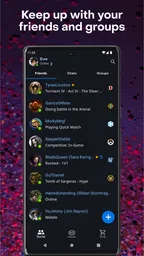
- Friends lists make it easy to see who is online.
- Chat supports staying in touch with Battle.net friends.
- Security options help protect your account.
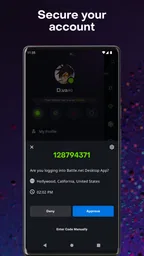
- The mobile app can approve login requests.
What could be better
- Some features require a Battle.net account.
- The app is less useful if you do not play Blizzard games.
- Certain account changes may require extra verification.
- Notifications can be easy to miss if disabled.
- Game downloads and updates require the desktop app.





