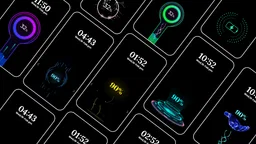
Battery Charging Animation review
 Analysis by Appsdrops
I like the idea behind Battery Charging Animation: it gives a routine moment a little personality by adding visual effects while a phone charges. That can be enjoyable, but it also means the app’s value depends on something very ordinary—whether its animations feel pleasant and easy to live with in your own charging setup. I’d consider it a small personalization choice, not a tool that changes how a battery works.
Readability and navigation matter more than decoration
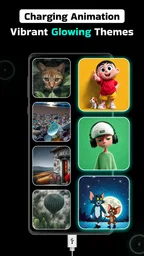
Battery Charging Animation is a free personalization app from Hifi Studio, aimed at people who want charging to feel less plain. The app has a 4.7 average from around 22,000 ratings, and it has been installed over a million times. Those figures suggest that the concept appeals to a broad group, though they don’t tell me whether a particular visual style will suit your phone or preferences.
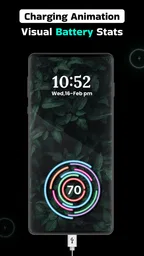
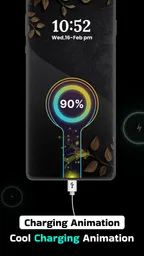
For me, a charging effect works best when it is immediately understandable: I connect the phone, notice the animation, and can still see the information I actually need. Decorative motion should be a layer around charging, not an obstacle to checking the battery or getting back to the screen I was using. When trying any animation option, I’d pay attention to whether its colors and movement remain clear in a bright room as well as at night.
The app’s age rating is Everyone, and its current version is 5.6.9. It supports Android 9 and later, so the first practical check is whether your device meets that requirement. If you’re helping someone else set it up, it’s worth checking the phone’s Android version before spending time choosing an effect.
A useful way to judge the experience is to test it in the exact place you usually charge: on a bedside table, a work desk, or a stand across the room. An animation that looks appealing when you’re holding the phone may be too busy or too small to notice from a distance. Conversely, a bright effect that catches your eye in a shop or office might be unwelcome in a dark bedroom.
Choose effects for the person using the phone
Readability is personal. Someone with low vision may prefer a simple, high-contrast screen and clear battery information over decorative movement; another person may enjoy a vivid visual cue that makes charging status easier to notice at a glance. I wouldn’t assume that an animation automatically improves accessibility. It only helps if the visual treatment is comfortable and does not compete with the phone’s essential information.
If you’re setting this up for a family member, let them choose and observe the result from their usual viewing distance. Don’t make the choice based only on what looks attractive in your hand. A style that is easy for you to distinguish might be hard for them to parse, especially if it relies on subtle color changes or rapid movement.
Motion can delight, distract, or tire
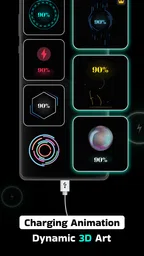
The central trade-off is that the app adds visual activity to a moment that would otherwise be still. For someone who enjoys animated personalization, that can make a familiar charging routine feel more playful. For someone sensitive to motion, flashes, or visual clutter, the same effect can be tiring or distracting. I’d treat personal comfort as the deciding factor rather than assuming that more animation is better.
Try it during a normal evening rather than judging it only in a quick setup session. Put the phone where it usually rests, connect it, and notice whether the effect pulls your attention away from reading, conversation, or winding down. If it does, that’s a practical reason to use a calmer visual choice if one suits you, or to remove the app and return to the phone’s ordinary charging screen.
Sound is another consideration when evaluating any animated charging experience. I wouldn’t count on a visual app to provide a useful audio cue unless the phone’s behavior makes that clear during your own test. If you need an alert you can hear, rely on a feature you already know works reliably on your device rather than treating a charging animation as a substitute.
Different places call for different expectations
At home, the animation can be a private bit of customization. At a shared desk, in a classroom, or on public transport, a bright moving screen may attract attention or bother the people nearby. A simple situational check helps: charge the phone once in a quiet, dim space and once in a shared, well-lit one. If you find yourself turning the screen away or worrying that it is distracting others, the effect may not fit that setting.
There is also a difference between using the phone while it charges and leaving it alone. If you often glance at notifications or keep a reference open while plugged in, an animated charging display may compete with the task you already have. If you usually set the phone down and walk away, the effect has more room to be a fun visual flourish without interrupting anything.
Battery Charging Animation is not a battery-care or power-management solution. I would not install it expecting faster charging, longer battery life, or a more accurate charge level. Its appeal is visual personalization, so people who want to monitor battery health or manage power should look to the phone’s built-in battery tools or a dedicated utility instead.
What it does well, and where it can feel limited
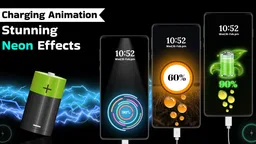
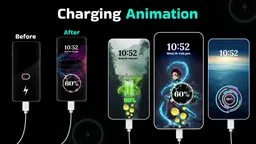
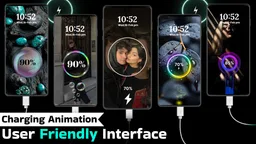
The strongest case for this app is simple: it gives people who enjoy a customized phone another place to express that taste. Compared with leaving the standard charging screen untouched, an animation can make plugging in feel more distinctive. Compared with a full theme or launcher, it keeps the idea focused on a specific everyday moment instead of changing the whole interface.
That narrow focus is also a limitation. If you rarely leave your phone visible while charging, you may barely see the effect, so it may not justify adding another personalization app. If your priority is a quiet screen, quick access to charging information, or minimal visual stimulation, the default experience is likely the more comfortable choice. And if you’re looking for a detailed battery dashboard, this is the wrong kind of app for that job.
The app is free to install, with in-app purchases listed at $8.99 to $19.99 per item. I’d start by deciding whether the core experience is useful and comfortable before considering any purchase. The important question is not how many effects you could collect, but whether you genuinely enjoy seeing one during your regular charging routine.
Small setup habits can make the trial more useful
To assess it fairly, test the animation in your typical charging position and at the time of day you’re most likely to notice it. Keep the phone at its usual distance, check whether the display remains readable, and see whether the movement feels calm or attention-grabbing. This avoids a common mistake: choosing an effect because it looks impressive while browsing, then finding it intrusive beside the bed.
Also consider who else shares the space. If the phone is left on a bedside table next to someone who prefers darkness, or on a communal desk where people face the screen, a restrained approach—or no animation—may be more considerate. Personalization is most successful when it suits both the owner and the place where the device is used.
Battery Charging Animation comes from Hifi Studio, and its 4.7 average is a positive sign of user interest, not a guarantee that every animation will work for every person. I’d recommend giving it a try if you like visible customization and enjoy small touches of motion. I’d skip it if you find animated screens uncomfortable, need charging information to stay unobstructed, or want practical battery tools rather than decoration.
My inclusive verdict
The best reason to use this app is that you can make charging feel more personal without expecting it to do a different job. For many people, a visual effect can be a cheerful detail; for others, movement and brightness can create needless distraction. The right choice depends on vision, sensory comfort, charging habits, and whether the phone sits in a private or shared space.
My recommendation is to judge it in context, not from a screenshot or a quick glance. If the animation is easy for you to see, comfortable to look at, and unobtrusive where you charge, it can be a pleasant personalization option. If it makes the screen harder to use or the room less comfortable, the plain charging experience is not a failure—it is simply a better fit. That’s the standard I’d use before keeping Battery Charging Animation on my phone.
What we like
- Adds a personalized visual effect when charging begins.
- Offers a simple way to make the charging screen feel more distinctive.
- Can provide a clear visual cue that the device is connected to power.
- Animation options let users choose a style that suits their taste.
- The main experience is easy to understand without a learning curve.
What could be better
- Some features or animation packs may require payment.
- Animations can feel distracting when the phone is used while charging.
- Background activity may use a small amount of battery or memory.
- Compatibility with every device and Android version may vary.
- The app may request permissions that users prefer not to grant.





