




Auto Navigator New & Used Cars review
 Analysis by Appsdrops
When I’m looking for a car, I want to compare realistic options without confusing a possible loan offer with a final buying decision. That is the lens I bring to Auto Navigator, Capital One Services, LLC’s free app for car shopping and financing. Its focus on both sides of the decision can be useful, but it also makes it worth thinking carefully about what information I’m comfortable sharing and how I use what the app shows me.
Shopping and financing belong in the same conversation
Auto Navigator sits in the auto-shopping corner of the Auto & Vehicles category. Rather than treating a vehicle search and a financing check as unrelated errands, it brings those topics together. I see the appeal: it can help a shopper connect the kind of car they’re browsing with the financial side of buying one.
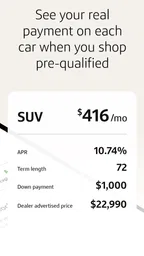
That combination is most useful early in the process, when I’m still deciding what fits my needs and budget. For example, I might be weighing a used sedan against a newer SUV. Keeping financing in view while comparing vehicles can encourage me to think beyond the monthly payment and consider whether the overall purchase feels sensible.
The app has a 4.8 average from around 6,700 ratings, and it has passed 100,000 installs. Those figures suggest that many people have tried it, but they can’t tell me whether its approach suits my circumstances. A well-rated shopping tool can still be the wrong fit if I want to browse anonymously, compare a broad range of lenders, or keep financing separate from vehicle research.
Where its combined approach helps
In a typical car search, I might start with a rough idea of the vehicle type, browse available possibilities, and then revisit the numbers before getting attached to a particular car. Auto Navigator’s central strength is that it makes the financing context part of that search instead of leaving me to mentally join information from separate tools.
That is a practical advantage, not a reason to treat an in-app figure as the whole cost of ownership. I would still account for insurance, fuel or charging, maintenance, taxes, and other expenses that shape whether a car is affordable. A financing view can help frame the purchase, but it does not replace a full household budget or a careful look at the vehicle itself.
I also wouldn’t use one app as my only source for choosing a car. General vehicle marketplaces can be better when I want to cast a wide net across listings, while independent research tools may be more useful for comparing ownership costs or reliability. Auto Navigator makes most sense as a focused part of the process: a way to connect shopping with financing, alongside other checks.
Trust starts with knowing what I’m doing
For an app that combines car shopping with financing, trust is not just about whether the screens are easy to use. It is also about understanding the difference between browsing, exploring financing, and taking steps that may involve personal or financial information. I’d approach each stage deliberately rather than tapping through prompts simply to get to the next screen.
Capital One is the developer, and the app is free to download. That removes an upfront app charge, but “free” does not answer every question a cautious user may have about information handling. I would read the in-app explanations and any applicable notices at the point where information is requested, and decide whether the requested details make sense for the task I’m trying to complete.
This is especially important because car shopping can shift quickly from casual browsing to a consequential financial decision. A person comparing body styles may not be ready to share the same information as someone actively exploring financing. My practical rule is to pause at that transition: understand what the screen asks, why it is relevant, and what choice is available before continuing.
Use account and device choices thoughtfully
The most reliable way to judge what controls are available is to inspect the app’s own screens and the account settings it presents, rather than assume that a particular privacy toggle or permission exists. I’d look for clear explanations before submitting information, review any choices shown during setup or use, and revisit account settings if my plans change.
On the device side, I would grant only permissions that the app actually requests and that I understand. A car-shopping task should not prompt me to approve a device access request without a clear reason. If a permission appears, I’d consider whether it is necessary for the action I want to take, and whether I can continue without granting it.
Those habits are useful beyond this app: don’t share more than a task requires, use a device lock, and avoid entering sensitive information while using a device or connection you don’t trust. They are not claims about special security tools inside Auto Navigator; they are sensible ways to approach any app that may bring shopping and financing together.
Make comparisons before getting attached
One non-obvious way I’d use the app is as a reality check rather than a commitment tool. I’d first make a short list of vehicle types that suit my daily routine, then use the financing context to see whether my preferred direction still feels reasonable. If the numbers make me reconsider, that is useful information early in the search, before I’ve invested time in a particular car.
A second helpful habit is to compare vehicles on the same terms. If I’m looking at a compact car and a larger vehicle, I’d keep the intended use constant: commuting, family space, or cargo needs. Otherwise, I may confuse a change in vehicle class with a change in affordability. The app can support the shopping-and-financing part of the decision, but I still need to make the comparison fair.
Third, I’d treat any financing-related display as a starting point for questions, not a substitute for reading the terms of a real offer. Before making a decision, I’d check the complete details presented in the relevant process and compare alternatives where appropriate. A convenient estimate can narrow my search; it should not pressure me into choosing a car or lender before I understand the commitment.
Who will find it useful—and who may prefer another route
I’d recommend giving Auto Navigator a look if you’re beginning a car search and want financing to remain part of the conversation. It may be especially useful when you have a broad idea of what you need but haven’t settled on a model or price range. The integrated focus can help turn “I like this car” into the more practical question, “Does this direction fit my finances?”
It is less suitable if your priority is a broad, independent sweep of every available listing or a detailed comparison of financing from multiple sources. In that case, I’d pair it with general listing services and direct lender research. It may also be a poor fit if you’re only casually browsing and don’t want to engage with the financing side yet; keeping that information separate may feel more comfortable.
For a realistic everyday example, imagine replacing a car before a commute becomes unreliable. I’d use Auto Navigator to explore possibilities and keep financing in view, then check vehicle history, inspect the car, compare the complete costs, and read any financing terms carefully before moving forward. That sequence keeps the app useful without asking it to answer questions it cannot answer on its own.
Practical details and a careful verdict
The app is free and is rated Mature 17+. It was released on April 6, 2021, and its current version is 2026.10.30; it requires iOS 11 or later. I’d check that my device meets that requirement before planning to use it, particularly if I rely on an older phone or tablet.
My overall impression is that Auto Navigator’s value comes from its specific combination of car shopping and financing, not from replacing every other resource a buyer might need. I like the idea of considering the financial side while exploring vehicles, and I’d use that connection to keep my search grounded. At the same time, I would not mistake convenience for a complete comparison or treat an early financing view as a final decision.
With 529 written reviews alongside its strong average rating, the app has attracted a substantial audience, but the best test is whether its workflow matches your own comfort level. I’d install it if I wanted a focused way to connect vehicle browsing with financing, inspect each information request as it appears, and verify the details before committing. My cautious recommendation is to use it as one considered step in a larger car-buying process, not as the process itself.
What we like
- Search listings by make model price and location.
- Save favorite cars for quick access later.
- Compare new and used vehicle listings in one place.
- View vehicle photos and key listing details.
- Browse listings from a mobile device.
What could be better
- Listing availability may vary by location.
- Some listings may have outdated prices or details.
- Filters may not cover every buyer preference.
- Contacting sellers may require leaving the app.
- Vehicle history information may not be included.





