
AR Drawing - Paint & Sketch review
 Analysis by Appsdrops
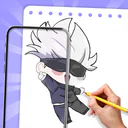
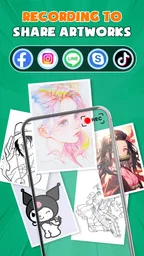
When I want to sketch an anime face but keep getting the eyes, jaw, or proportions slightly off, an AR drawing app sounds more useful than another blank canvas. AR Drawing - Paint & Sketch is aimed at that starting point: it offers a way to use augmented reality as a drawing guide, so I can focus on following a visible outline rather than inventing every shape from scratch. That makes it appealing to beginners and anyone who wants a low-pressure way to practise anime-inspired drawing.
From reference to first sketch
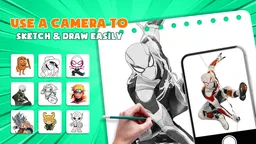
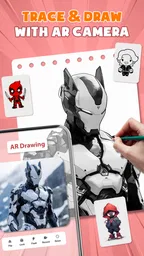
The app sits in the art and design category and is developed by LOGICLABS LIMITED. Its central idea is straightforward: use an AR drawing workflow to help turn a reference into a sketch on a surface. I would approach it as a practice aid, not as a digital illustration studio. The distinction matters: the benefit is guidance while drawing by hand, rather than a promise of advanced editing tools or a finished artwork at the tap of a button.
For a first session, I would choose a simple anime subject and treat the reference as a set of shapes. Start with the broad silhouette, then work inward to the face and smaller details. This is more effective than trying to trace every line perfectly at once. A guide can help with placement, but it cannot decide how much pressure to use, how to correct a wandering stroke, or which details are worth keeping. Those choices remain yours, and that is part of the practice.
The app’s appeal is also practical. A beginner can use a visible guide to get past the intimidating blank page, while a more experienced artist can use it for a quick warm-up or to study proportions. If you already draw confidently from references, you may find a conventional sketchbook or a tablet drawing app more flexible. AR guidance is most useful when you want help getting a design onto paper, not when you need complete control over every digital layer.
A more useful way to follow the guide
I would avoid treating the displayed lines as instructions to copy mechanically. Instead, use them to check the big relationships: whether the eyes sit at a consistent height, whether the head feels balanced, and whether the hair mass fits the face. Then look away from the guide occasionally and assess the drawing on its own. This small habit helps keep the result from feeling like a collection of traced marks and makes the session more like a lesson in observation.
A second practical tip is to begin with a light hand. If the first pass is only a loose construction, it is easier to adjust the outline before committing to darker details. That is especially helpful with anime faces, where a small shift in eye placement or chin shape can change the expression. The AR reference can assist with alignment, but it does not automatically correct the drawing or explain why a proportion looks unusual.
Making the drawing fit an everyday session
A realistic use case is a short evening practice session at a desk. I might have a few minutes, a pencil, and no particular idea for a character. Rather than search for a complicated tutorial, I can use an AR guide to get a basic anime outline started, then spend the rest of the session refining the features by hand. That is a better fit for this kind of tool than expecting it to teach anatomy in depth or produce a portfolio-ready illustration without effort.
It can also help someone who wants to draw alongside a child or a friend who is just beginning. The shared guide gives both people a clear starting point, while each person can make their own choices about expression, hair, or finishing touches. The app is rated for Everyone, which makes its general audience broad, though the best experience still depends on having a suitable space and patience for the physical drawing process.
One trade-off is that an AR workflow asks you to manage the reference and the real-world drawing together. You need to look between the guide and your marks, and that can interrupt the rhythm of sketching. If you prefer to zoom, undo, reposition a layer, or experiment without worrying about paper, a standard tablet art app is likely the smoother option. If you want a hands-on drawing exercise with a visual prompt, the AR approach has a more direct purpose.
From sketch to a finished personal version
The handoff from guide to finished drawing is where I would make the most deliberate choices. Once the main outline is down, I would stop relying on the reference for every stroke and decide which details deserve emphasis. A slightly different eye shape, a simplified fringe, or a changed mouth can make the sketch feel personal. The guide is a starting structure; it should not dictate the character’s final personality.
This is also where expectations matter. An AR drawing aid can support tracing and placement, but the quality of the finished page still depends on the user’s control and decisions. It is not the same as a drawing course that explains each technique, nor is it a full replacement for a conventional reference image. I would use it to build confidence and practise steady observation, then switch to freehand work when I want to test what I have learned.
For a useful progression, repeat the same kind of subject with one change each time. Keep the head angle similar but alter the expression, or use the same basic face structure and try a different hairstyle. That makes it easier to notice what the guide helps with and what still requires your own judgement. It is a more rewarding approach than rushing through unrelated sketches and expecting instant improvement.
What the app offers, and what can get in the way
The app is free, and its current version is 1.7.0. It has an average rating of 4.2 from around 21,000 ratings, with more than 1 million installs. Those figures suggest that the concept has reached a sizeable audience, but they do not tell me whether the AR workflow will suit a particular person. I would judge it by the kind of drawing session I want: guided, physical practice rather than a feature-heavy digital workspace.
The release date is August 19, 2025, and the minimum operating system requirement is version 7.0. Those details are useful when deciding whether to try it on an older device. The practical question is less about the app’s category and more about whether your phone and surroundings make it comfortable to follow an AR guide while drawing. A cramped surface or an awkward viewing position can make a simple sketch feel needlessly fiddly.
There is also a learning trade-off. If you rely on a guide for every proportion, you may finish a drawing without becoming much better at placing those features independently. I would use it as scaffolding: first follow the visual structure, then hide or ignore the reference as much as possible and finish from observation. That way, the convenience supports practice instead of becoming a substitute for it.
Who should choose this workflow
I would recommend AR Drawing - Paint & Sketch to a beginner who wants an approachable way to start anime sketches, or to someone who enjoys drawing on paper but needs help with initial placement. It can also suit a casual artist looking for a focused warm-up rather than an open-ended canvas. The strongest reason to try it is the combination of a visual guide and hands-on drawing, which gives a hesitant sketcher a clear first move.
I would skip it if my main goal were detailed digital painting, extensive layer control, or structured lessons that explain technique step by step. A conventional drawing app is a better fit for editing and experimentation; a book, course, or carefully chosen reference may be better for learning why proportions work. The AR method is not automatically the best tool simply because it is more novel. It earns its place when the guide helps you draw more often.
My overall view is positive but specific: this is a practice companion, not a shortcut to drawing skill. The best results come when I use the AR outline to get started, make my own decisions during the handoff, and treat any awkward marks as part of the exercise rather than a failure. If that sounds like the kind of support you need, LOGICLABS LIMITED’s app is worth trying; if you want a complete digital art studio, I would look elsewhere.
What we like
- A useful way to trace reference images onto paper
- Adjustable image opacity helps control the tracing guide
- The camera view makes it easy to align a sketching surface
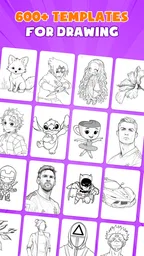
- A range of drawing subjects offers options for practice
- Can help beginners build confidence with basic shapes
What could be better
- Requires a steady phone position while tracing
- Camera perspective can make alignment tricky
- Screen glare may obscure the drawing guide
- Small displays can limit the visible tracing area
- Results depend on having suitable lighting





