
Apartments & Rentals - Zillow review
 Analysis by Appsdrops
Looking for a place to rent can turn into a tiring cycle of checking listings, comparing neighborhoods, and trying to remember which apartment had the useful kitchen photos. Zillow gives me a practical starting point on a phone: it is a free House & Home app from Zillow Group, built around viewing rental homes and apartments. I find it most useful as a way to explore what is available and narrow down possibilities, rather than as a substitute for contacting a property manager or visiting a place.
If you are opening it for the first time, the main goal is simple: get from a broad search to a short list that reflects what you actually need. That might mean a commute-friendly apartment, a house with room for a family, or just a better sense of what your budget can find in a particular area. The app is rated for Everyone, and its approachable browsing style suits people who are beginning a search as well as renters who already know their preferred neighborhood.
What to expect when you start browsing
Zillow is not a rental application form or a moving checklist. Its value is in helping you look at homes and apartments, compare options, and decide which listings deserve further attention. The listings are updated daily, which matters in a market where an appealing place can attract interest quickly. I would still treat each listing as a lead to investigate, not as a complete picture of the property or a guarantee that it is still available.
The app has a substantial audience: it has over five million installs and a 4.8 average from around 75,000 ratings. Those figures suggest that many people find it useful, but they do not tell you whether its selection is strong in your own town. Rental coverage and listing quality can feel very different from one area to another, so I would judge it by the homes that appear for the neighborhoods you care about.
Compared with checking a few individual property-management sites, a broad rental app is more convenient for discovery: you can scan multiple possibilities in one place instead of beginning with a different company for every building. The trade-off is that a broad search may not capture every local listing, and details can change between browsing and contacting someone. If you already have a preferred building or landlord, checking their own channel can be a better way to confirm current availability.
Set up a search around real priorities
Before tapping through listings, I recommend deciding which requirements are firm and which are flexible. A commute limit, a maximum rent, or the need for a particular number of bedrooms may be non-negotiable. Things like finishes, a balcony, or a specific style of kitchen might be preferences. This distinction keeps a search from becoming so narrow that you miss a workable home—or so broad that every result needs to be ruled out manually.
Start with the area where you would genuinely live, not just the neighborhood that looks appealing on a map. If your routine depends on a workplace, school, transit stop, or family nearby, use that as the anchor for your search. Then widen the area deliberately. Looking a little beyond your first choice can reveal alternatives worth considering, but expanding too far at once makes it harder to compare places fairly.
I would also keep a simple note outside the app with your must-haves and questions. For each promising listing, record the rent shown, the address or area, and what you need to ask. This is especially useful when several homes have similar photos. It prevents an attractive living room from overshadowing a practical issue such as a long commute or a missing feature you consider essential.
Turn a promising listing into a useful comparison
The first meaningful success is not finding a perfect apartment in a few minutes; it is identifying one or two listings that merit a closer look. Open a result and assess it as a whole. Check whether the room layout seems compatible with your daily routine, whether the photos show the spaces you care about, and whether the location makes sense for the places you regularly travel to.
A non-obvious but useful habit is to compare listings by the same questions rather than by their best feature. For each one, ask: Could my furniture fit? Is there enough storage? What would I need to verify about the building? How would I get to work or errands? A house may look larger, for example, but its location or maintenance questions could make an apartment the more practical choice. The app helps you discover candidates; your consistent checklist makes the comparison meaningful.
When a listing looks promising, take a screenshot or make a note of the details you want to discuss, then contact the relevant listing contact through the route available for that property. Ask whether it is still available and request clarification on anything important that the listing leaves unclear. Treat a reply as the beginning of verification, not the end: arrange a viewing and confirm the terms directly before making decisions or sending money.
Common points that can confuse first-time renters
A daily-updated rental feed should not be read as a live promise that every displayed home is still open. A listing can remain visible while its status is changing, or the information you see may not answer every question you have. If a place is a serious contender, contact the listing representative promptly and confirm availability, move-in timing, and the terms that matter to you.
Photos can also create a false sense of certainty. A polished image tells you something about how a room is presented, but not necessarily its dimensions, condition, natural light, noise level, or storage. I use photos to decide what to ask about and what I want to inspect in person. If a listing shows only a few angles, that is a reason to request more context, not automatically a reason to reject it.
Another common trap is treating the displayed rent as the entire cost of living there. Before comparing two options, ask about recurring charges and any one-time costs, and find out which utilities or services are included. Those details can change which home is more affordable, even when one listing initially looks cheaper. The app can help you find choices, but a direct conversation is needed to establish the full financial picture.
Location deserves the same careful check. A neighborhood name can cover a much larger area than a first-time renter expects, and a nearby landmark on a map does not guarantee an easy walk or commute. Look at the actual address or ask for it when appropriate, then consider your route at the times you would use it. This is one reason I would not choose a rental from images and a broad area label alone.
Who will get the most from it
I would recommend Zillow to someone who is starting a rental search, moving to a new area, or comparing the broad shape of the market before contacting landlords. It is particularly useful when you do not yet know which neighborhoods or property types fit your budget and routine. Browsing several kinds of homes in one app can help turn a vague idea—“somewhere closer to work”—into a more specific set of areas and trade-offs.
It is less suitable as the only source for a highly specialized search, such as a building with a very particular leasing process or a small local market where listings circulate through community channels. If you already know the property you want, contacting its management directly may be faster. And if you are making a final decision, an in-person viewing and direct confirmation of costs and terms are more important than any convenience the app offers.
For an everyday example, imagine that you need to move before a new job begins but do not know whether to prioritize a larger home farther out or a smaller apartment near your commute. I would search the likely areas, save a few plausible candidates in my own notes, and compare them using the same questions: travel time, space, total expected cost, and unresolved details. Then I would contact the strongest options and book viewings. That workflow makes the app useful without expecting it to make the decision for you.
Keep the search useful beyond the first session
Once you have a short list, resist the urge to keep browsing endlessly. Revisit each candidate with a specific purpose: confirm whether it is available, clarify an uncertain detail, or decide whether it is worth seeing. If a listing no longer fits, remove it from consideration rather than letting it distort your comparison. A smaller, well-understood set of options is easier to act on than a long collection of appealing pictures.
It also helps to separate facts from impressions. “The listing says there are two bedrooms” is a fact to verify against the layout; “the second room looks too small for a desk” is your judgment. Keeping both in view makes conversations with a property contact more focused. Ask concrete questions about the things that could change your decision instead of sending a general message and hoping every concern gets addressed.
The app is free, and its current version is 2026.85.0.136528, with a minimum operating-system requirement of 10. That makes it easy to try if your device meets the requirement, though the best experience still depends on whether the rental inventory in your target area is useful to you. Its strong average rating is encouraging, but I would not let ratings replace a few minutes of testing your own search.
My overall view is that Zillow is a solid discovery tool for renters who want to get oriented and build a sensible shortlist. Its strongest contribution is bringing potential homes into one browsing routine; its limitations are the ones you should expect from a listing app: availability and details need confirmation, photos cannot replace a viewing, and local coverage may vary. If you use it to ask better questions and take the next step with promising listings, it can make the early part of a move feel much more manageable.
What we like
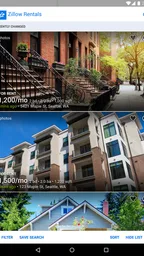
- Rental listings include photos and key property details.
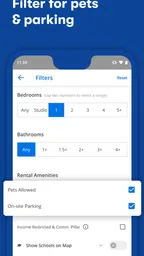
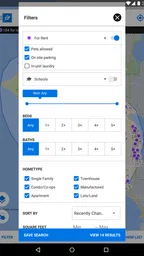
- Search filters help narrow options by price and bedroom count.
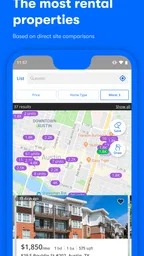
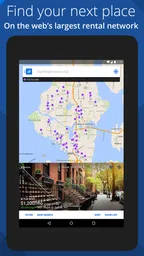
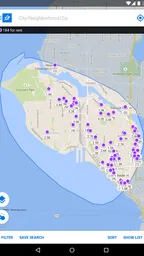
- Map browsing makes it easier to compare neighborhoods.
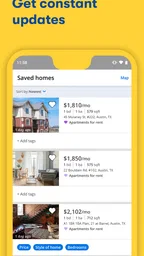
- Saved searches can help track new rental listings.
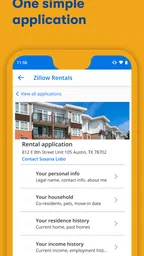
- Contact options let renters reach property managers.
What could be better
- Some listings may be outdated or already unavailable.
- Rental availability and pricing can change quickly.
- Contact responses depend on the property manager.
- Some listings may require a separate application fee.
- Location coverage can vary by market.





