



Apartments.com Rental Search review
 Analysis by Appsdrops
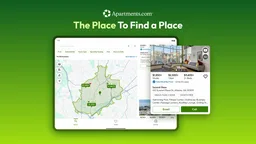
Apartment hunting is one of those tasks that keeps spilling into ordinary life: I might spot a promising neighborhood on a commute, compare a listing during lunch, then revisit it at home before deciding whether to contact anyone. Apartments.com Rental Search is built for that kind of browsing, bringing rental listings for several types of homes into a phone app. I see its biggest strength as making the search easier to pick up and put down, rather than turning a complicated housing decision into something effortless.
How the search feels when you’re connected
The app is a House & Home rental-search tool from CoStar Apartments.com Android Team. It covers apartments, houses, condos, and townhomes, which makes it useful when you’re open to more than one kind of rental. Instead of beginning with a single building or property manager, I can use it to explore what might fit a location and a set of practical needs.
Connectivity matters because the value of a rental search depends on being able to load current listing information and move between options. In a stable connection, browsing is naturally more convenient: I can check a property, return to the results, and compare possibilities as I narrow the search. The app is not a substitute for verifying details directly before making a decision, but it can help me decide which listings deserve that next step.
A useful way to use it is to treat the first pass as a filter for attention, not as a final shortlist. I would note the properties that seem promising, then check their details carefully and contact the relevant source to confirm anything that affects the decision. Rental details can change, and a polished listing should not be taken as a guarantee that a home is still available or that every condition will suit you.
That distinction is especially important when several homes look similar. I find it more practical to compare each one against the same personal checklist—location, home type, budget, and the needs that matter in daily life—than to rely on whichever listing makes the strongest first impression. A search app can put options in front of you; it cannot decide whether the commute, layout, or surrounding area works once you picture an ordinary week there.
Use short sessions to make better comparisons
Rental browsing often happens in fragments, so I would avoid trying to judge everything in one rushed scroll. A short session can be useful for discovering candidates, while a later session is better for checking them against the same criteria. This simple split reduces the chance of confusing one property’s details with another’s and makes it easier to notice when a listing only looks attractive because it appeared first.
For a practical comparison, I would keep a brief note outside the app with the address or listing identifier, the strongest reason to consider it, and the main question I still need answered. That is not an app feature; it is a way to make phone-based searching more reliable. It is particularly helpful when you are comparing different home types, since a condo and a townhome may suit the same search area but involve different trade-offs in space and routine.
Where a phone helps—and where it gets in the way
The mobile format is best when I need to browse opportunistically. If I have a few spare minutes, I can look for possibilities without setting up a full research session at a desk. That is handy for renters who are just beginning to understand what is available in an area, or for people whose schedules make it difficult to sit down for a long search.
But the small screen can make serious comparison less comfortable. Details that are easy to hold in mind while viewing one property become harder to compare across several listings, especially when you are switching between screens or taking calls at the same time. I would use the app to find and inspect candidates, then slow down before making decisions involving a lease, a move, or a visit.
A realistic example: imagine you are leaving work and have a short ride home. You can use that time to scan rentals near a few areas you are considering, flag the ones worth revisiting, and avoid committing to a viewing based only on a quick glance. Once home, you can compare the likely options more deliberately and follow up on the questions that matter. The app fits the discovery stage especially well; the careful verification stage still needs your attention.
For people who are relocating, the broad mix of apartments, houses, condos, and townhomes is helpful because it leaves room to test different kinds of housing before settling on one. If you already know the exact building or landlord you want, though, a direct property-management channel may be more efficient than browsing a general rental search. Likewise, someone who values a wide desktop view for side-by-side research may prefer to do the main comparison on a computer and use the app as a companion while away from home.
When the connection is unreliable
As with many listing searches, a weak or interrupted connection can turn a quick check into a stop-and-start task. If a listing or search result does not load as expected, I would first retry when the connection is steadier rather than assume the property information is complete. The important habit is not to make a decision from a partial view or from details remembered after a screen failed to refresh.
When browsing on the move, it helps to separate exploration from anything time-sensitive. I would not rely on a brief check in a place with uncertain reception to confirm availability or settle a viewing plan. If a property looks promising, save the key details in a personal note while they are visible, then return to the listing when you have a dependable connection. That small backup step makes it easier to resume without pretending the app itself will preserve every detail in every situation.
There is also a judgment call around repeated retries. If the app is slow because the network is struggling, repeatedly reopening the same page may waste time and make it harder to remember which information was current. I prefer to pause, check the connection, and come back once loading is reliable. For a rental search, patience is more useful than treating every moment as an urgent opportunity—unless you already have a confirmed appointment or a specific deadline to meet.
Keep mobile data use deliberate
If you are watching your data allowance, browsing thoughtfully is a better approach than repeatedly refreshing the same search while travelling. I would narrow the area and criteria before spending time opening many listings, and leave longer comparison sessions for a trusted connection when convenient. This is a general way to manage a mobile search, not a claim about a particular data-saving setting in the app.
It can also help to decide what you need to learn before opening a listing. Are you checking whether the home type is suitable, whether the location is worth considering, or whether you need to ask about a specific detail? Having a question in mind makes each visit more purposeful and cuts down on aimless browsing. If the listing answers none of the important questions, move on rather than spending extra time reloading it.
For renters with limited mobile access, I would use the app primarily when I can get a reasonably steady connection, then keep a simple offline note of the candidates I want to revisit. That approach avoids depending on continuous browsing during a commute or in a building with poor reception. It also makes it easier to discuss options with a roommate or family member without needing to repeat the whole search together on one phone.
Who will get the most from it
I would recommend Apartments.com Rental Search to renters who are exploring an area, comparing more than one kind of home, or fitting small search sessions around a busy day. It is free, rated for Everyone, and has a 4.7 average from around 98 thousand ratings. More than 5 million installs suggest it is a familiar choice for many Android users, though popularity alone cannot tell you whether the listings match your particular needs.
The app was released on January 17, 2012, and the current version is 16.4.1, with Android 10 as its minimum operating system requirement. Those details help you check basic compatibility before installing. The large volume of user feedback—around 11 thousand reviews—also gives a prospective renter a sense that many people have used it, but I would still judge it by how well its available listings serve the area and home type I care about.
It may be less suitable if you want a complete decision-making system rather than a place to discover rentals. A listing search cannot replace a direct conversation about availability, a careful review of lease terms, or an in-person look at the property and neighborhood. If you already have a trusted local agent or a landlord’s own channel, that route may provide more focused communication. I would also look elsewhere when the main need is a large-screen workflow for comparing many candidates at once.
My connectivity verdict
For me, the app’s best role is as a flexible starting point: browse when the connection is good, use spare moments to uncover candidates, and return to the strongest options for a more careful check. Its range of rental home types gives the search room to evolve, while the phone format makes discovery easy to fit into daily routines. The trade-off is that mobile browsing can encourage quick judgments, and unreliable connectivity makes it unwise to treat a partial result as a final answer.
I would install it if I wanted a free, accessible way to explore rentals and was comfortable doing the final verification myself. I would skip relying on it as my only source if I needed guaranteed up-to-the-minute confirmation or a detailed desktop-style comparison process. Used with a steady connection, a consistent checklist, and a little patience, it can make the first stages of apartment hunting more manageable without obscuring the work that still belongs to the renter.
What we like
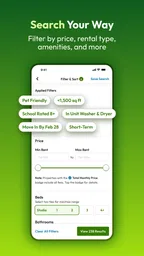
- Search filters help narrow results by price and property features.
- Map view makes it easier to compare neighborhood locations.
- Saved searches help you revisit promising listings.
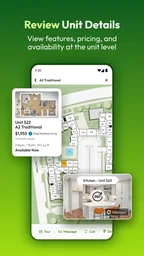
- Listing details can include photos and floor plans.
- Contact options make it convenient to inquire about rentals.
What could be better
- Some listings may be outdated or no longer available.
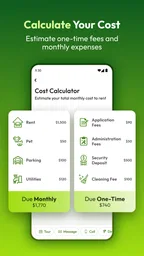
- Rental prices and fees can vary from the displayed estimate.
- Coverage and listing choices depend on the local market.
- Some property details may be missing or incomplete.
- Contacting landlords may require sharing personal information.





