

Apartments by Apartment Guide review
 Analysis by Appsdrops
Apartment hunting is less about finding a pretty listing than figuring out whether a place fits your budget, commute, timing, and daily routine. I’d use Apartments by Apartment Guide as a starting point for that search, especially when I want to browse rental homes and apartments in one place rather than begin with a stack of unrelated searches. It is a free House & Home app from Rent Group, Inc, and its focus is clear: helping renters look for their next home.
What matters when you choose a rental-search app
Before settling on any rental app, I’d ask what I need most: a broad pool of places, a focused search for apartments, or a way to manage a move that is already underway. These are different jobs. A dedicated apartment-search app can make the first stage easier, but it does not replace checking a listing carefully, contacting the property, and deciding whether the location works in real life.
That distinction is important here. Apartment Guide is best thought of as a discovery tool, not a promise that every home shown will suit your circumstances. I would use it to narrow the field, note promising options, and prepare questions for a property contact. I would still verify availability, costs, lease terms, and practical details directly before making plans around a listing.
The app has a 4.6 average from around 54,000 ratings, which suggests that many users find it useful, though ratings alone cannot tell you whether its listings match your particular area or budget. It has been available since September 2, 2010, and its current version is 12.7.0. That long presence gives the product a clear rental-search identity, but I’d judge it by how well it serves the search I’m doing now.
Start with your non-negotiables
I get better results from any rental search when I decide on a few essentials before browsing. Think about the maximum monthly rent you can manage, the neighborhoods you would genuinely consider, and the features you cannot compromise on. Separating must-haves from nice-to-haves matters: otherwise it is easy to dismiss a workable home for a minor preference or spend time considering a place that misses a basic requirement.
A useful approach is to keep a short comparison note outside the search itself. For each promising listing, I would record the location, the advertised rent, what the rent appears to include, and any question that needs an answer. That makes it easier to compare homes later and helps prevent the attractive photos of one place from overshadowing practical differences.
Where Apartment Guide fits in the process
The app is aimed at people looking for apartments and rental homes, so it makes sense when your immediate task is exploring possible places. Apartment Guide has more than one million installs and is free to download. Its content rating is Everyone, making it suitable for a general audience, although the rental search itself is mainly useful to people who are planning a move or helping someone else look.
I would not expect a search app to settle every decision for me. A listing can help me identify a property worth investigating, but it cannot tell me how a street feels at the time I would commute, whether the layout works for my furniture, or whether a particular lease condition suits my plans. Treating the app as the first stage of a decision, rather than the decision itself, is the more reliable way to use it.
Where it earns a place in my search
The strongest reason to try Apartment Guide is its narrow purpose. When I am looking for a place to rent, an app centered on apartments and rental homes is more relevant than a general home-buying service or a broad local directory. That focus can make it easier to stay on task: I can use the search to discover candidates, then spend my attention comparing the homes that have a realistic chance of working.
A practical workflow is to browse when you have time to think, not only when you are rushing to answer a property contact. I would first identify several plausible options, then compare their locations and stated details side by side in my own notes. After that, I would contact the strongest candidates with specific questions. This two-step method helps turn casual scrolling into an organized shortlist.
For example, imagine I need to move closer to work but do not yet know which nearby area feels right. I could use the app to explore rental options in the locations I am considering, then map out the commute and visit the most promising properties. The app helps with the discovery stage; the visit and commute check provide the context a listing cannot. That division of labor is a useful way to avoid choosing a home based on an appealing description alone.
Make the shortlist useful, not just long
One subtle trap in rental browsing is collecting too many possibilities. A long list can feel like progress while making it harder to act. I would keep only listings that meet my essential requirements, and put uncertain ones in a separate “check first” group. That distinction is especially helpful when a listing looks promising but leaves an important question unanswered.
Another worthwhile habit is to compare homes by the life they support, not just by the headline rent. Consider how far each one is from work, transit, groceries, or the people you see regularly. A lower rent can be less appealing if the location adds a difficult commute or makes everyday errands inconvenient. Apartment Guide can help surface candidates, but the renter has to supply that personal context.
I would also revisit my criteria after seeing the first batch of options. If nearly every suitable home falls outside one preference, I can decide whether that preference is truly essential or whether another neighborhood would be acceptable. This is more useful than repeatedly changing filters without a clear reason. It turns the search into a deliberate trade-off rather than an endless scroll.
Where other approaches may work better
Apartment Guide will not be the right tool for every housing search. If I am looking for a room in a shared home, a short stay, a home to buy, or a rental in a place where the app turns up few relevant options, I would broaden the search to other kinds of housing platforms and local sources. Different services serve different needs, and a focused apartment search should not be mistaken for a complete picture of every possible arrangement.
Some renters may prefer a general classifieds service or local community groups, particularly when they are looking for unusual arrangements or want to hear directly from individual landlords. Others may rely on property-management company pages once they know which buildings or neighborhoods interest them. Those routes can complement Apartment Guide: I would use the app to discover possibilities, then check other sources when the search calls for a particular property or type of rental.
There is also a real limitation common to listing-based searches: availability and details can change. A home that looks suitable in a search may already be taken, or its advertised information may not answer the questions that matter to you. I would confirm the current status and full terms with the relevant property contact before paying anything, arranging a move, or turning down another option.
That is why I would not rely on Apartment Guide alone if I had a very tight deadline or a highly specific requirement. In that situation, I would search in parallel, contact promising properties promptly, and keep a backup plan. The app can organize discovery, but it cannot remove the need to follow up or widen the search when the shortlist is thin.
What switching costs in practice
Trying Apartment Guide does not have a purchase price, so the main cost is time and attention. The real friction comes from building a shortlist and then repeating parts of that work elsewhere if another source has better options for your area. To keep that effort manageable, I would record the properties I have already checked and the questions I still need answered rather than depending on memory across several apps.
If you are already using another rental-search service, there is no need to abandon it immediately. Run the same basic search in both places for a short while and compare the usefulness of the results, not just the number of listings. Are the options in locations you would actually live in? Do they give you enough information to decide whom to contact? Does the search help you act, or simply keep you browsing? Those are better tests than choosing an app based on reputation alone.
Apartment Guide’s current version is 12.7.0, and it requires Android 8.0 or later. That compatibility detail is worth checking before you plan to use it on an older Android device. If the app does not suit your phone or your search area, using another rental source is a sensible alternative; the goal is to find a workable home, not to stay loyal to one tool.
Who I would recommend it to
I would recommend Apartment Guide to renters who are at the exploration stage and want a dedicated place to look for apartments and rental homes. It is particularly sensible for someone comparing neighborhoods, starting a shortlist, or helping a friend or family member search. Its free price makes it easy to try without committing money, and its established focus makes it more directly relevant to a rental hunt than a general housing app.
I would be more cautious about recommending it as someone’s only search method. Renters with unusual needs, a narrow location requirement, or an urgent move should search more broadly and contact properties directly. Anyone who expects an app to verify every detail or make the final choice for them may also be disappointed. The useful work here is discovery and organization; due diligence still belongs to the renter.
Overall, I see Apartment Guide as a practical starting point, not a complete rental process. I would install it when I wanted to explore apartment and rental-home possibilities, use a short list of essentials to keep browsing focused, and confirm the important details before acting. With 6.4K reviews and an Everyone rating, it is a well-established option for general use, but the best reason to choose it is simpler: it gives renters a focused place to begin, while leaving room to compare other sources when their needs call for something different.
What we like
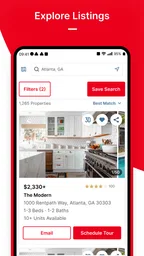
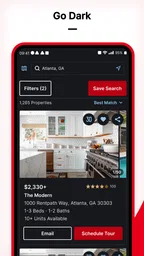
- Search listings by rent range and apartment features.
- Save favorite properties for easier comparison.
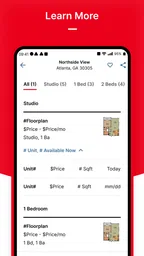
- View photos and floor plans before contacting a property.
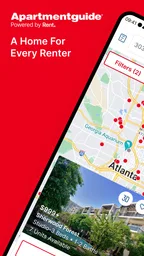
- Map-based browsing helps explore neighborhoods.
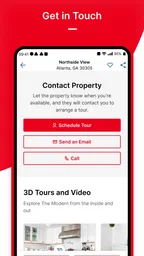
- Contact details make it easy to reach leasing offices.
What could be better
- Listing availability may change before you contact a property.
- Some listings may have incomplete or outdated details.
- Search results can vary depending on location coverage.
- Not every property provides floor plans or extensive photos.
- The app may direct you to external sites for some details.





