





Apartment List: Rent app review
 Analysis by Appsdrops
Finding a place to rent is rarely one neat task. You start with a budget and a rough idea of what you want, then the search quickly turns into comparing locations, amenities, and asking prices across a long list of possibilities. Apartment List is built for that apartment-hunting stage: it helps renters explore apartments for rent and compare the details that can make one listing feel like a better fit than another.
A more organized starting point
When I’m beginning a rental search, I don’t always have every detail settled. I may know the kind of home I want, but still be weighing price against convenience or deciding which amenities are worth prioritizing. A dedicated apartment finder is useful in that situation because it gives the search a clear focus instead of leaving me to piece together options from unrelated sources.
Apartment List sits in the House & Home space and concentrates on apartment rentals. Its purpose is straightforward: help you find apartments for rent and compare prices, amenities, and rental options. That makes it relevant both to someone starting from scratch and to a renter who already has a shortlist but wants a more practical way to assess it.
The app is free, and its audience is broad: its content rating is Everyone. It has a 4.4 average rating from around 67,000 ratings, with roughly 15,000 written reviews. Those figures suggest that many people have used it, although the value of any rental search still depends on how well the available options match your own needs.
Turning a vague search into a shortlist
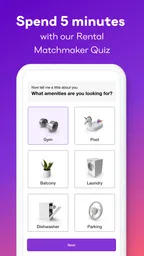
The first useful step in apartment hunting is working out what “right for me” actually means. Price matters, of course, but it is rarely the only consideration. Amenities can affect daily comfort, while the available rental choices determine whether a promising search direction is realistic. Apartment List’s emphasis on comparing these elements gives the process a sensible starting point: look at options side by side rather than judging each listing in isolation.
I’d approach the app with a few priorities in mind, even if they are not fully fixed. Decide which features are essential, which are preferences, and where you may be willing to compromise. That small bit of preparation makes comparisons more meaningful. A lower asking price might look appealing until an amenity you consider important is missing; another option might be more attractive overall once you weigh the full set of details.
This is where a rental app can save mental effort. Instead of repeatedly reopening a listing and trying to remember how it compares with another, you can keep the central decision criteria in view. The goal is not to make the decision for you. It is to make the choices easier to understand before you spend time pursuing one particular apartment.
Moving through the comparison
Once I know what I’m looking for, the next part is reviewing the rental options and comparing the details that matter. Apartment List’s core promise centers on prices, amenities, and apartments for rent, so the natural workflow is to use those details to narrow a broad search into a more manageable group of possibilities.
It helps to compare consistently. I would look at the price first, then check the amenities, and finally consider whether the listing remains appealing as a complete package. That order keeps one attractive detail from dominating the decision. A home can look promising at first glance, but a balanced comparison gives a clearer sense of whether it suits the priorities I started with.
Rental searches also tend to change as you learn more. You might begin focused on one feature and later realize another matters more. A useful search experience should leave room for that adjustment rather than making the first set of preferences feel permanent. Apartment List’s role as an apartment rental search app is to help organize the discovery and comparison stage, while the renter remains in control of what counts as a good match.
That distinction matters. No app can decide whether a neighborhood, apartment, or amenity is right for someone without that person’s judgment. What the app can do is make it easier to move from “I need a place” to a clearer set of candidates. The more carefully you assess each option against your actual needs, the more useful the comparison becomes.
From app research to real-world decisions
An apartment search does not end when you find a listing that looks promising. The app is one part of a longer process: it helps you discover and compare possibilities, while the next steps involve deciding which ones deserve your attention and taking the search further. That handoff from browsing to action is a natural point to pause and check whether your shortlist still reflects your original priorities.
I’d treat a promising result as a lead, not an automatic decision. Revisit the price and amenities, compare it with the other options you considered, and ask whether it fits the practical requirements that led you to start searching. This simple check can prevent an appealing first impression from carrying too much weight.
There is also a useful mental handoff between the app and your own judgment. The app can help put rental options into a comparison process, but your circumstances determine which trade-offs are acceptable. One renter may value a particular amenity; another may put more weight on price. Keeping that personal context in the loop is essential to making the search feel relevant rather than generic.
For renters who are still exploring, the outcome may simply be a better sense of what is available and which details deserve attention. For someone closer to making a decision, the result can be a more considered shortlist. Either way, the benefit is organizational: you have a clearer basis for comparing apartments instead of relying on scattered impressions.
Where the process can feel less smooth
Apartment hunting is inherently demanding, and an app cannot remove every source of friction. Comparing listings only helps if you know what matters to you; without that, it is easy to browse repeatedly without getting closer to a decision. I recommend setting a few priorities before you begin, then reviewing each option with those priorities in mind.
Another challenge is the difference between finding a promising option and feeling ready to act on it. A listing may look suitable in a comparison, but the renter still has to decide whether it deserves a closer look. That transition can feel like a pause in the workflow, especially when several options appear similarly appealing. Keeping a shortlist and noting why each candidate stands out can make the decision less overwhelming.
It is also worth remembering that a comparison is only as useful as the details you choose to weigh. Price and amenities provide a helpful basis, but personal needs vary. A renter who focuses only on one attractive feature may overlook a more important trade-off. I find it best to use the app as a structured aid, then step back and consider the full choice rather than letting one number or amenity make the decision alone.
So the app’s strongest role is not replacing every part of the rental process. It is helping with the discovery and comparison work that comes before a renter settles on a direction. That is a realistic and valuable scope for an apartment-finding tool, provided you approach the results thoughtfully and remain ready to make your own assessment.
Who may find it useful
Apartment List makes sense for people who want a focused way to explore apartments for rent and compare practical details. It can be a good starting point if you are new to the search, and it can also help if you already know what you want but need to weigh several rental options. The app has more than 5 million installs, which reflects its reach among renters looking for this kind of service.
The experience is particularly relevant if you prefer to organize your decision around price and amenities rather than browse without a clear comparison method. If you are already certain about your priorities, the app’s central purpose aligns neatly with the next step: reviewing possible rentals against those preferences. If you are undecided, the same process can help you identify which factors matter most.
Apartment List was released on January 30, 2017, and its current version is 3.28.0. It supports devices running Android 9 or later. The app’s straightforward focus is its appeal: it is about apartment rentals and comparing the options, rather than trying to turn a housing search into something more complicated than it needs to be.
A practical verdict on the rental search
Apartment List offers a clear path through a familiar challenge: start with a housing need, explore rental possibilities, compare prices and amenities, and use that comparison to decide what deserves a closer look. I like that the app’s purpose is easy to understand. It gives renters a focused place to think through options without suggesting that a single result should settle the whole decision.
The most satisfying way to use it is as part of a complete workflow. Begin with a few priorities, assess the available apartments consistently, and treat the shortlist as a stepping stone to your next decision. That approach makes the comparison more useful and keeps the process grounded in your own needs.
Apartment List is a sensible choice for renters who want an organized apartment finder rather than a vague starting point. It can help turn a broad search into a more manageable comparison, especially when price and amenities are central to the decision. For me, its value lies in making the early stages clearer: it helps you see the options, weigh the trade-offs, and move forward with a better-informed shortlist.
What we like
- Personalized matches can make it easier to narrow down rental options.
- Saved listings help you return to apartments you want to compare.
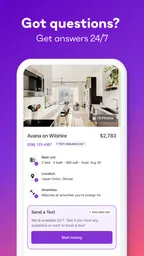
- Photos and listing details support remote apartment research.
- Search filters help focus on homes that fit your needs.
- The app provides a convenient way to explore rentals on the go.
What could be better
- Listing availability may change before you contact a property.
- Some listings may have incomplete or outdated details.
- Rental coverage can vary depending on your location.
- Contacting properties may require sharing personal information.
- The app cannot replace an in-person visit before signing a lease.





