

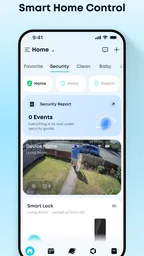
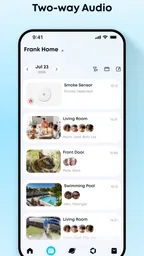
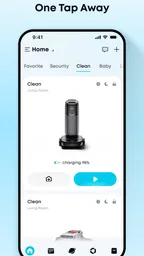
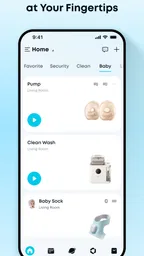

Anker eufy review
 Analysis by Appsdrops
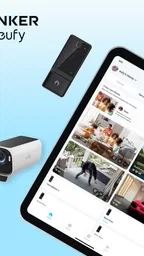
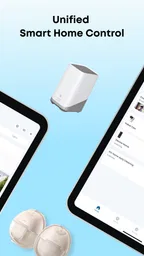
Anker eufy makes the most sense when you already own, or plan to use, several compatible eufy products and want one place to manage them. I like the idea behind it: instead of hopping between separate controls for household devices, I can start from a shared app. That convenience is the point, but it comes with an important qualification: the app is most useful as part of the eufy ecosystem, not as a general-purpose smart-home controller for equipment from every brand.
This is a free Lifestyle app from Anker, aimed at everyday home management rather than technical tinkering. Its broad appeal is reflected in an average rating of 4.5 from around 260,000 ratings, and it has passed 5 million installs. Those figures suggest it has found a substantial audience, but they do not tell me whether it will suit a particular home. The deciding question is simpler: do the products you want to control belong in the eufy family?
One hub is useful when your home uses eufy
The practical benefit of a shared app is not merely having fewer icons on a phone. It is having a familiar starting point when you need to check or manage a device. If you use multiple compatible eufy products, a single place to open can make routine tasks feel less scattered. That matters most when household members share responsibility for devices or when you move between different kinds of home tasks during the day.
A realistic example is arriving home with shopping while also trying to keep an eye on a household device you manage through eufy. A central app gives you a more direct route to the relevant control than remembering which separate app handles which product. I would treat that as a modest but recurring convenience, not as a dramatic transformation: it saves mental switching when the devices are already part of the same ecosystem.
The strongest reason to try it is therefore consolidation within eufy. If you have one eufy product, the app can be a straightforward place to begin. If you have several, the value can grow because there is less need to maintain a collection of brand-specific apps. If your home mostly relies on competing systems, though, the promise of “one place” may not extend far enough to replace what you already use.
What makes the app valuable in daily use
I find the hub approach particularly appealing for people who do not want to treat home technology as a hobby. An app that gathers compatible products reduces the effort of remembering where to go, and it gives a household a shared point of reference. That is helpful for someone who wants useful controls without spending time comparing every device interface or building an elaborate setup.
There is also a practical trade-off in choosing a single ecosystem. Staying within eufy can make management feel more coherent, while mixing brands may give you a wider choice of products. The app is not a reason by itself to replace equipment that already works well. I would choose devices based on what the home actually needs first, then see whether a unified eufy experience is a welcome bonus.
One useful habit is to decide in advance which household tasks you expect to manage from the app. For example, think about whether you want one place for routine checks, occasional adjustments, or sharing access with other people at home. That simple inventory helps prevent a common disappointment: installing a hub app and expecting it to organize devices that are not part of its supported family.
Where the all-in-one idea reaches its limit
The main weakness is inherent in the product’s focus. A unified experience is convenient only when the devices you care about can participate in it. If your home is built around several different brands, you may still need other apps, and the promise of fewer app switches becomes less complete. For a mixed setup, a platform designed to bring different manufacturers together may be a better fit, provided it supports the products you own.
I would also avoid assuming that one app automatically means one simple setup. Managing several products in one place can still involve learning each product’s own controls and deciding how you want the household to use them. The hub can reduce app-hopping, but it cannot remove the differences between devices. That distinction matters if you are looking for a single screen that makes every part of a smart home behave identically.
Another point to weigh is the cost beyond downloading the app. The app itself is free, but its ecosystem may involve purchases, and in-app purchase options are listed from $0.99 to $499.99 per item. That is a very broad range, so I would check the particular product or purchase you have in mind rather than treating the free download as evidence that the entire experience costs nothing. The app is best judged as a control layer for products you choose, not as a complete home solution included at no cost.
For people who prefer to keep phones uncluttered, the app’s usefulness depends on how often they will actually use it. If you only occasionally interact with one device, a dedicated product app may be enough, and adding another hub may feel unnecessary. Conversely, if you regularly manage multiple compatible products, the extra app can earn its place by giving you a consistent entry point.
Who should consider it, and who should look elsewhere
I would recommend giving it a look if you already rely on eufy products, are choosing your first one, or want household controls to feel less fragmented. It is particularly suited to people who value convenience over mixing and matching every brand. Anker develops the app, and its focus is clearly tied to bringing eufy use into one shared mobile experience rather than acting as a neutral catalogue for all home technology.
I would be more cautious if you have invested in another smart-home ecosystem and are satisfied with it. In that situation, an additional app may create another place to check instead of reducing the number you use. The same goes for anyone who expects a general controller to absorb unrelated devices: compare support for your actual products before changing routines or buying new equipment.
It is rated for Everyone, and the app is available at no charge, which makes trying it relatively low-commitment if you already have a compatible device. Still, free installation is not the same as a reason to install it. I would begin with the specific task you want to make easier, then judge whether the app’s central role saves enough time to justify keeping it on your phone.
Getting a better experience from a shared home setup
If more than one person handles household devices, agree on which person will do the initial organization and how others should find the controls they need. This is a small step, but it can prevent the app from becoming a private dashboard that only one person understands. A shared app helps most when it fits the household’s habits, not merely when it contains several devices.
I would also keep expectations tied to the products in use. Before buying anything to complete a setup, check that it works with the eufy experience you want and consider whether the purchase solves a real daily problem. This is a better approach than buying into an ecosystem simply to make an app screen look more complete. The strongest setup is the one that makes a recurring task easier, not the one with the most devices.
For someone deciding whether to switch from separate apps, the key test is how often those switches happen. If you find yourself opening different controls throughout the week, consolidation may be worthwhile. If you rarely open them, the difference may be too small to notice. That makes the app’s value personal and practical rather than universal.
Compatibility, cost, and what to expect before installing
The current version is 6.1.32_32827, and it requires Android 8.0 or later. That makes the operating-system requirement worth checking before downloading on an older phone. The app’s free price is appealing for exploring its role, while optional in-app purchases mean the overall cost depends on what you choose to use alongside it.
Because the app is tied to a family of products, I would confirm compatibility for the exact device you own or intend to buy before making it central to a routine. That is the most useful pre-installation question, especially if you are comparing it with a broad smart-home platform. A few minutes spent checking product fit can save the frustration of expecting one app to manage equipment that belongs elsewhere.
For existing eufy users, trying the hub is a sensible way to see whether shared access improves everyday use. For newcomers, I would decide on the home need first and the app second. The interface can be a useful companion to compatible products, but it should not be the sole reason to purchase hardware.
A practical recommendation
Overall, I see Anker eufy as a focused convenience app with a clear audience. It is strongest when several compatible eufy products already have a place in your home, because that is where bringing controls together can reduce friction. It is less compelling as a universal smart-home answer, and it will not make a mixed-brand setup feel unified by itself.
I would recommend it to people who want a more orderly way to manage eufy devices and are comfortable choosing within that ecosystem. I would suggest looking elsewhere if brand flexibility or broad cross-platform control matters more than keeping eufy products together. That is the honest dividing line: use it when consolidation matches the devices you own, and skip it when it would simply become one more app to check.
With an average rating of 4.5 and a large community of users, it is clearly an established option, but the better reason to keep it is whether it simplifies your own routine. It is free to install, carries an Everyone age rating, and offers a practical home-management role without needing to be treated as the control center for every device. If your household already leans toward eufy, I think it is worth trying; if not, choose the ecosystem that fits your home rather than building your home around the app.
What we like
- Provides a central place to manage compatible eufy devices.
- Device controls are easy to access from the app.
- Supports live camera viewing on compatible models.
- Can send alerts when supported devices detect activity.
- Helps review recorded footage from compatible cameras.
What could be better
- Features vary considerably between eufy device models.
- Some functions require a compatible eufy product.
- Camera alerts may need careful tuning to reduce false notifications.
- Live video depends on a reliable network connection.
- Setup can take time when adding several devices.





