



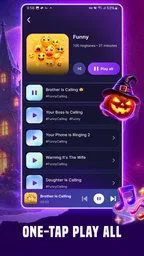
Android Ringtone Songs review
 Analysis by Appsdrops
I like changing a ringtone when the default sounds start blending into the background, but finding a sound that feels personal can take more effort than it should. Android Ringtone Songs is a free personalization app from Ringtone Phone App, built around browsing ringtone music and making custom sounds with an AI ringtone tool. My overall impression is that it is most appealing to people who want more choice than their phone’s built-in sound picker offers, while its value depends on whether its collection and creation tools suit the way they actually use their phone.
What you get without paying
The app is free to install, which makes it easy to try before deciding whether it belongs on your phone. It also includes in-app purchases, with listed items ranging from $0.29 to $59.99 each. Those prices make it important to distinguish between trying the app and paying for something inside it: free access does not mean every item or option is free, and the listed range alone does not explain what each purchase unlocks.
I would treat the paid options as optional until I had explored the free experience and found a specific sound or capability worth paying for. If you are only looking for a single new ringtone, check the app’s purchase screen carefully before confirming anything. If you expect to browse extensively or use custom creation regularly, first see which parts are available without a purchase and whether the paid choices match your needs. That is a more dependable way to judge value than assuming that a large sound collection automatically makes every purchase worthwhile.
The app has a 4.7 average from around 318,000 ratings, and it has passed 10 million installs. Those figures suggest that many Android users have tried it, but popularity does not tell me whether a particular sound is to my taste or whether I will want any paid extras. I see them as a reason to consider the app, not as a substitute for checking how its catalog and costs fit my own routine.
A ringtone app with two ways to personalize
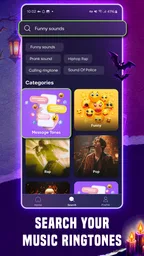
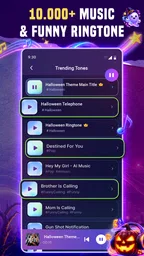
Android Ringtone Songs combines a library of ringtone music with an AI ringtone maker for custom sounds. That pairing is the app’s clearest distinction from the basic ringtone picker already built into Android. A built-in picker is convenient if I only want to select a sound already on my phone; this app is aimed at people who want to browse beyond that small, familiar set or try creating a sound for themselves.
The choice between browsing and making matters in practice. When I want something quickly, a ready-made sound is the sensible route: I can compare options and choose one without turning ringtone selection into a project. When the available choices do not feel right, a custom-making tool offers another path. The trade-off is that creation usually takes more attention than picking a finished option, so I would use it when I have a clear idea in mind rather than expect it to save time every time.
The app’s description presents a very large music selection, but a broad catalog is useful only when it is easy to narrow down. I would approach browsing with a purpose: decide whether I want something noticeable for calls, softer for notifications, or distinctive enough to recognize in a busy room. That small bit of planning makes it easier to compare sounds on their actual usefulness instead of scrolling through choices just because they are available.
Make the sound work in everyday life
A ringtone has a different job from music played for listening. It needs to be recognizable when a phone is in a pocket or across a room, and it should not be irritating after repeated use. When comparing choices, I would listen for a clear opening and a sound that remains identifiable without relying on a long build-up. A favorite song can be enjoyable through headphones but a poor call alert if its opening is quiet or easy to confuse with background noise.
One practical scenario is choosing a separate sound for calls during a busy workday. A distinctive ringtone can help me notice my phone without checking the screen constantly, while a less prominent sound may be better for notifications that happen often. If I am using the custom maker, I would start with that real-world purpose and judge the result on the phone itself, not only while previewing it. A sound that seems balanced in a quiet room may feel too sharp in a shared space.
A second useful approach is to think about where the phone will be. If it usually stays on a desk, a moderate sound may be enough; if it is often carried in a bag, something more recognizable could be a better fit. I would also avoid choosing an especially loud or dramatic alert just because it stands out during a short preview. The right option is one I can live with after hearing it repeatedly.
Where the app’s value is strongest
The strongest case for using Android Ringtone Songs is wanting several routes to a more personal phone sound without first searching for separate tools. Browsing offers ready-made choices, while the AI maker gives users an alternative when they want something custom. That combination is more useful to an experimenter than a simple folder of audio files, especially if they enjoy changing their ringtone now and then.
It is less compelling if the built-in Android sounds already do the job. In that situation, installing another app and sorting through a catalog could add steps without solving a real problem. It may also be the wrong choice for someone who wants a narrowly curated selection and dislikes browsing, or someone who only wants to use a particular audio file they already own. For those needs, the phone’s existing settings or a straightforward file-based approach may be more direct.
There is also a difference between having many choices and having the right choice quickly. A large library can be a strength when I am in the mood to explore, but it can feel like work if I only want one suitable alert. I would set a limit for a first browsing session: look for a sound that fits one clear purpose, then stop once I find a good candidate. That keeps personalization practical instead of turning into endless comparison.
Trade-offs worth considering
One friction point is that custom creation does not guarantee a better result than a ready-made ringtone. The tool is appealing in principle, but the outcome still needs to suit the phone’s role as an alert. I would preview any custom sound at a realistic volume and consider whether it begins clearly enough to catch attention. If it feels awkward or takes too much tweaking, choosing a finished sound is a perfectly reasonable use of the app.
Another trade-off is cost clarity. Installation is free, but in-app purchases span a wide range, so I would not assume that a feature or sound I want is included at no charge. Before buying, I would check the exact item and what it provides, then decide whether I will use it often enough to justify the expense. The highest listed purchase price is substantial compared with the simple task of changing a ringtone, so it makes sense to be especially deliberate about any larger purchase.
The app is rated for teens, which is useful for families considering whether it is appropriate for a younger Android user. That rating does not tell me what a particular person will find suitable, so I would still review the app together if the phone is shared or used by a teen. More generally, users who prefer a very minimal phone setup may find an additional personalization app unnecessary, even if its tools are appealing to people who enjoy changing sounds.
Who should give it a try
I would recommend giving it a try if you are tired of hearing the same default ringtone, enjoy comparing different sounds, or want to experiment with making a custom alert. It is particularly suited to someone who likes personalizing a phone but does not want to begin by assembling audio tools from scratch. Its free installation means you can explore the available experience before deciding whether any optional purchase is worth considering.
It is a weaker fit if your priority is the simplest possible way to assign a sound you already have, or if you rarely notice your ringtone and do not care about changing it. It is also not an automatic bargain just because it has many installs and a strong average rating: the value of a ringtone is personal, and the purchase range makes checking costs worthwhile. If you are unsure, I would start with free browsing and only consider paying after identifying something specific you want.
Android Ringtone Songs is running version 2.3.1 and requires Android 7.0 or later. It was released on July 12, 2021, and its rating is Teen. Those details help set expectations about compatibility and audience; the key decision is still whether you want a ringtone library and custom-making option rather than relying on the sounds already on your device.
My verdict on trying or skipping it
For me, the app’s value is in having ready-made ringtone choices and a custom-sound route together, not in any promise that every user will need both. I would install it if I wanted to refresh my call sound, had time to compare options, or was curious about shaping a more personal alert. I would skip it if the default picker already covers my needs or if I wanted a direct, no-browsing way to use an existing audio file.
Since the app is free to install but offers paid items, my advice is simple: explore first, decide what you actually want, and check the specific cost before confirming a purchase. That approach keeps the app’s main appeal—more room to personalize—separate from the question of whether any extra spending is justified. For Android users who enjoy tweaking their phone’s sound, it is a reasonable option to test; for everyone else, the built-in ringtone settings may be enough.
What we like
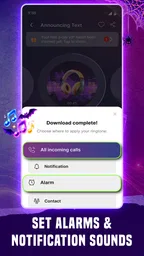
- Set custom ringtones for calls and notifications.
- Browse a range of ringtone styles and genres.
- Preview tones before choosing one.
- Personalize sounds for individual contacts.
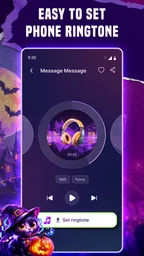
- Simple controls make ringtone setup accessible.
What could be better
- Some tones may feel dated or overused.
- Audio quality can vary between tracks.
- Ad interruptions may disrupt browsing.
- The ringtone selection may not suit every taste.
- Some features may require an internet connection.





