
All Weather Mode: Weather Home review
 Analysis by Appsdrops
I’m usually cautious about weather apps that promise to make checking the forecast feel effortless. It is easy to be impressed by a fresh home screen for a few days, then forget the app is there. All Weather Mode: Weather Home has a more practical pitch: make local conditions and a useful forecast easy to reach from the home screen. That focus gives it a clear chance to become part of a daily routine, though its lasting value depends on whether you genuinely want weather information close at hand.
Quick access is the first-week appeal
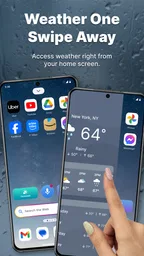
In its first few days, the appeal is simple: you can check what the day may bring without opening a full-featured weather service and digging through screens. The app is a free personalization app from Clarity App Crafting, and its home-screen orientation is what distinguishes it from a conventional forecast app. It is meant to put weather within easy reach, rather than make weather itself a hobby.
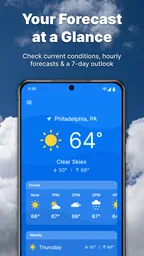
That can be useful during the small decisions that shape a day. Before leaving, I might want to know whether a jacket is sensible; later, I may check whether conditions are likely to change before a walk or a trip across town. An hourly forecast helps with near-term planning, while a longer outlook is more useful for deciding whether an outdoor plan is worth pencilling in. The practical benefit is less about discovering new weather information and more about reducing the effort needed to check it.
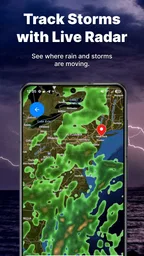
The home-screen approach is especially appealing if you already glance at your phone between tasks. Weather can become a quiet part of that habit: a quick look before a commute, school run, errand, or evening walk. It is a better fit for someone who wants a fast answer than for someone who enjoys exploring radar layers, maps, or detailed meteorological explanations.
For a realistic example, imagine deciding whether to take a short walk during a busy afternoon. A glance at the current local conditions can answer whether it feels suitable to go now; the hourly view can help you judge whether waiting would be wiser. That does not make a forecast infallible, but it turns a general “What will the weather be like?” question into a more useful timing decision.
What the forecast views are good for
The two forecast horizons serve different purposes, and I would use them that way rather than treating them as interchangeable. Hourly information is for decisions that are close enough to change your plans today. The 10-day outlook is a broad planning aid: it can help you spot a promising or unsettled stretch, but I would not rely on it for precise details far into the future.
That distinction is worth keeping in mind when the forecast changes. A shift in the later outlook does not necessarily mean the app has become less useful; longer-range forecasts are inherently less dependable as a basis for detailed plans. I would use the extended view to decide whether to keep an outdoor option open, then check the nearer forecast again when the event is approaching.
The app has a 3.9 average from around 899 ratings, with 233 written reviews, and it has passed 500K installs. Those figures suggest that it has found an audience, but they do not tell me whether its home-screen approach will suit a particular person. The better test is whether quick access is something you will actually use after the novelty of setting up a weather-focused screen has worn off.
Does it earn a place month after month?
Weather is a recurring need, so the underlying use case does not expire after a week. If you regularly check local conditions before going out, placing that information close to the home screen can save a small amount of friction again and again. The savings are modest, but repeated small conveniences can be more valuable than a dramatic feature you rarely open.
Its staying power is likely to depend on fit. Someone who checks the weather several times a day may appreciate having the forecast nearby. Someone who only looks when planning a trip may find a standard weather app, a search, or a built-in phone forecast perfectly adequate. In other words, this is not automatically a better source of weather; it is a different way to keep weather visible.
That comparison with ordinary alternatives matters. A typical weather app is often better for people who prefer to open an app deliberately, inspect a fuller set of information, and close it when finished. A home-screen-oriented option makes more sense when the desired answer is brief and habitual. I would choose based on the way I check, not on the assumption that a dedicated home-screen experience must contain more useful forecasting.
One helpful workflow is to give each forecast a job: use the hourly view for deciding when to leave, and use the longer outlook only to sketch plans that can still change. This avoids treating an early forecast as a promise. It also helps keep the app useful without encouraging constant checking, which can turn a small convenience into needless phone use.
There is a trade-off in keeping weather prominent. A glanceable setup can make a routine faster, but it also gives weather more of your screen and attention. If you rarely need a forecast, that visibility may feel like clutter rather than a benefit. If you often make outdoor plans, it can be a sensible shortcut.
Maintenance and the small habits that matter
The app is currently at version 1.3.96 and requires Android 9 or later. Those details make it easier to judge whether it is a practical candidate for your device, but they do not by themselves say how much upkeep it will require. In everyday use, I would keep the setup simple: place the weather view where I naturally look, then give it a few days to see whether I actually consult it.
A useful test is to notice whether you reach for the home-screen forecast before leaving or whether you still open another weather service out of habit. If you keep switching, ask why. Perhaps the quicker view answers your everyday question well enough, while the other app is only needed for a more detailed check. That division can make both tools useful without expecting one to replace every weather-related task.
Another practical tip is to avoid checking the long-range outlook repeatedly when your plans are still flexible. Look at it when you are considering a date, then revisit the hourly forecast closer to the time. This makes the app a planning aid rather than a source of false certainty. It is a small change in how you use the forecasts, but it can make the information feel more actionable.
As a free app rated for Everyone, it is easy to try without a purchase decision or a need to treat it as a major commitment. I would still judge it by the space and attention it asks for. A home-screen weather experience only earns its keep if the convenience is noticeable in your own routine; otherwise, removing it or returning to a simpler weather-checking habit is a reasonable choice.
Where fatigue can set in
The main risk is not that weather stops mattering; it is that the presentation stops being useful. Once the home screen feels familiar, a glance may become automatic without helping you make a better decision. If you find yourself checking the same conditions repeatedly despite having no plans to change, the app may be encouraging a habit that adds little value.
There is also a limit to what a short forecast view can do. People who need detailed interpretation, specialist weather information, or a richer set of tools may prefer a more comprehensive weather service. A convenient local view is not a substitute for every kind of forecast, and I would not choose it on the assumption that a quick glance can answer every question about changing conditions.
Likewise, if your phone’s ordinary weather option already gives you the local and near-term information you need, this app has to justify the extra home-screen presence through convenience. The case is strongest when the setup makes checking meaningfully faster. If it simply duplicates something you already see elsewhere, the novelty may fade quickly.
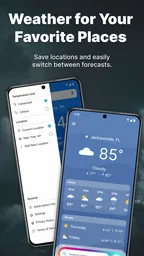
For people who travel frequently, the usefulness will also depend on whether the local view matches the place they need to plan around. I would make a point of checking that the displayed forecast is relevant before relying on it for a day away. That is a sensible habit with any local weather tool, especially when a decision depends on conditions somewhere other than home.
My long-term verdict
I see All Weather Mode: Weather Home as a practical convenience rather than a must-have weather authority. Its strongest idea is putting local conditions and forecasts within easy reach, which can make everyday planning smoother for someone who checks the weather often. The combination of an hourly view and a longer outlook supports both immediate choices and loose planning, provided you treat the distant forecast as a guide rather than a guarantee.
I would recommend trying it if weather checks already happen naturally throughout your day and you want them to take less effort. It is less compelling if you only check occasionally, prefer a detailed weather dashboard, or are already satisfied with your phone’s standard option. In those cases, another dedicated home-screen setup may add clutter without changing your decisions.
My advice is to evaluate it after the first week, not just during setup. Ask whether it has helped you time a departure, choose what to wear, or avoid an inconvenient walk in changing conditions. If it has, that recurring usefulness can justify keeping it. If you mostly ignore it, the app has not failed so much as revealed that a prominent forecast is not a need in your routine. That is the difference between a pleasant first impression and a tool that deserves lasting space.
What we like
- Shows current conditions alongside a multi-day forecast.
- Weather alerts can help users prepare for severe conditions.
- Home screen widgets offer quick access to forecast details.
- Location-based forecasts reduce the need for manual searches.
- The interface makes key weather information easy to scan.
What could be better
- Forecast accuracy can vary by location and weather provider.
- Some features may require location access to work properly.
- Frequent alerts can feel distracting for some users.
- Widgets may use battery while keeping information updated.
- Some content or features may be limited to certain regions.





