
AIReel : AI Video Generator review
 Analysis by Appsdrops
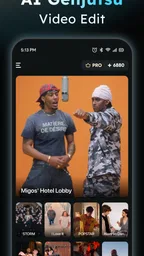
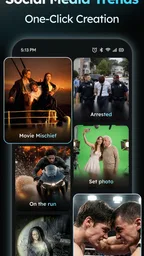
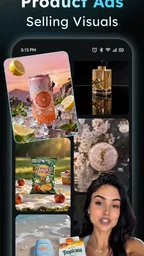
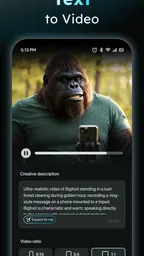
I’m drawn to creative apps that make it easy to turn a rough idea into something shareable, but an AI video tool is only useful if it gives you enough control to make the result feel intentional. AIReel is an art-and-design app from FunCreate Limited that works with images and text to generate videos. That makes it appealing for quick visual experiments, social posts, and concept sketches—though I’d treat it as a creative starting point, not a replacement for a full video editor.
Free access, with paid purchases to consider
AIReel is free to install, with in-app purchases listed from $6.99 to $129.99 per item. That gives you a way to try the app before spending money, while making it important to check what a purchase covers inside the app rather than assuming that “free” means every creative option is included. The listed prices span a wide range, so I would decide what I actually need before paying.
Its current version is 3.4.3, and it was released on April 11, 2025. The app has an average rating of 4.3 from around 41,000 ratings, with roughly 820 written reviews and over five million installs. Those figures suggest plenty of people have tried it, but they don’t tell me whether a particular paid option is worthwhile for my own workflow. I’d use the free access to judge the results first.
For a casual user, the key cost question is not simply whether the app can create a video. It is whether the outcome saves enough time or helps express an idea better than a familiar alternative. If you only need an occasional animated visual, paying for more may not make sense. If you expect to create regularly, compare the purchase options shown in the app with how often you will genuinely use them.
What the image-and-text workflow is good at
The most useful way to approach an image-and-text video generator is to think in terms of a visual brief. Start with one clear subject, decide what you want the viewer to notice, and keep the description focused on that purpose. A prompt that tries to specify a scene, mood, movement, style, and several unrelated details at once can leave the result feeling muddled. I’d make a simple first attempt, inspect what the app produces, and then adjust one part of the idea at a time.
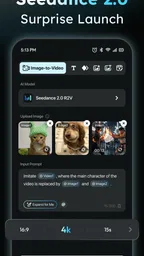
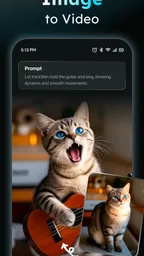
Images and text serve different jobs in this workflow. A source image gives the app a visual anchor; a written prompt lets you explain the direction you want to explore. If you already have a product photo, a sketch, or a character concept, beginning with that image can be more practical than trying to describe every visual detail from scratch. If you have no suitable image, text gives you a way to test a concept before preparing artwork.
A useful, less obvious habit is to save the original image separately before experimenting. That gives you a clean reference when you compare generated results and helps you avoid confusing changes from the source with changes caused by your prompt. I’d also keep a short note of the wording behind a result I like. Even without relying on any specific editing controls, that makes it easier to repeat a promising direction rather than rebuilding it from memory.
For instance, imagine you want a short visual for a community event announcement. You could begin with an image of the event artwork and describe the mood or motion you want the video to suggest. The practical aim is not to make a complete campaign in one go; it is to create a lively visual that gives people a reason to pause. Before sharing it, I’d check that the main message remains easy to understand and that the generated motion does not distract from essential details.
That final check matters because a video can look appealing while still being awkward for its intended use. If you need text to remain perfectly legible, branding to stay consistent, or timing to match a voice-over, a dedicated editor may be the better finishing tool. AIReel’s image-and-text premise is strongest when you want to explore a visual idea quickly, rather than when you need exact control over every frame.
Where it fits among creative alternatives
Compared with a conventional video editor, an AI generator puts more emphasis on producing a visual direction from a prompt or source image than on precise timeline work. That can be a welcome shortcut for someone who has an idea but little editing experience. It is less suited to a creator who already knows exactly how each shot should begin and end, or who needs meticulous control over cuts, pacing, and text placement.
It also differs from a general drawing app. A drawing tool is usually the better choice when the main goal is to craft a still image by hand, refine line work, or make deliberate adjustments to individual elements. AIReel is more relevant when the desired result is a video based on an image or written concept. The trade-off is straightforward: generation can help you move from an idea to a moving visual, but it may not give you the same direct authorship as building the artwork yourself.
I would not treat an AI-generated result as automatically ready for a professional deliverable. A small business owner might find it useful to create a draft visual for a post, then review it carefully and finish the message in a tool designed for precise layout. An illustrator might use it to explore motion around a character design, while keeping the original illustration untouched. In both cases, the benefit is ideation; the limitation is that a generated interpretation can differ from the exact design in your head.
One practical workflow is to separate concept generation from final production. Use the app to test whether a visual idea works, then move to a familiar editing tool if you need exact captions, a fixed brand palette, or dependable timing. This avoids asking a generator to solve every part of a project and makes it easier to judge whether a paid purchase would genuinely improve your process.
Trade-offs to think through before spending
The first trade-off is predictability. Text-to-video and image-to-video tools can be useful precisely because they interpret a brief, but interpretation is not the same as precise execution. If your project depends on a particular object staying unchanged or on a specific sequence of actions, inspect the result rather than assuming it will match your instructions. For casual creative work, surprise can be part of the appeal; for client work, it can mean extra review and rework.
The second is the difference between a compelling preview and a usable finished asset. Ask yourself whether the result suits its destination: does it communicate the intended idea quickly, and can it be shared without extra correction? If the answer is no, the time spent revising may outweigh the speed of generating a first version. This is especially relevant for promotional material where a product’s appearance, wording, or visual identity needs to remain consistent.
The third trade-off is spending against an uncertain level of use. Since the app is free to install but offers purchases at several price points, I’d avoid buying simply because a first result looks impressive. Try the kinds of prompts you expect to use, then decide whether the available paid option solves a repeated problem for you. A one-off experiment and a regular content workflow are very different reasons to pay.
There is also a learning curve in writing useful prompts. A broad request may produce something that looks generic, while an overloaded one can make the intended direction harder to follow. I’d describe the subject and the central visual mood first, then refine only the aspect that feels wrong. This small discipline makes experimentation more informative: you learn which changes help, instead of changing several things and guessing why the result improved or declined.
Who is likely to get the most from it
AIReel makes the most sense for people who want to turn a concept or image into a video without beginning with a conventional editing timeline. It may suit social creators who need occasional visual experiments, hobbyists exploring AI-assisted art, and small teams that want a fast draft before polishing elsewhere. The app is rated for Teen users, so that age guidance is worth considering when deciding who should use it.
It is a weaker fit for someone who needs frame-by-frame control, highly consistent brand assets, or a finished video with carefully coordinated sound and typography. If you are already comfortable in a full video editor, that tool may remain the better choice for final production. If your goal is only to create a carefully finished still illustration, a dedicated art app is likely more direct.
For someone deciding whether the paid options are worthwhile, I’d make the choice based on a repeatable use case. Try creating a few different kinds of visual brief: a simple concept image, an existing picture with a new visual direction, and a practical post you might actually share. If the results are useful often enough to reduce work you would otherwise do by hand, a purchase may be easier to justify. If you are mainly curious, free access is the sensible place to begin.
My verdict: try it for ideas, not exact control
I see AIReel as a convenient experiment space for turning images or written concepts into video, with the strongest value coming from quick visual exploration. Its free starting point lowers the barrier to trying that workflow, while the range of in-app purchase prices makes it sensible to evaluate your needs before spending. FunCreate Limited has built an app in the art-and-design space for people who want motion without starting from a traditional editing process.
My recommendation is to try it if you enjoy testing visual ideas and are comfortable reviewing the output with a critical eye. Keep your source artwork, use focused prompts, and treat a promising result as a draft when precision matters. Skip it if you need dependable control over every detail or expect a generator to deliver a polished, brand-perfect video without further work. That distinction is what makes the app worth considering for some creators—and an unnecessary purchase for others.
What we like
- Turns text prompts into short videos with little editing experience needed.
- AI-assisted creation can speed up the move from idea to draft.
- Useful for creating social media clips and visual concepts.
- A practical option for users without filming equipment.
- Can help explore different creative directions quickly.
What could be better
- Generated scenes may not match the prompt precisely.
- Video quality and consistency can vary between results.
- Fine control over movement and composition may be limited.
- AI-generated content may need review before public sharing.
- Some features or exports may require payment.





